STR-DA6400ES
5
UPDATE OF SOFTWARE OF IC2513 ON THE CONTROL BOARD, IC3610 ON THE D VIDEO BOARD AND IC5208
ON THE DSP BOARD
Perform operation of the following when the update of software of the IC2513 on the CONTROL board, IC3610 on the D VIDEO board
and IC5208 on the DSP board are necessary.
• IC2513 on the CONTROL board, IC3610 on the D VIDEO board and IC5208 on the DSP board
Connect:
for PC
J1499
Procedure:
1. Connect J1499 on the MAIN board and PC by using the RS-232C cable.
2. Turn on the main power.
3. The update is executed by using PC.
4. When the update ends, turn off the main power.
5. Remove the RS-232C cable from the J1499 on the MAIN board and PC.
ERROR MESSAGES
If there is a malfunction, the display shows a code of two numbers and a message. You can check the condition of the system by the message.
Refer to the following table to solve the problem.
messages cause and response
PROTECTOR
Irregular current is output to the speakers, or the upper panel of the receiver is covered with something.
The receiver will automatically turn off after a few seconds. Cheack the speakers connection and turn
on the power again.
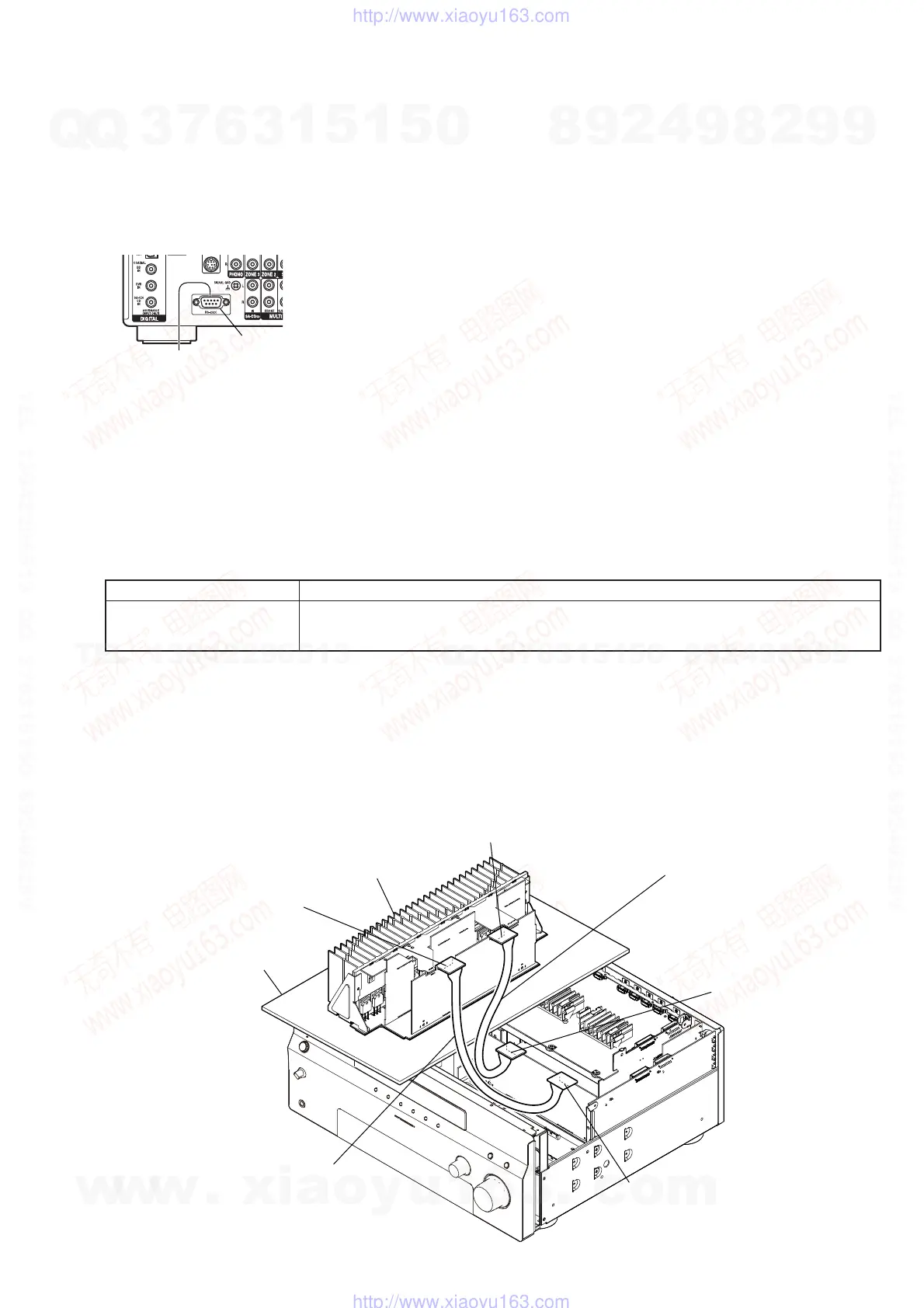
POWER AMP BLOCK SERVICE POSITION
In checking the Power AMP block, prepare jig (extension cable J-2501-291-A: 2 mm Pitch, 12 cores, Length 300 mm/J-2501-311-A: 2 mm
Pitch, 15 cores, Length 300 mm).
A-CLASS AMP board
(CN1504)
Connect the extension jig (J-2501-311-A)
to the A-CLASS AMP board (CN1505)
and E-VOL board (CN1202).
E-VOL board
(CN1206)
A-CLASS AMP board
(CN1505)
power AMP Block
Connect the extension jig (J-2501-291-A)
to the A-CLASS AMP board (CN1504)
and E-VOL board (CN1201).
E-VOL board
(CN1201)
insulating sheet
w
w
w
.
x
i
a
o
y
u
1
6
3
.
c
o
m
Q
Q
3
7
6
3
1
5
1
5
0
9
9
2
8
9
4
2
9
8
T
E
L
1
3
9
4
2
2
9
6
5
1
3
9
9
2
8
9
4
2
9
8
0
5
1
5
1
3
6
7
3
Q
Q
TEL 13942296513 QQ 376315150 892498299
TEL 13942296513 QQ 376315150 892498299
http://www.xiaoyu163.com
http://www.xiaoyu163.com















 To Next Page