User manual 208898 5
CRANEX Novus e 2. Unit description
2.2 Control panels and keys
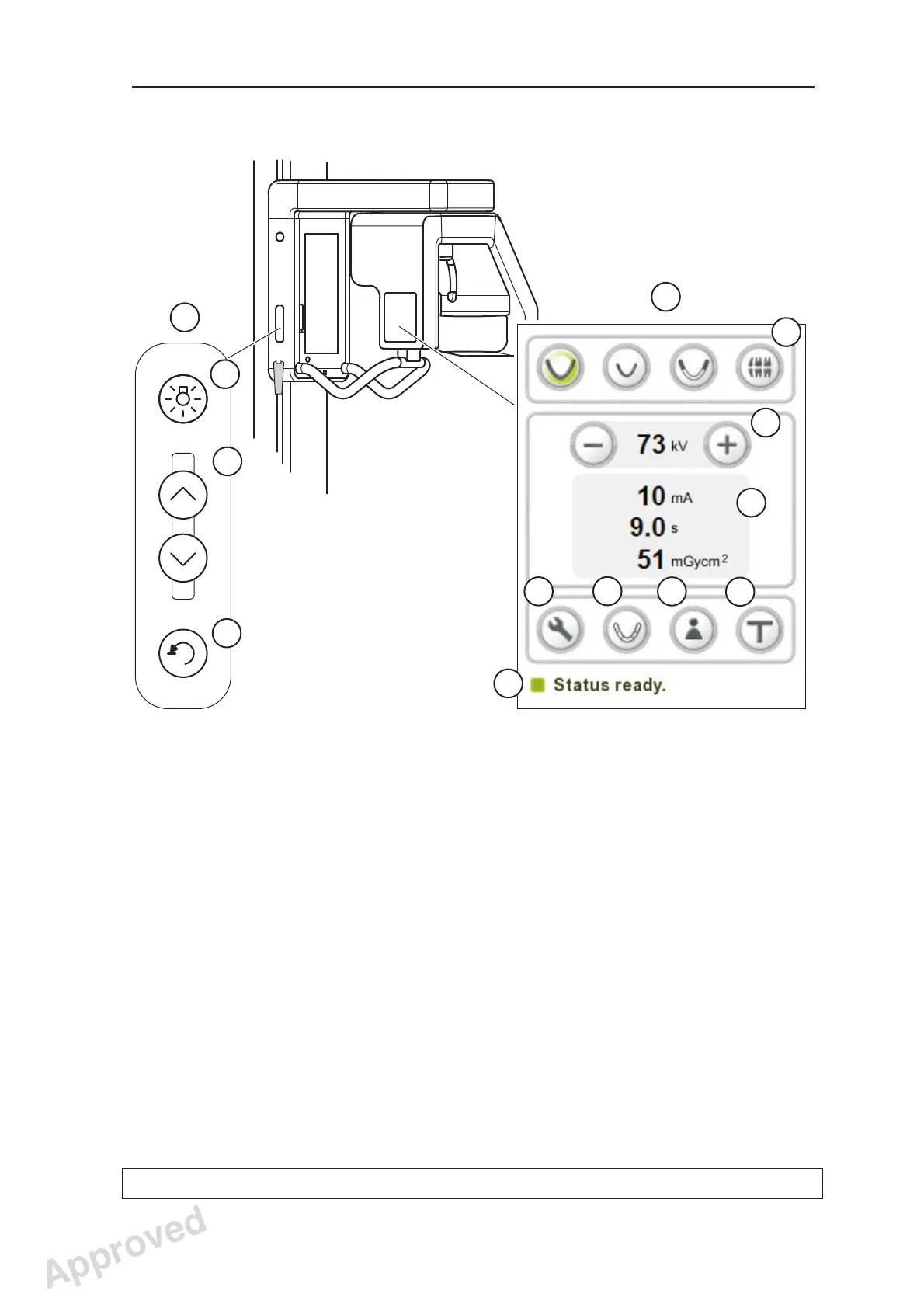
16. Side control panel
A. Lights key - switches the positioning lights on and off.
B. Up / down keys
C. Return key - drives rotating unit to the patient in/out position (PIO)
17. Main control panel
D. Program keys - Adult pan, Child pan, TMJ, Bitewing (optional)
E. kV selection keys
F. Exposure values
G. Service key
H. Sectional Panoramic program selection key (optional)
I. Patient Name -key (visible only if patient name display is
supported by the dental imaging software)
J. Test exposure
K. Unit status indicator
16
A
B
C
17
I
D
E
G
F
J
K
H
Approved: Ukkonen Juha-Pekka 2015-03-13 13:08
Reviewed: Savinen Antti Juhani 2015-03-12 11:32
Approved
See PDM system to determine the status of this document. Printed out: 2016-01-27 12:19:26
D508980, 4
Copyright © 2015 by PaloDEx Group Oy. All rights reserved.



 To Next Page