30 User manual 208898
3. Taking an Exposure CRANEX Novus e
Bitewing (Optional)
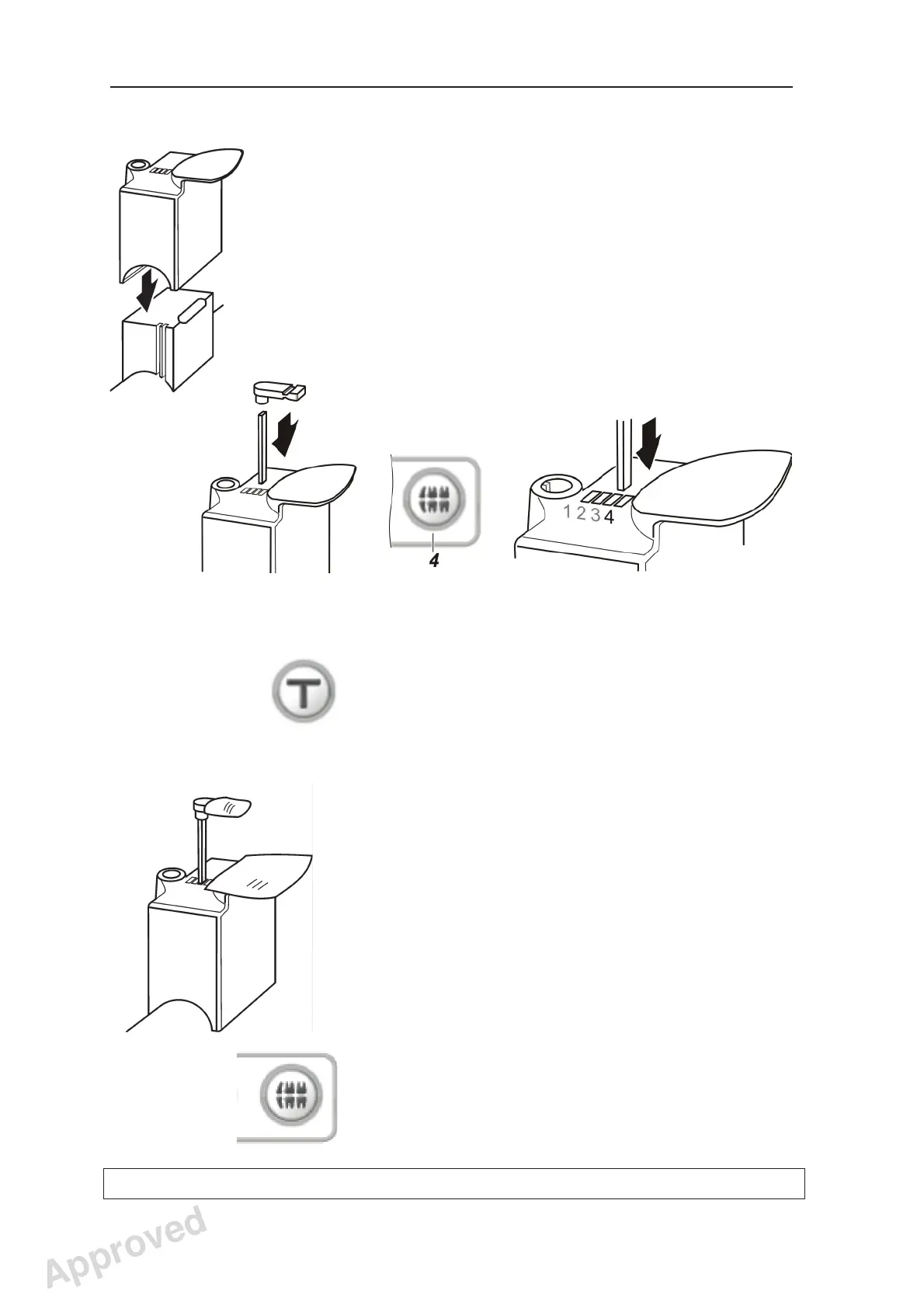
1. Slide the chin rest on to the support holder.
2. Attach the bite block to the rod and insert the
rod and bite block into hole 4 in the chin rest.
IMPORTANT NOTE:
If the patient is exceptionally large or has
unusual skull anatomy, a test exposure (T)
should be taken to ensure that the rotating unit
does not touch the patient’s head or shoulders
during the exposure. If the rotating unit seems to
touch the patient’s head or shoulders, check the
patient’s position and if that does not help, then
move the rod and bite block forward into hole 3
or 2.
3. Place the appropriate disposable covers on to
the patient support you are using.
4. Press the bitewing key to select the bitewing
program. The key color will change which
indicates that the program has been selected.
The magnifi cation of the program is 1.25.
Approved: Ukkonen Juha-Pekka 2015-03-13 13:08
Reviewed: Savinen Antti Juhani 2015-03-12 11:32
Approved
See PDM system to determine the status of this document. Printed out: 2016-01-27 12:19:26
D508980, 4
Copyright © 2015 by PaloDEx Group Oy. All rights reserved.



 To Next Page