INSTRUCTION MANUAL
SPACE s.r.l.
ER 200 - ER 220
ER150 - ER160 - ER165
Code M0076 - rev.1.6
(04/2005)
Page 22/ 40 SPACE s.r.l. – 10090 Trana (TO) Via Sangano, 48
Tel. (+39) 011/ 933.88.65 – Fax (+39) 011/ 933.88.64
e-mail: info@spacetest.com
7.4 ALU and/or STATIC programs
The available functions permit selecting the appropriate weight positions to be placed in
positions different to standard (dynamic unbalance).
The ALU programs measure rims by means of data pre-set in the wheel balancer.
The measurements entered by the operator will therefore be automatically corrected by the
machine according to the program selected.
From the initial program page (see para. 6 on page 13) press the “F2 key”.
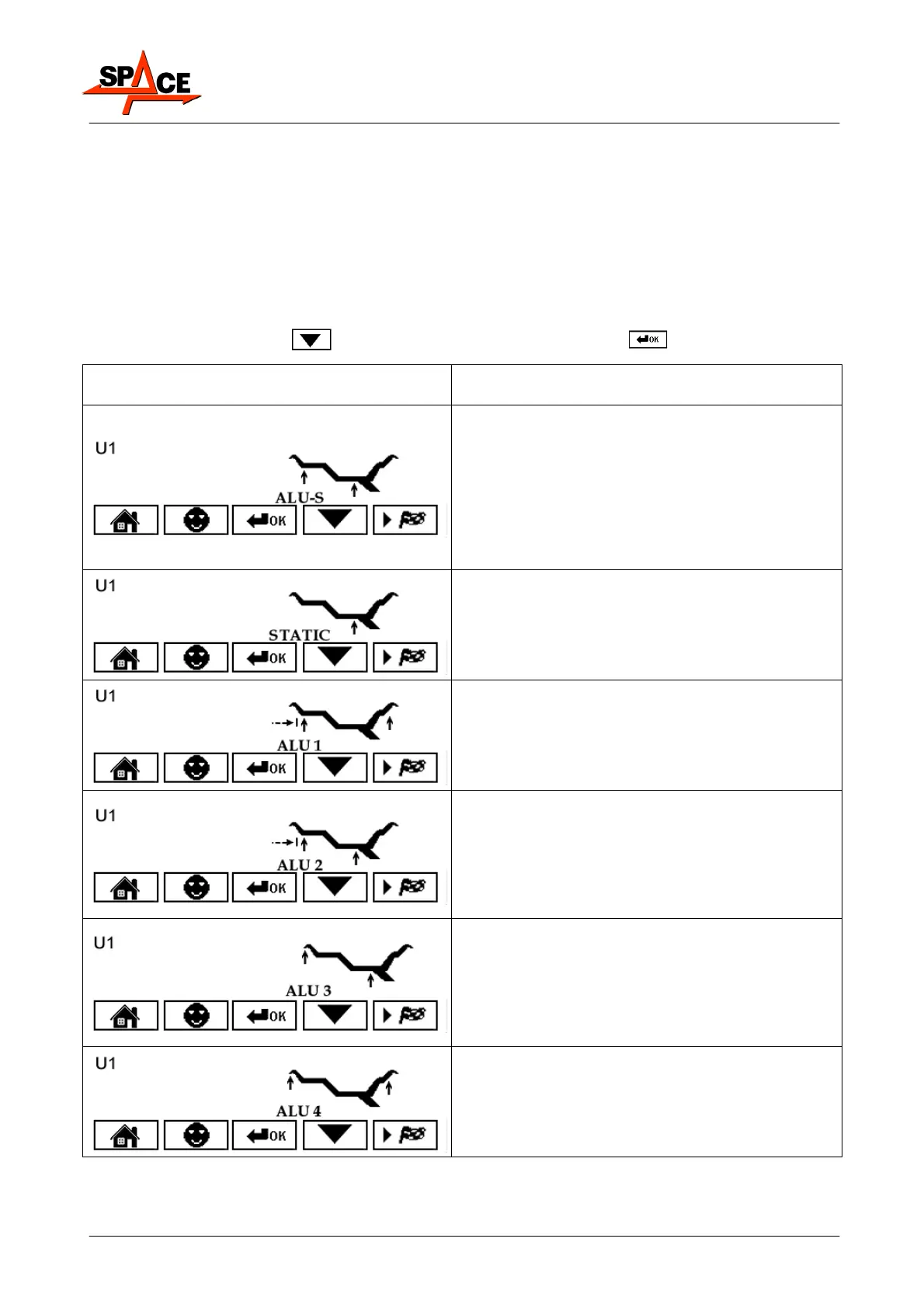
The display screen shows a window with possible selection modes. Select the desired function
by means of the “F3 key”
and confirm with the "CENTRE key" .
POSSIBLE FUNCTIONS THAT CAN BE
SELECTED
DESCRIPTION
The ALU-S function enables the user to enter 2
different positions for fitting the adhesive weights
on the outer and inner side of the rim, so as to
select the position of the weights according to
specific need. The position of the outer weight is
not visible but is hidden inside.
Press the “CENTRE key” to confirm. Enter the
measurements (par. 7.1.2 on page 16) and
proceed as described in para. 7.4.2.
Static balancing is a procedure that offsets wheel
vibrations using a single adhesive weight on a
single plane.
Press the "CENTRE key" to confirm.
Enter the measurements (para. 7.1.3 on page 17)
proceed as described in para. 7.4.1 on page 23.
The ALU 1 function permits balancing wheels
with light alloy rims by fitting adhesive weights
on the outer and inner sides of the rim.
Press the "CENTRE key" to confirm.
Enter the measurements normally and proceed
as for dynamic unbalance.
The ALU 2 function balances wheels with light
alloy rims by fitting adhesive weights on the
outside and inside of the rim. The position of the
outer weight is not visible but hidden inside.
Press the "CENTRE key" to confirm. Enter the
measurements normally and proceed as for
dynamic unbalance.
The ALU 3 function is a procedure that uses
mixed weights to offset wheel unbalance: weight
with clip on inner side of wheel, adhesive weight
on outer side, not visible because inside the rim.
Press the "CENTRE key" to confirm.
Enter the measurements normally and proceed
as for dynamic unbalance.
The ALU 4 function is a procedure that uses
mixed weights to offset wheel unbalance: weight
with clip on inner side of wheel, adhesive weight
on outer side. Press the “CENTRE key” to
confirm. Enter the measurements normally and
proceed as for dynamic unbalance.



 To Next Page