INSTRUCTION MANUAL
SPACE s.r.l.
ER 200 - ER 220
ER150 - ER160 - ER165
Code M0076 - rev.1.6
(04/2005)
Page 28/ 40 SPACE s.r.l. – 10090 Trana (TO) Via Sangano, 48
Tel. (+39) 011/ 933.88.65 – Fax (+39) 011/ 933.88.64
e-mail: info@spacetest.com
9 WEIGHTS HIDDEN BEHIND SPOKES MODE
Only for models ER220 / ER160 / ER165
Adhesive correction weight positioning may not look attractive on some types of rims. In this
case, the "weights hidden behind spokes" mode can be used. This splits any correction weight
on the outer side into two parts to be hidden behind the rim spokes. Can be used in both
Static or ALU-S modes.
Proceed to display the static or ALU-S unbalance measurements by performing a spin (Figure
28).
Once the unbalance values have been determined, press the “F2 key” corresponding to the
icon
. At this point, the next row of keys is displayed on the display screen.
Press the “F3 key” relating to the weights hidden behind spokes mode
.The program
will display the box in Figure 34.
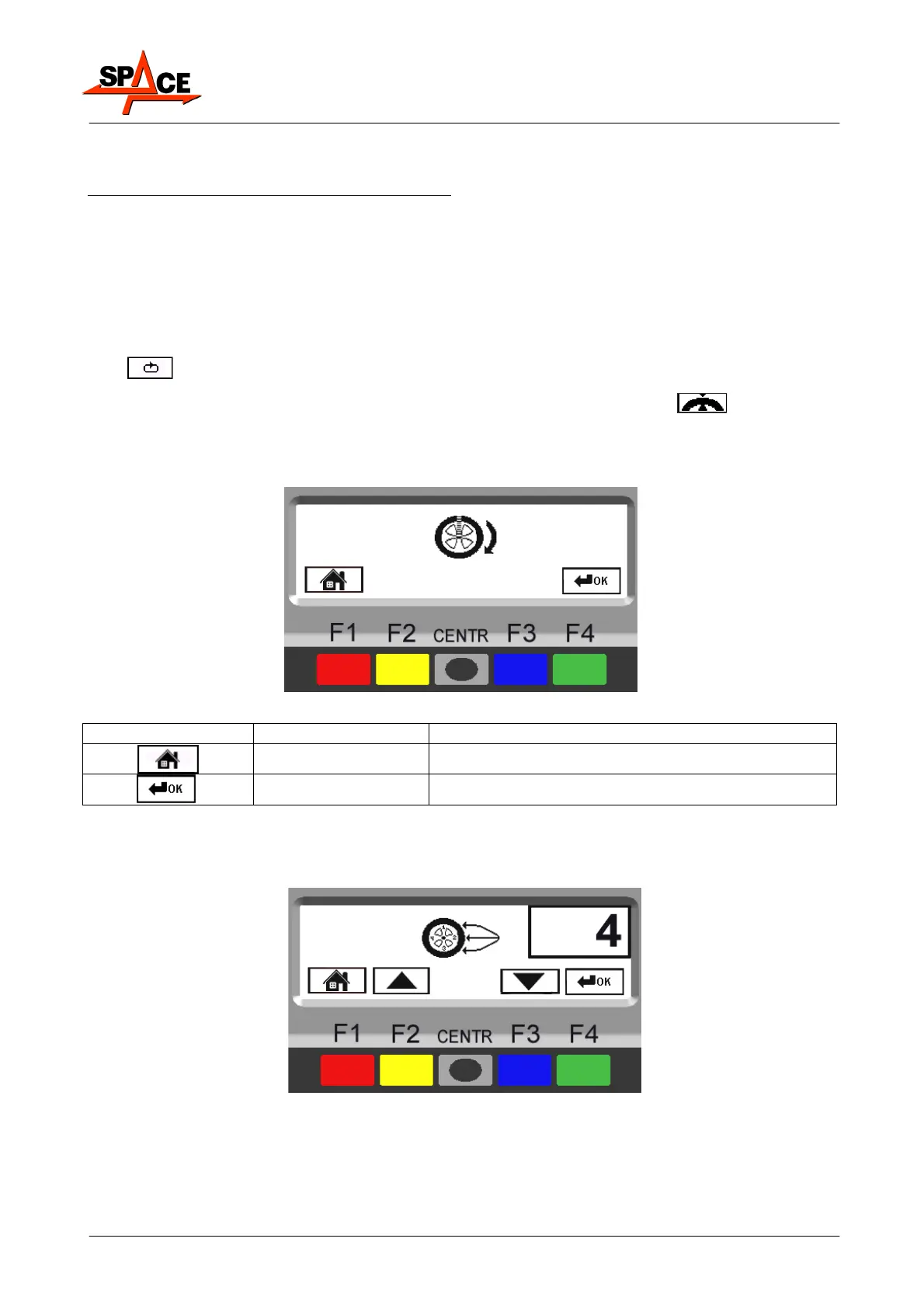
Move any spoke up to 12 'o' clock (in many cases, the position could already be behind or
near one of the spokes) and press the “F4 key” to confirm and continue.
Figure 34
ICON KEY DESCRIPTION
RED (F1) Return to previous page.
GREEN (F4) Confirm spoke positioning at 12 'o' clock
Enter the number of spokes existing on the wheel, using keys F2 and F3 (Figure 35).
A minimum of 3 spokes and a maximum of 12 can be entered.
Press the “F4 key” to confirm and continue.
Figure 35



 To Next Page