INSTRUCTION MANUAL
SPACE s.r.l.
ER 200 - ER 220
ER150 - ER160 - ER165
Code M0076 - rev.1.6
(04/2005)
Page 34/ 40 SPACE s.r.l. – 10090 Trana (TO) Via Sangano, 48
Tel. (+39) 011/ 933.88.65 – Fax (+39) 011/ 933.88.64
e-mail: info@spacetest.com
11 SETUP OF UNITS OF WEIGHT MEASUREMENT AND RIM
WIDTH/DIAMETER AND SETTING CAR/MOTORCYCLE MODE
The weight determining wheel unbalance can be indicated on the monitor with "gram" or
"ounce" measurement unit.
The width and diameter can be indicated in "inches" or "mm"
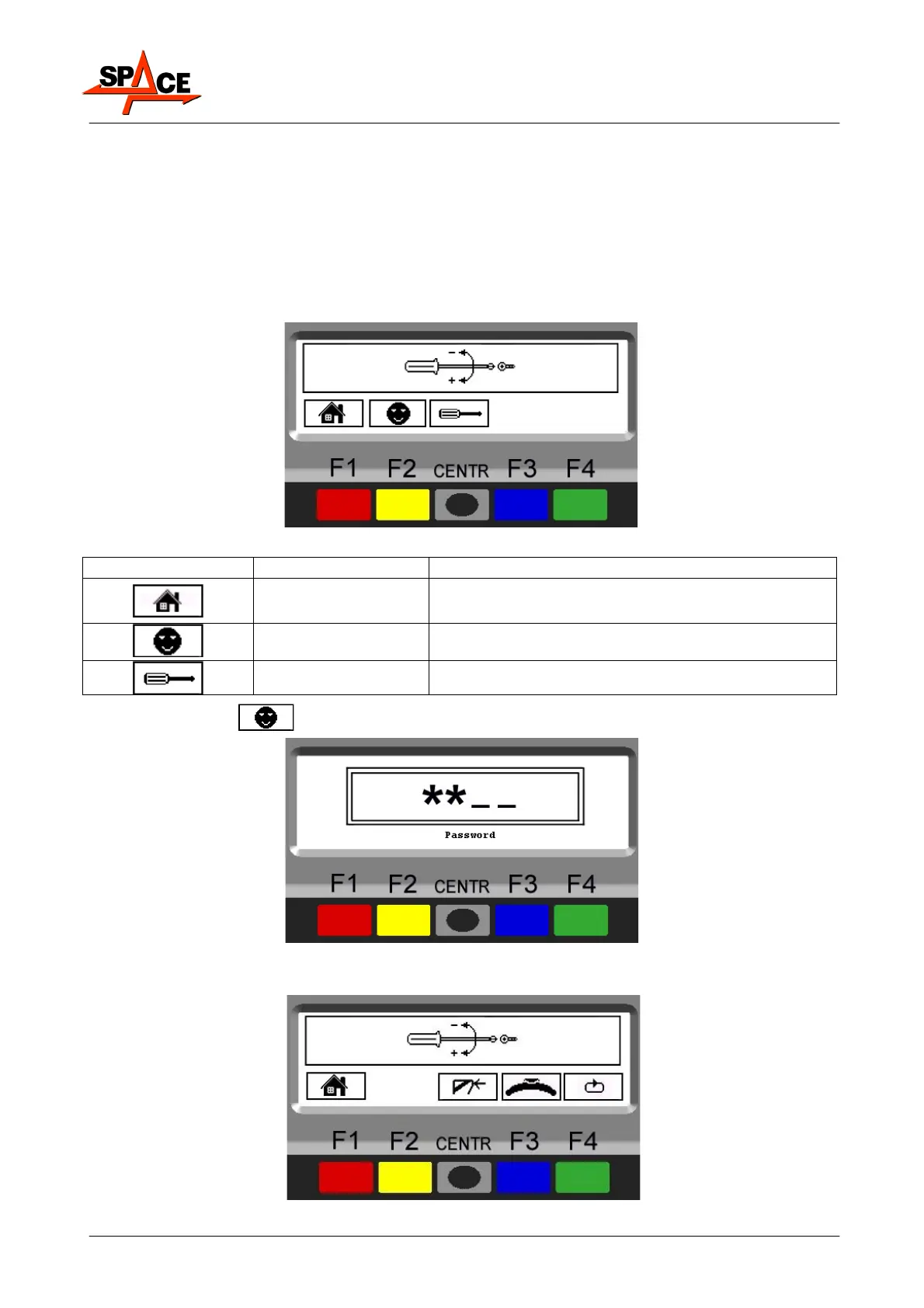
To change the unit of measurement, press the "F1 key" from the opening presentation page
(Figure 5 on page 13); the program will show the following display page:
Figure 41
ICON KEY DESCRIPTION
RED (F1) Return to program opening page
YELLOW (F2)
Client configuration. Enter the password:
F1-F2-CENTR-F3
CENTRE For technical assistance only
Press the “F2 key”
Figure 42
Enter the password
F1-F2-CENTR-F3
, the program will show display page in Figure 43:
Figure 43



 To Next Page