INSTRUCTION MANUAL
SPACE s.r.l.
ER 200 - ER 220
ER150 - ER160 - ER165
Code M0076 - rev.1.6
(04/2005)
SPACE s.r.l. – 10090 Trana (TO) Via Sangano, 48 Page 35/ 40
Tel. (+39) 011/ 933.88.65 – Fax (+39) 011/ 933.88.64
e-mail: info@spacetest.com
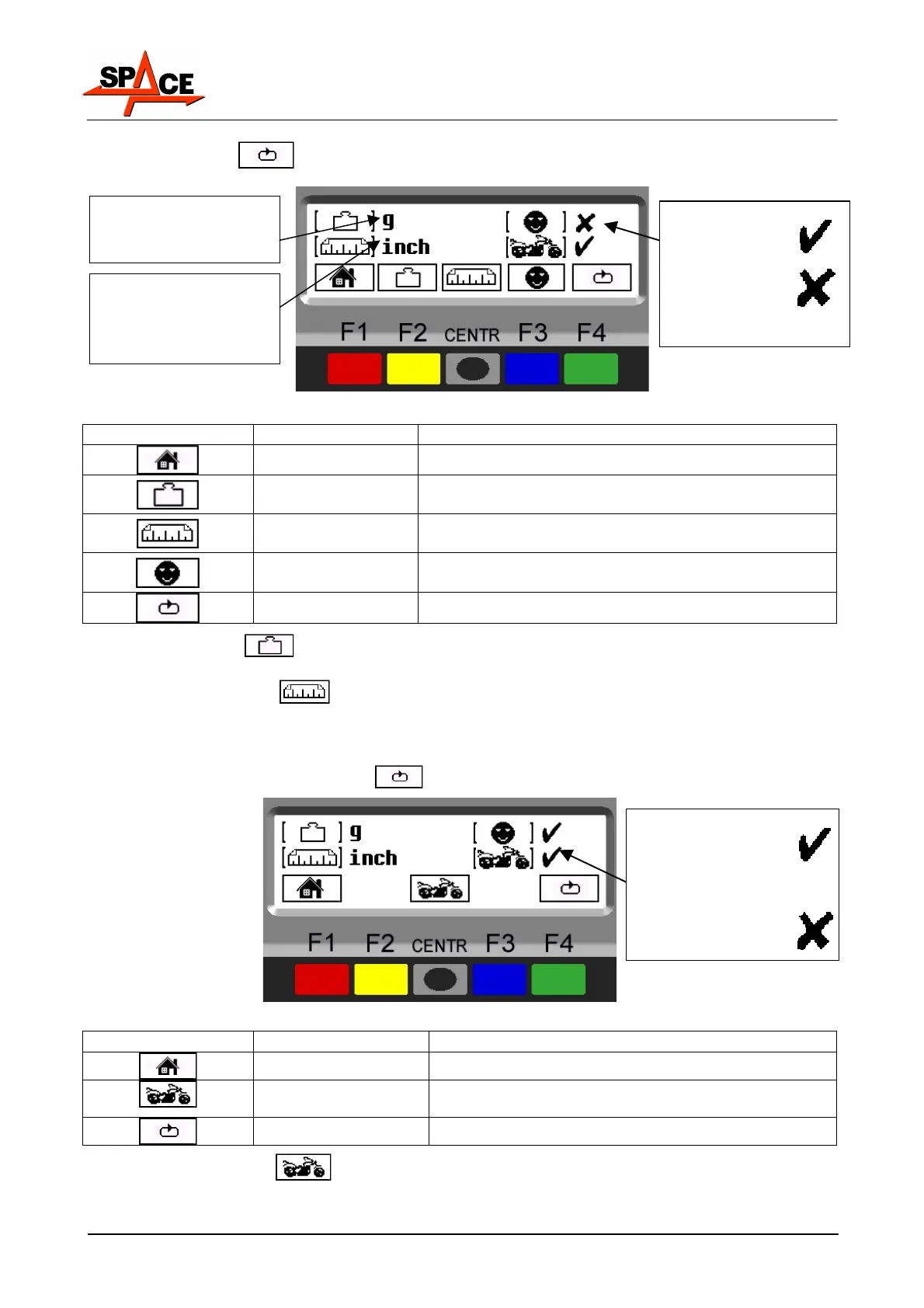
Press the “F4 key” , the program will show the following display page:
Figure 44
ICON KEY DESCRIPTION
RED (F1) Return to page in Figure 41.
YELLOW (F2)
Change unit of weight measurement from grams
(g) to ounces (oz) and vice versa
CENTRE
Change unit of width/diameter measurements
from inches (in) to millimetres (mm) and vice versa
BLUE (F3)
Enable/disable “User control” function (see para.
7.2 on page 18)
GREEN (F4)
Display subsequent operations
Press the “F2 key” to change weight unit of measurement from grams to ounces and
vice versa. The symbol "g" or "oz" appears on the monitor.
Press the “CENTR key”
to change the width and diameter unit of measurements from
inches to millimetres and vice versa. The symbol "in" or "mm" appears on the monitor.
After setting the required measurement unit, to engage or disengage the motorcycle wheel
balancing mode, press the “F4 key”
. The program will show the following display page:
Figure 45
ICON KEY DESCRIPTION
RED (F1) Return to page in Figure 41.
CENTRE
Engage/disengage motorcycle wheel balancing
mode.
GREEN (F4) Display subsequent operations
Press the “CENTR key” to engage or disengage motorcycle wheel balancing mode.
All the settings of the measurement unit are stored even after the machine is switched off.
Selected unit of
width/diameter
measurement = inches
(inches)
Selected weight
measurement unit =
grams (g)
"User control"
function
ENABLED Æ
"User control"
function
DISABLED Æ
Motorcycle wheel
balancing mode
ENGAGED
Æ
Motorcycle wheel
balancing mode
DISENGAGED
Æ



 To Next Page