Used in conjunction with Personal Alarms to control the interval with more precision. See the PersonalAlarms.cfg
template and Personal Alarms configurable parameters. This setting will override any existing
wifi.rtls.ekahau.txInterval parameter. If this setting is not defined or specified incorrectly, the existing
wifi.rtls.ekahau.txInterval value will be used.
During the alarm state, if RTLS is enabled, the handset will automatically use the shortest txInterval of 10 seconds
regardless of the setting of any parameter. Once the alarm is cleared, the txInterval setting will revert to its former
value.
Note that this setting will overrule any interval set in the handset Administration Settings menu.
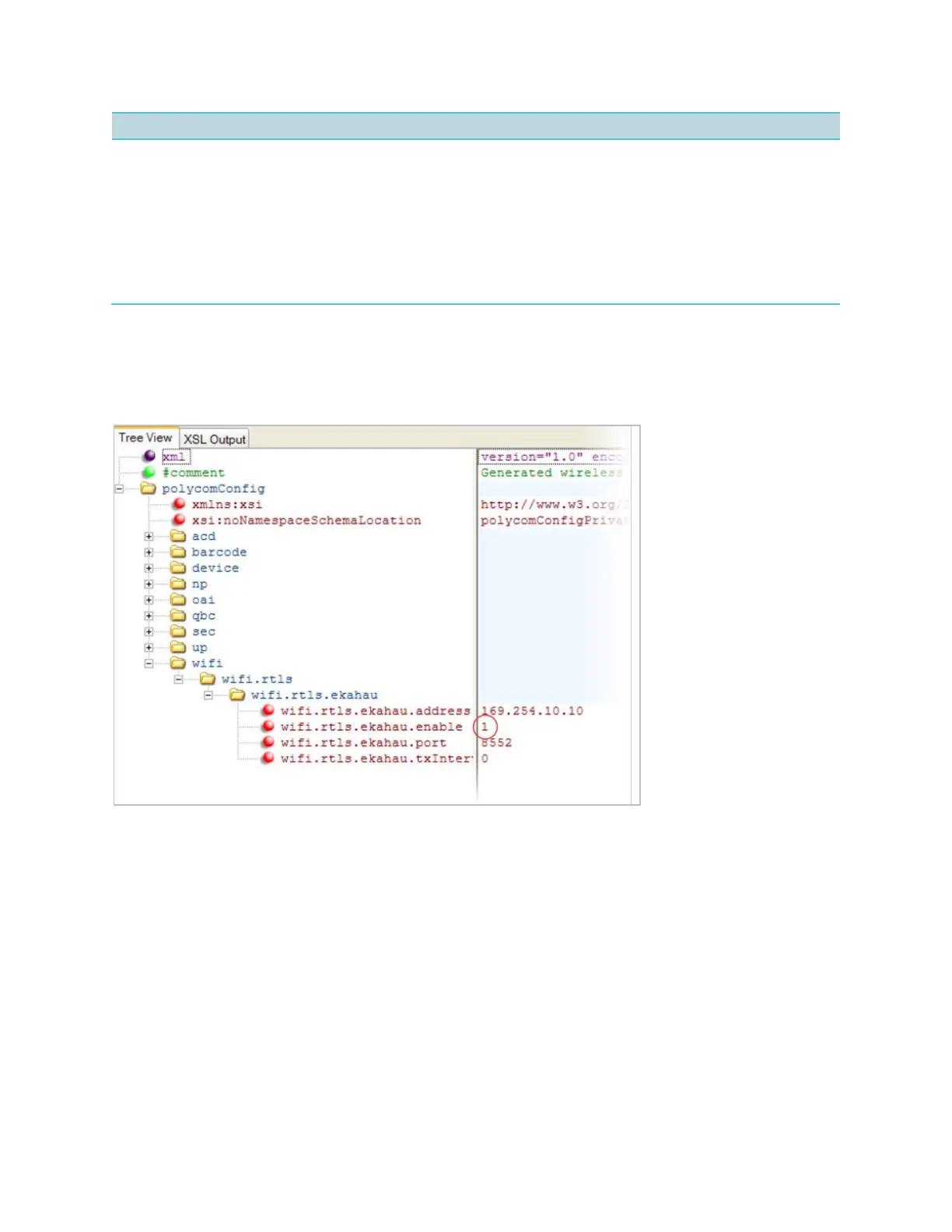
Example Location Service Integration Configuration
To use RTLS, enable the wifi.rtls.ekahau.enable parameter, as shown next. All other
Ekahau parameter vales shown in the following example are the default values.
Microsoft Exchange Calendar Integration
Spectralink handsets can display the Microsoft Exchange 2007 and 2010 calendar. The
calendar gives you quick access to meeting information and you can dial in to conference calls.
To integrate the Microsoft Exchange Calendar features with your handset, configure the
parameters in the next table.
You can access the feature from the Applications menu on the Spectralink handsets.
You will need valid Microsoft Windows credentials to access the Microsoft Exchange Calendar
information on the handset. You can manage these credentials through the Login Credentials,
which are available through Home> Settings> Basic Settings> Login Credentials.



 To Next Page