EasyManua.ls Logo

SpectraLink 8440 - Default Feature Key Layouts

SpectraLink 8440
335 pages
Print Icon
To Next Page IconTo Next Page
To Previous Page IconTo Previous Page
Loading...
Spectralink 84-Series Series Wireless Telephones Administration Guide
1725-86984-000_P.docx
September 2016 299
Default Feature Key Layouts
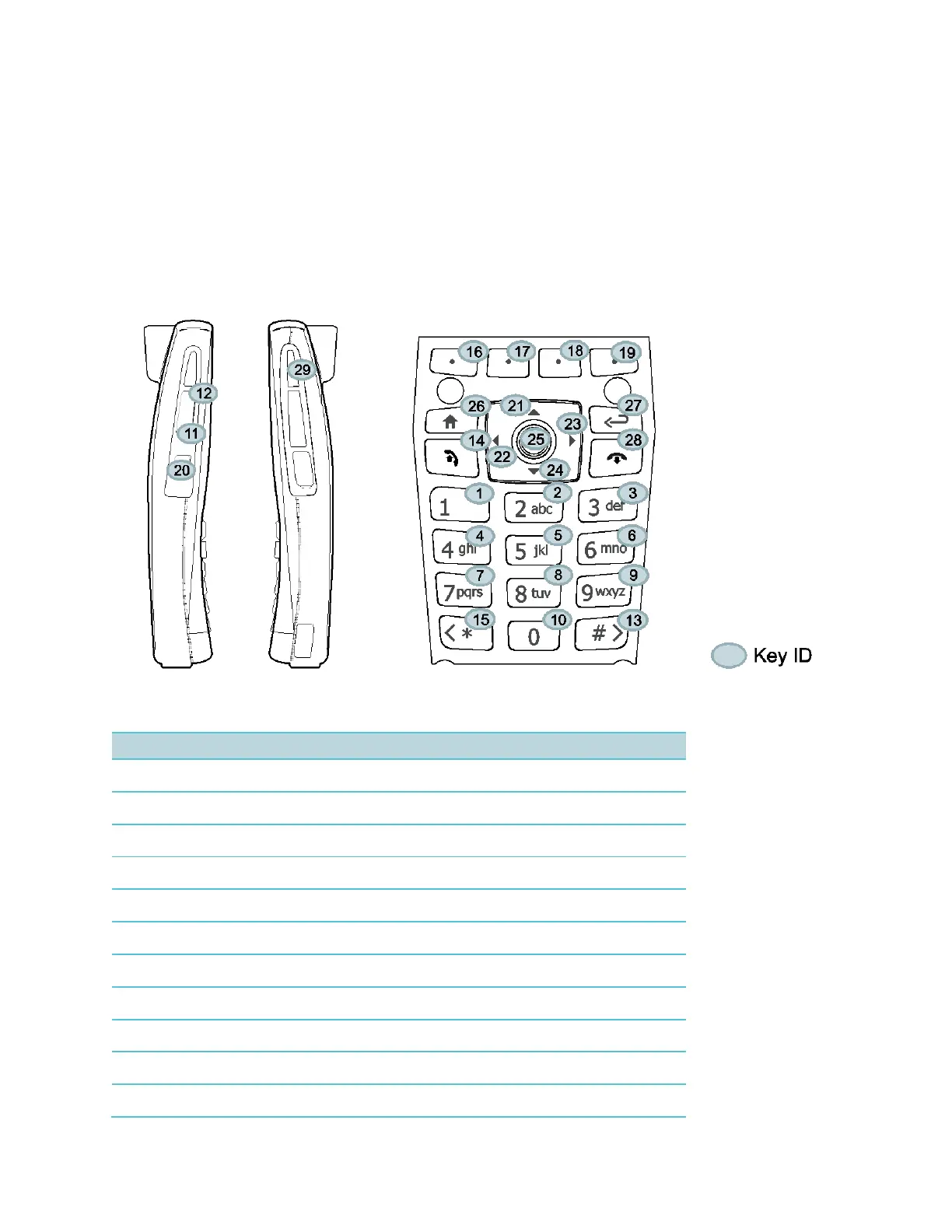
The following figures and tables show the default key layouts for the Spectralink 84-Series
wireless handsets.
The illustration of the Spectralink handsets is followed by a table that shows the available
handset key functions.
Spectralink 84-Series
Table 12-2: Spectralink 8440 and 8450 handset key functions
Key ID
Function
Key ID
Function
Key ID
Function
1
Dialpad1
12
VolUp
23
ArrowRight
2
Dialpad2
13
DialpadPound
24
ArrowDown
3
Dialpad3
14
Green
25
Select
4
Dialpad4
15
DialpadStar
26
Home
5
Dialpad5
16
SoftKey1
27
Back
6
Dialpad6
17
SoftKey2
28
Red
7
Dialpad7
18
SoftKey3
29
Barcode
8
Dialpad8
19
SoftKey4
9
Dialpad 9
20
Talk
10
Dialpad0
21
ArrowUp
11
VolDown
22
ArrowLeft

Table of Contents

Other manuals for SpectraLink 8440

Related product manuals