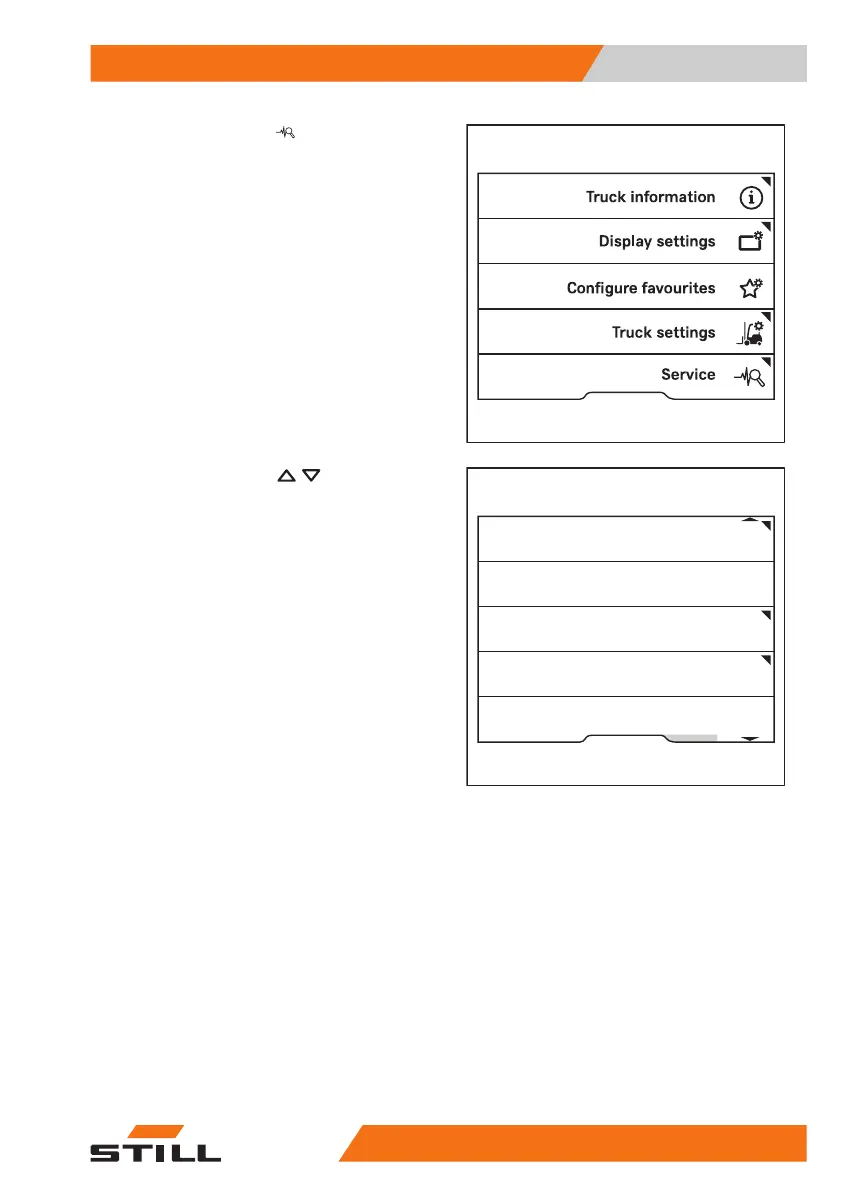
– Press the
Service
softkey.
– Press the scroll keys
until the
Change PIN codes
menu appears.
– Press the
Change PIN codes
softkey.
– Follow the instructions on the display.
Access authorisation for the fleet
manager (variant)
Trucks equipped with the "Access authorisa-
tion for the fleet manager" variant can be con-
figured by the users themselves. Access to
these settings is protected by a fleet manager
password.
Three options are available for the "Access
authorisation for the fleet manager" variant:
1
No fleet manager password
Access to the configuration menus is not
enabled. If access is required at a later
Fleet manager
Calibration
Relieve hydraulics
Shock sensor
Change password (access auth.)
Change PIN codes
6219_003-276_en
Operation
4
Switching on and starting
13157378011527EN-12/2023 - 07



 To Next Page