CAUTION
Coolant with a different specification must not be
mixed in!
– Only use the coolant specified in the maintenance
data table to top up the cooling system.
– Only use coolant according to the manufacturer's
instructions.
– Make sure that the tank cap(1) is screwed
on and is tightly sealed.
– Check the leak tightness of the cooling sys-
tem; see the section entitled "Cleaning the
radiator, checking for leaks".
– Replace the rear cover.
Draining water from the fuel filter
WARNING
Consumables are toxic!
Observe the safety regulations when
handling diesel fuel.
A sensor in the fuel filter monitors the water
level in the filter. If the water exceeds a certain
level, the warning message
FUEL FILTER
appears in the display-operating unit. This
message means that the water that has col-
lected in the fuel filter needs to be drained. To
do this, proceed as follows:
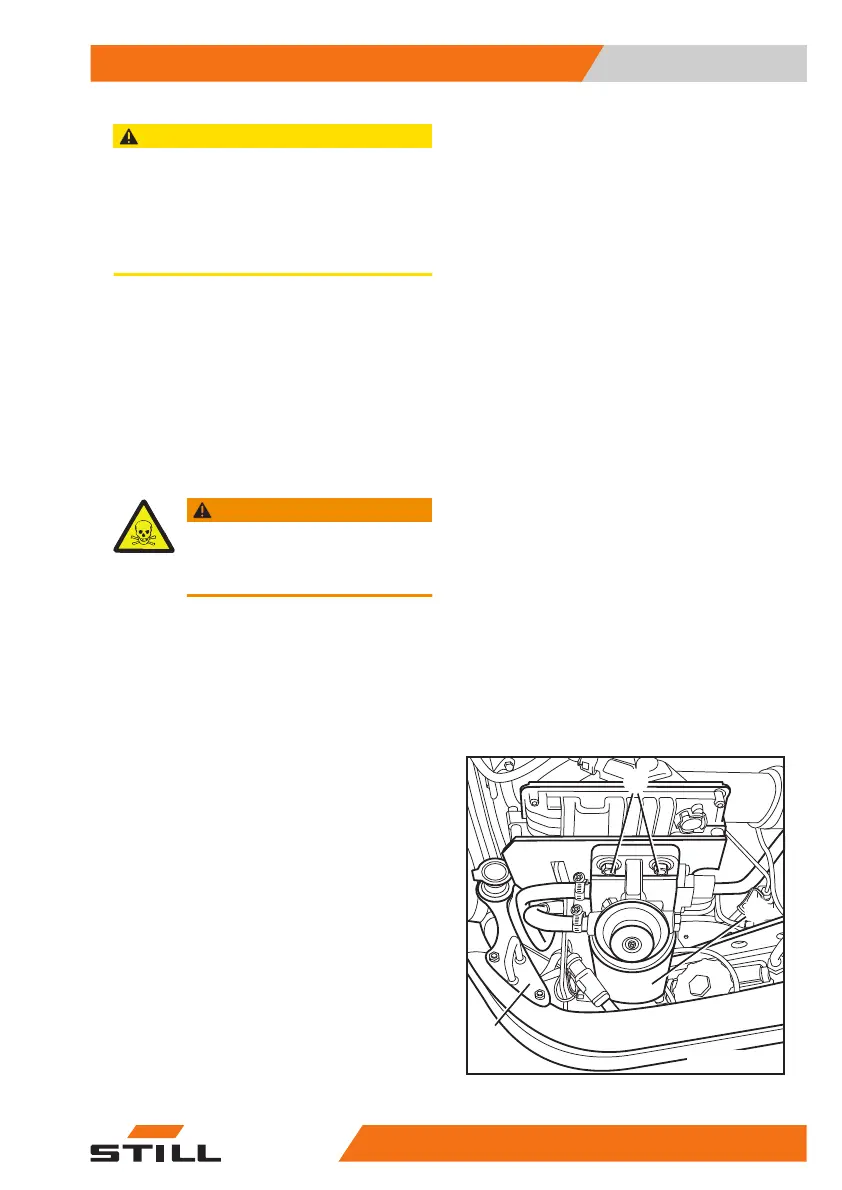
The fuel filter(1) is located in the front left of
the engine compartment (when viewed in the
drive direction), directly adjacent to the locking
eye(2) on the bonnet lock.
– Open the bonnet.
– Loosen the assembly nuts(3).
3
1
2
7094_121-009
Maintenance
5
Preserving operational readiness
43157378011527EN-12/2023 - 07



 To Next Page