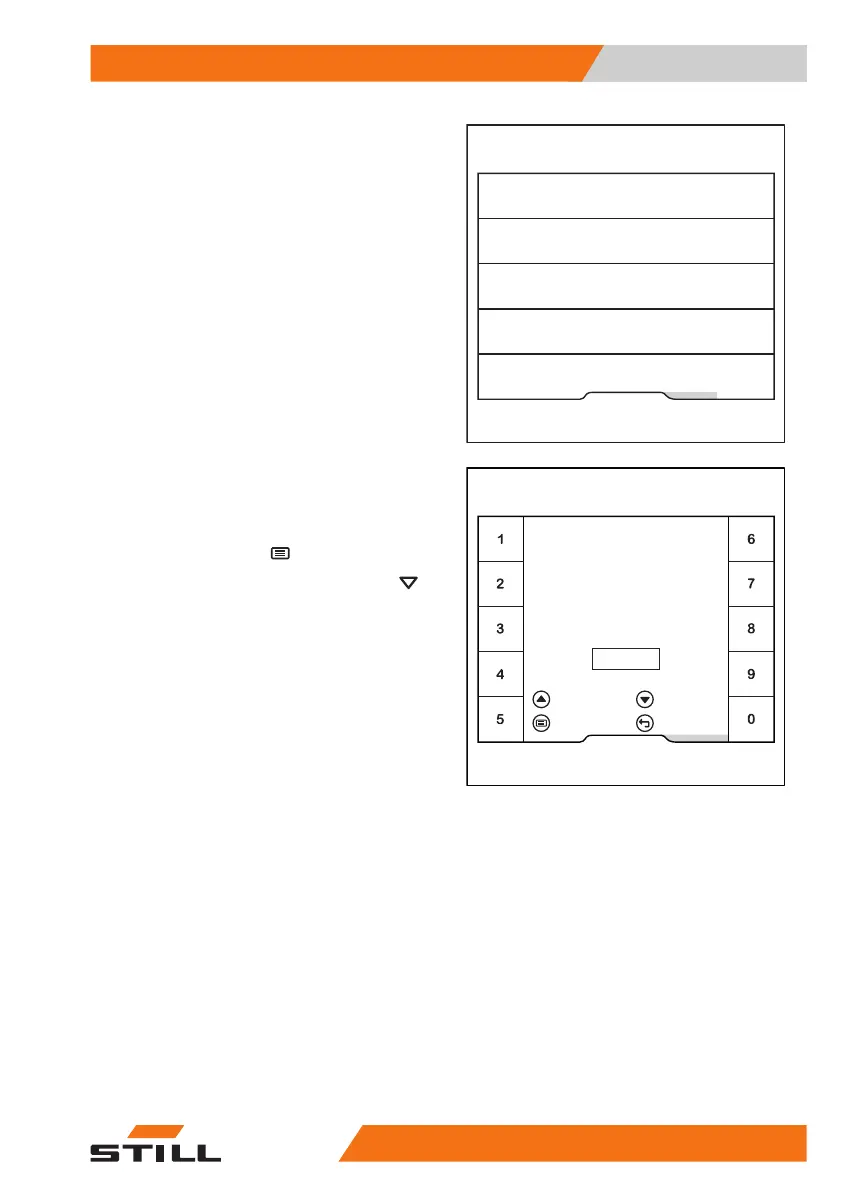
This menu offers three storage locations.
– To configure storage location 1, press
the
Intermediate lift cut-out
1
softkey.
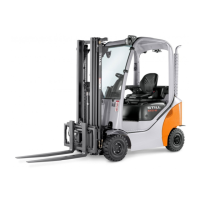
In this menu, you can define the desired lift
height.
– Enter the lift height using softkeys
0 to 9
.
– To
save
, press the button.
– To
activate
, press the scroll button .
The menu closes. The storage locations are
displayed. An orange activation bar indicates
that the
intermediate lift cut-out
1
is activated.
Fleet manager
Intermediate lift cut-out 2
Intermediate lift cut-out 3
End lift cut-out
Intermediate lift cut-out 1
6219_003-315_en
Fleet manager
Enter desired height
= Clear
Intermediate
lift cut-out 1
6,892
= Activate
= Save = Cancel
6219_003-316_en
m
Operation
4
Lift height-dependent assistance systems
24957378011527EN-12/2023 - 07



 To Next Page