– Press the button.
– Press the "Settings"Softkey
.
– Activate the "Access authorisation for the
fleet manager".
– Push the "Auxiliary hydraulics"Softkey.
This menu lists all the available hydraulic
axles for attachments.
– Refer to the operating instructions of the at-
tachment to determine which hydraulic axle
is occupied by the attachment.
The authorised service centre will help you
determine the axles.
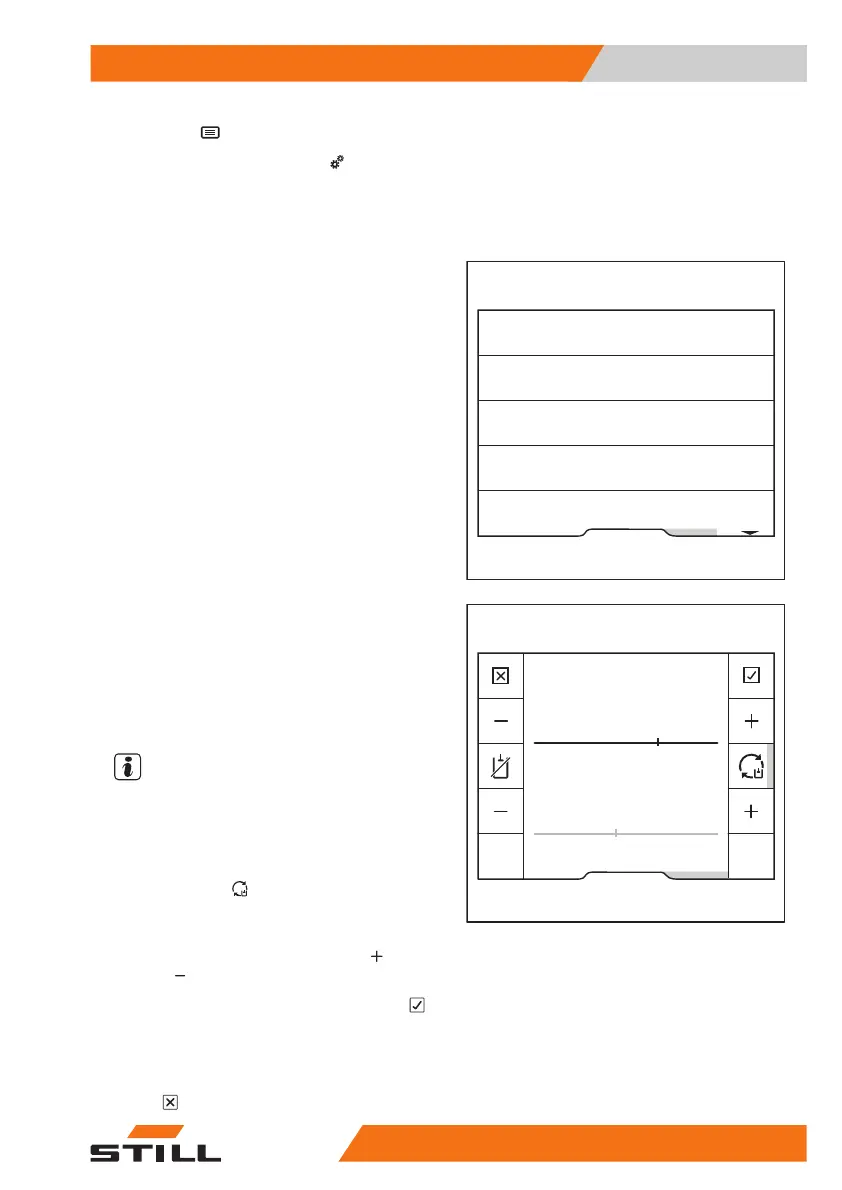
Setting the revolution speed
– Push the softkey for the hydraulic axle to be
configured.
This menu indicates the supply flow.
The return flow is shown in a lighter colour.
●
The currently set speed of the hydraulic
pump is given in
rpm
●
The currently set supply flow rate is given in
L/min
.
NOTE
The supply flow rate depends on the speed.
The return flow automatically adjusts to the
set supply flow. When the orange activation
bar next to the "Synchronise auxiliary hy-
draulics"softkey
lights up, synchronisation
takes place automatically. The return flow is
shown only dimly on the display.
To adjust the speed, push the "Plus"
or
"Minus"
softkey.
– To save the setting, press the "Confirm"
softkey.
The settings are saved.
– To cancel the setting, press the "Can-
cel"
softkey.
Fleet manager
Hydraulic axle 2
Hydraulic axle 3
Hydraulic axle 4
Hydraulic axle 5
Hydraulic axle 1
6219_003-283_en
Fleet manager
Forwards
Auxiliary hydraulics 2
3 300 1/min
46,2 L/min
Backwards
3 300 1/min
46,2 L/min
6219_003-284_V2_en
Operation
4
Attachments
30757378011527EN-12/2023 - 07



 To Next Page