10
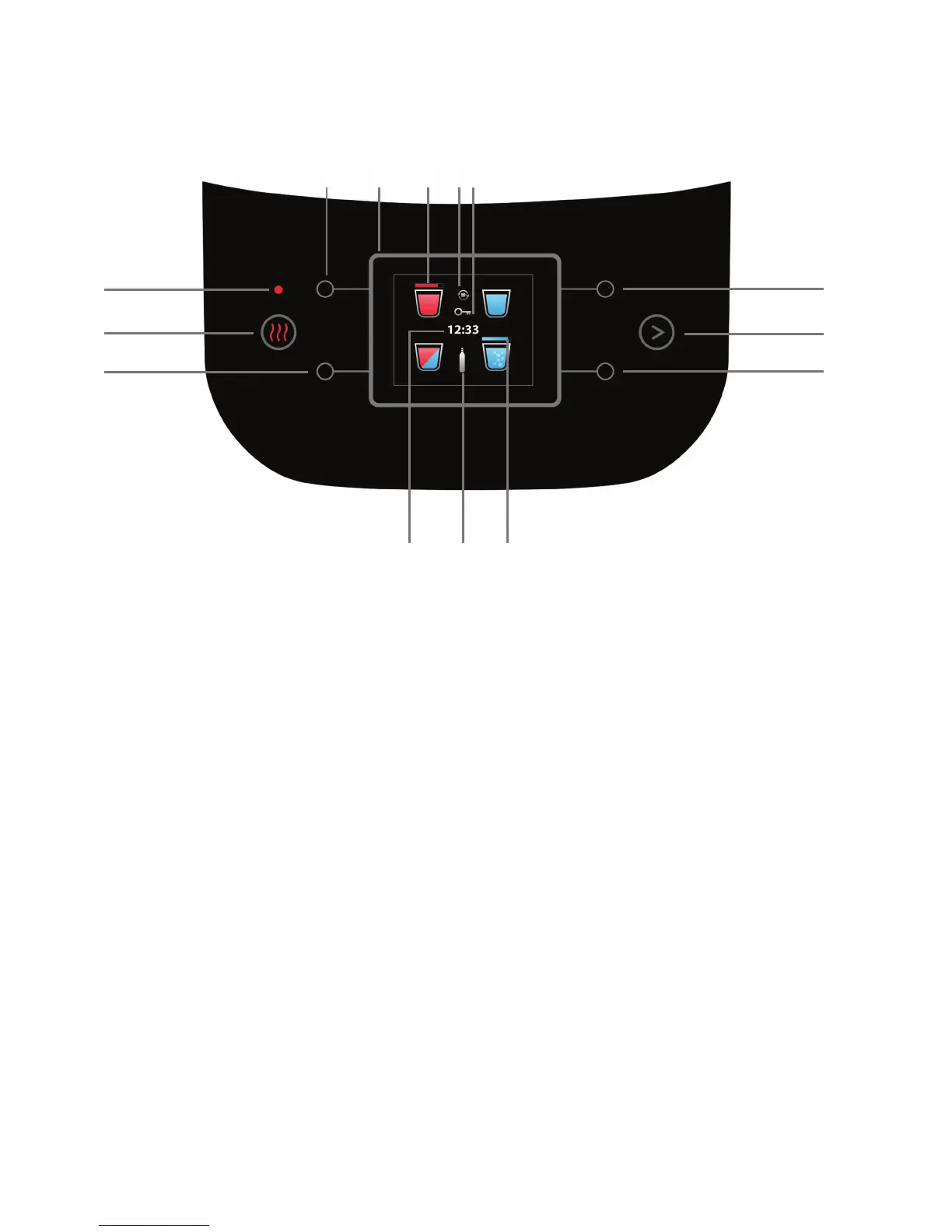
2. Operation/Control Panel
1. Measured quantity of mix water dispensing button
2. Extra hot - boiling button
3. Boiling control light (blinks until boiling has been completed)
4. Hot water dispensing button
5. Digital display
6. Boiling progress bar - when boiling temperature has been achieved, is
replaced with extra hot water icon
7. Wakeup / smart heating icon (appears when option is on)
8. Child lock icon (appears when the option is on)
9. Cold water dispensing button
10. Additional dispensing options button (short press) and settings / preferences
menu (long press)
11. Sparkling cup of water dispensing button
12. Cylinder emptying progress bar - appears when starting CO
2
emptying until
the process is complete
13. The CO
2
cylinder icon (appears when the CO
2
cylinder is empty or no cylinder
is present or when it is not screwed-in all the way)
14. Clock
Please note! The above display is for illustration purposes only.
2
1314
3
11
10
1
4 75
9
8
12
6



 To Next Page