27
d. Displaying and Resetting the Filter Replacement Timer
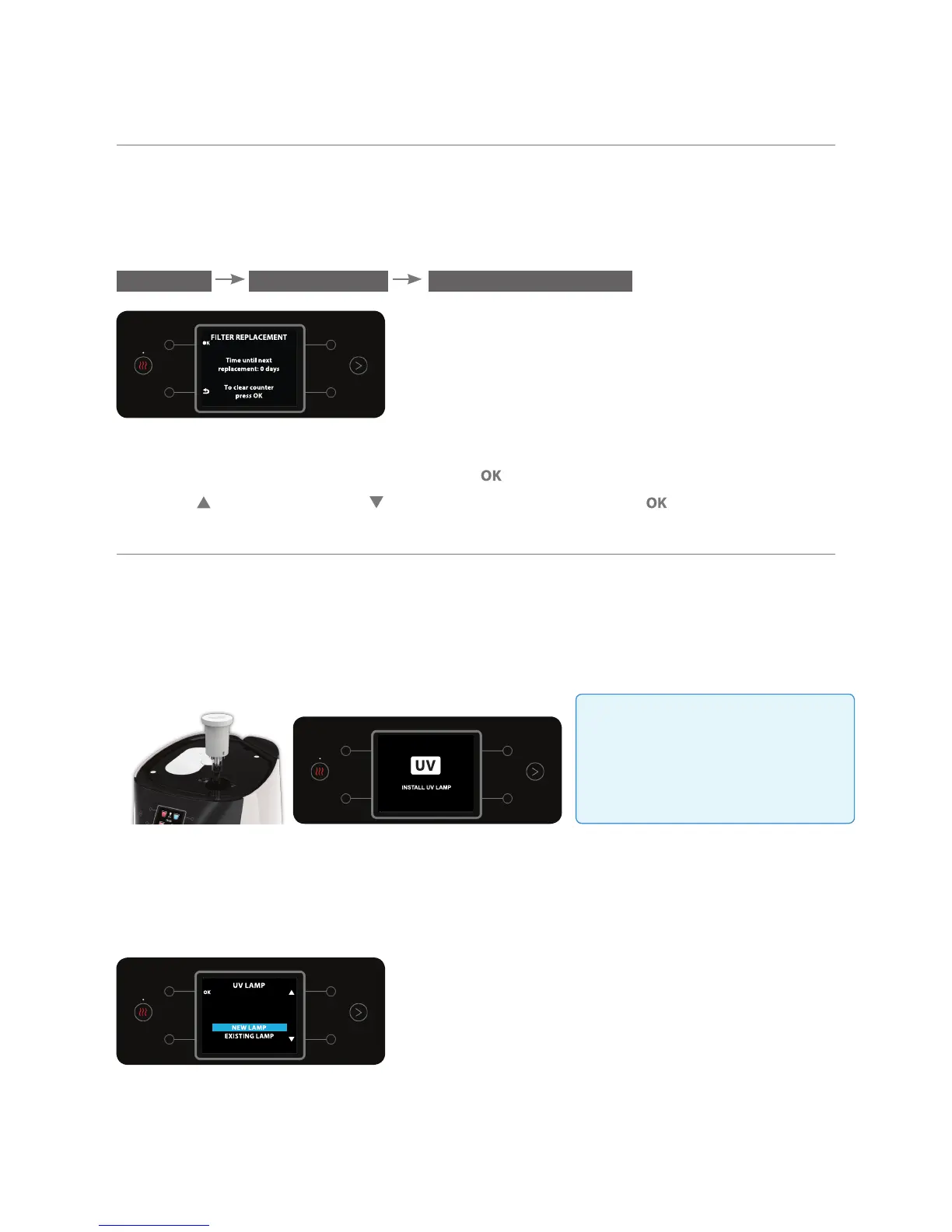
This option enables showing the time till the next filter replacement on the display;
and resetting it if necessary. To display or reset the filter replacement timer, enter
the FILTER REPLACEMENT sub menu.
MENU MAINTENANCE FILTER REPLACEMENT
The number of days till the next filter replacement will appear on the display.
To reset the filter replacement timer, press . To confirm, select YES using the
top right and bottom right buttons. To confirm, press the button.
e. Lamp Replacement Instructions
1. Removing the lamp: Remove the water bar’s top cover.
Pull the lamp gently upwards. A message will appear on the display to install a
new lamp.
2. Inserting a new lamp: Remove the wrapper from the new lamp, avoid
touching the glass body of the lamp.
Insert the new lamp into the water bar. Select NEW LAMP.
3. Lamp successfully installed The message UV LAMP INSTALLED
SUCCESSFULLY will appear on the display.
Warning!
Do not use the UV lamp when
it is out of the water bar as
dangerous UV-C radiation may
affect your eyes and skin.



 To Next Page