21
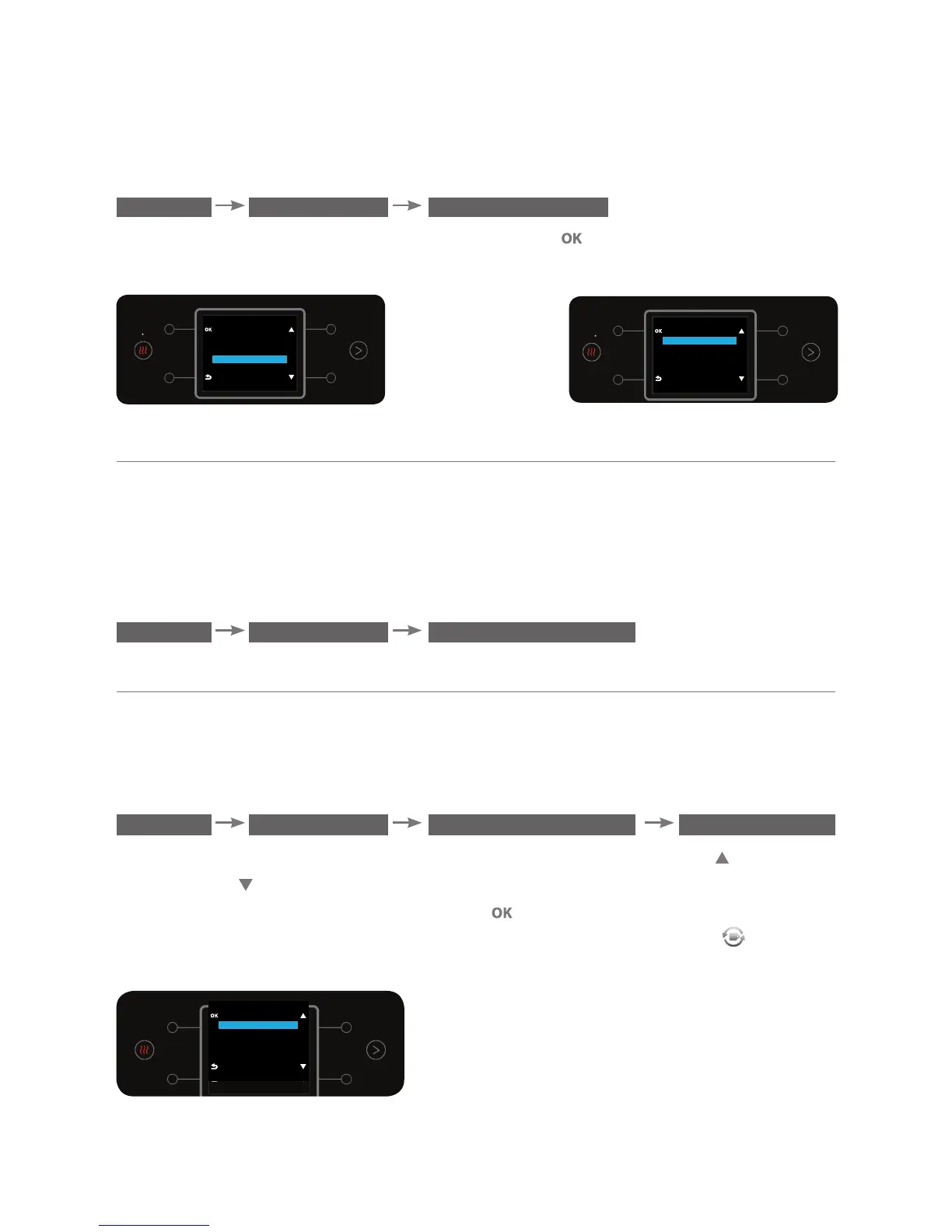
To select the preferred sparkling level for display on the home screen, enter the
SPARKLING LEVELS sub menu:
MENU PREFERENCES SPARKLING LEVELS
Select the preferred sparkling level and press the button to confirm.
The sparkling level default is REGULAR.
d. Automatic Heating
This option enables the user to set a time for boiling the water or change the
settings so that the water bar learns the user's water boiling habits and boils
the water on a regular basis according to the learned data.
To select the water boiling state, enter the AUTOMATIC HEATING sub menu.
MENU PREFERENCES AUTOMATIC HEATING
d.1. Smart Heating
This option enables the water bar to learn the user's hot water consumption
habits and boil water at fixed times customized to the user’s needs.
To set the smart heating, enter the SMART HEATING sub menu.
MENU PREFERENCES AUTOMATIC HEATING SMART HEATING
Turning on the smart heating function is done using the top right and the
bottom right buttons.
To confirm the required option, press the button.
*Please note! When this option is activated a “smart heating” icon
will be
displayed.
PREFERENCES
DEFINE QUANTITY
DEFINE TEMPERATURE
SPARKLING LEVELS
AUTOMATIC HEATING
SPARKLING LEVELS
STRONG
REGULAR
LIGHT
AUTOMATIC HEATING
SMART HEATING
WAKEUP
OFF



 To Next Page