64 6506-209-001 REV F www.stryker.com
Operation
Installing the optional mounting bracket (Continued)
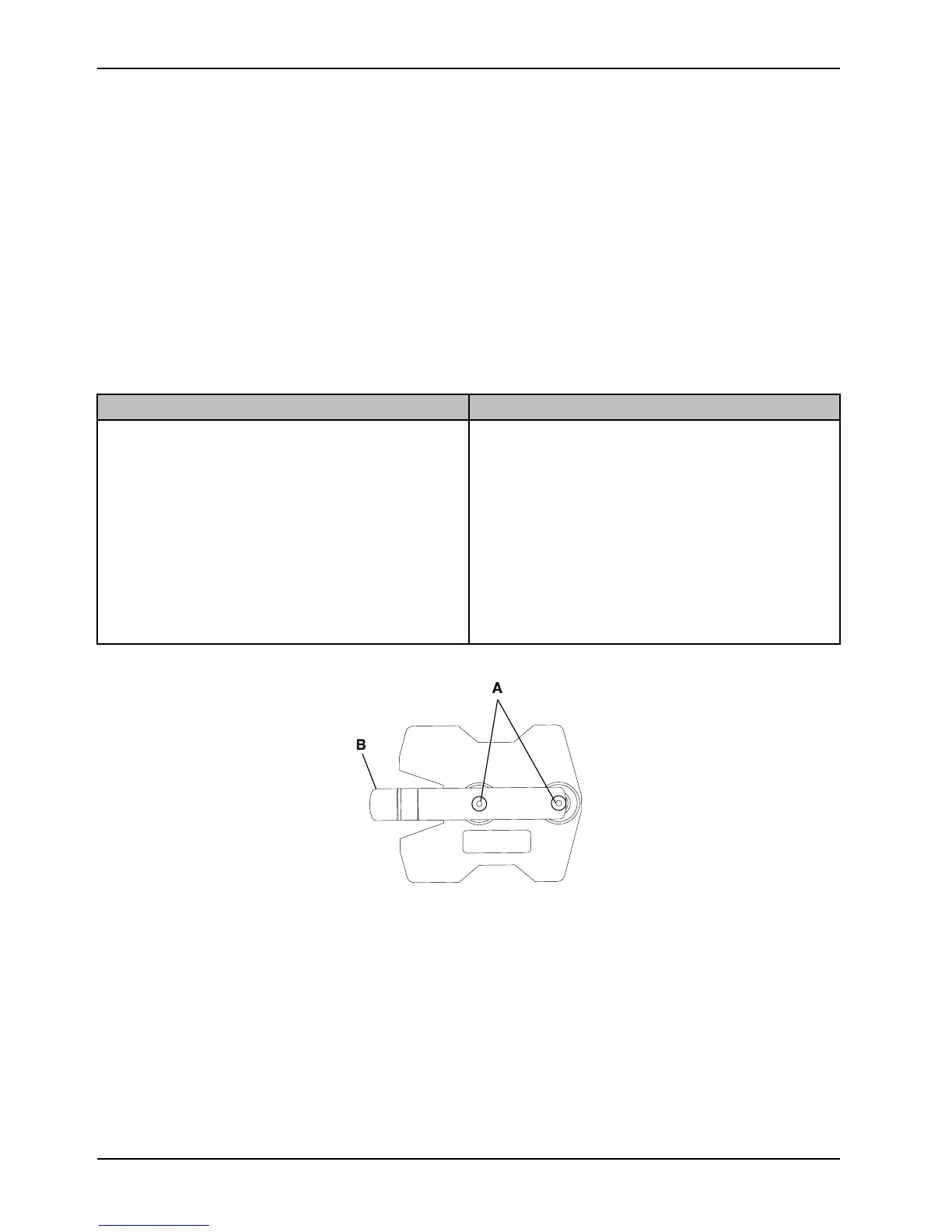
To install the optional mounting bracket (Figure 52 on page 64):
1. Use the SMRT charger mounting bracket as a template to mark the location of the mounting holes (A) at the area
where you will install the mounting bracket.
2. Position the mounting bracket, making sure that the:
a. Spring tab (B) is located at the rear of the SMRT charger.
Note: When mounting the bracket to a vertical surface, the spring tab should be horizontal with the spring tab
point to the left (Figure 52 on page 64).
b. Power cord easily plugs into the rear of the SMRT charger.
c. SMRT charger slides from front to back to connect to the bracket after mounting.
d. Bracket is installed correctly for the ambulance or station location:
Ambulance location
Station location
• Secure the bracket to a horizontal structural support
surface or shelf using size #10, grade 5 screws
minimum (not supplied).
• Make sure that the selected mounting surface is
strong enough to securely hold the SMRT charger
and SMRT Pak during transport.
• Locate the bracket in an enclosed cabinet and out of
patient reach during transport.
• Allow for easy SMRT Pak installation and removal.
• Locate the power supply within reach of the power
cord.
• Secure the bracket to a horizontal or vertical
structural support surface using size #10, grade 5
screws minimum (not supplied).
• For vertical installation, position the mounting bracket
so the spring tab is directly below the mounting
screws, so the SMRT Pak remains supported by the
SMRT charger even if the release button is
accidently pressed.
• Allow for easy SMRT Pak installation and removal.
• Locate the power supply within reach of the power
cord.
Figure 52: Mounting bracket
Installing the charger onto the optional mounting bracket
To install the SMRT charger onto the optional mounting bracket (Figure 53 on page 65):
1. Align the rear keyway slots (A) onto the bracket fasteners (B).
2. Slide the SMRT charger (C) in until it locks into the mounting bracket (D) to secure the charger to the bracket.










 To Next Page