pg 12
Flint - tremolo & reverb
Live Edit Functions
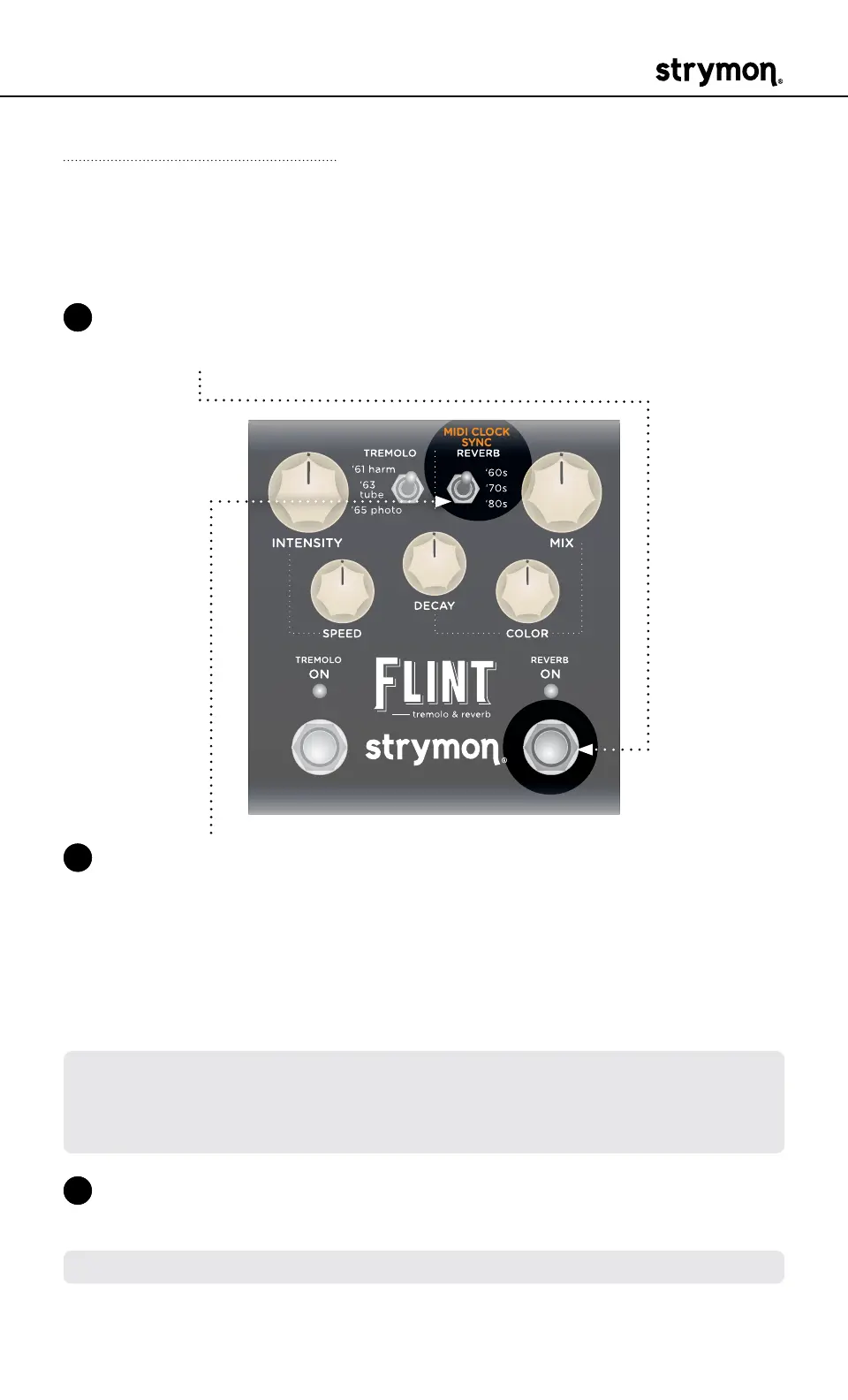
MIDI Clock Sync
Determine whether Flint’s Tremolo Speed will sync to incoming MIDI
Clock messages�
1 Press and hold the REVERB ON footswitch� Once both LEDs flash,
release the footswitch�
2 Set the position of the REVERB (MIDI CLOCK SYNC) type switch to
select whether Flint will sync to incoming MIDI Clock messages� Both
LEDs will momentarily change color to indicate the current status as
you set the switch�
• Off: RED (default)- Flint will not respond to MIDI Clock�
• On: BLUE - Flint will respond to MIDI Clock�
NOTE: When synced to MIDI Clock, the TREMOLO ON LED will light PINK,
and the SPEED knob will act as a multiplier or divider of the incoming clock
tempo� The synced SPEED multi/div settings are: 1/4 (min), 1/3, 1/2, x1 (at
12 o’clock), x2, x3, x4 (max)�
3 Press the REVERB ON footswitch to exit and store your MIDI Clock
setting�
NOTE: The MIDI Clock setting is saved per Favorite setting or per MIDI preset�



 To Next Page