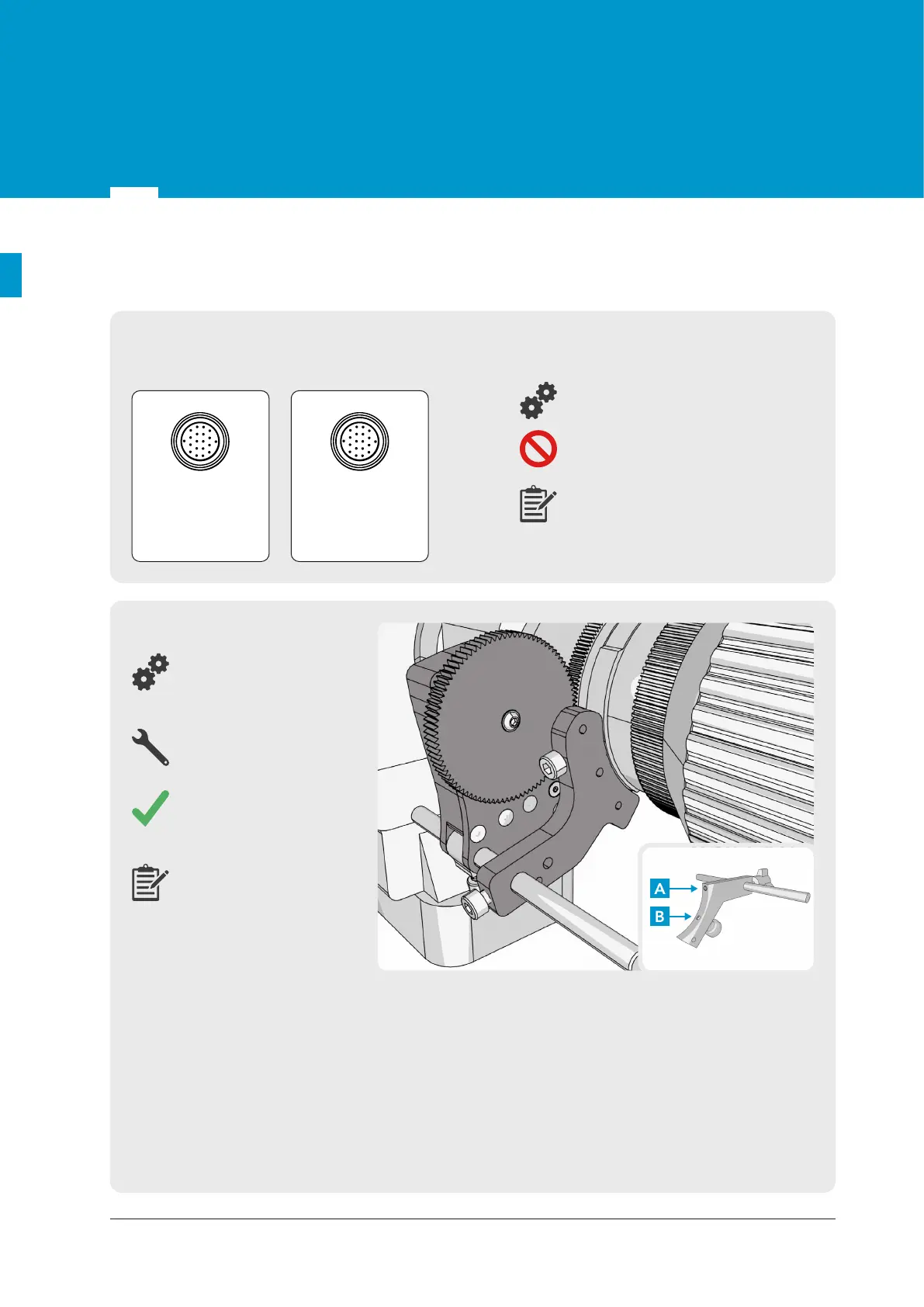
If your lens does not have internal encoders, so you are using our external lens encoders, mount
both sensors (Zoom and Focus) on the camera using the Universal lens bracket. Check that the
mount is firmly connected and touching the camera lens on two points (points A and B shown
above), so it can't be rotated. The connector end is labelled and you can plug it into the port on the
Spyder module. Choose the correct gear for Canon (0.5m), Fujinon (0.6m), or for Cine lens (0.8m),
which will be pressed onto the shafts of encoder. The gear teeth will mesh with the external
zoom/focus ring of the lens as shown. If the lens does not have standard 0.5 gear module (Canon),
0.6 gear module (Fujinon), or 0.8m gear module (Cine), an adjustable 0.8m gear module strap
(available as part of the kit) needs to be fastened securely onto the required part(s) of the lens ring
so that it will mesh with the Cine gears in the kit.
Gears
External lens encoder
Universal lens bracket
Allen/Hex keys
1.5mm & 3mm
Check that there is no
backlash or dirt between
the teeth.
The Focus sensor should
be installed in a similar
fashion like the zoom
sensor shown.
For a Canon or Fujinon lens having an available connecter as shown below connect the correct lens
cable (depending on the lens manufacturer) between the lens and the Spyder module.
Cable 8 or 9 from Optional parts list
Never force a connection. Check
number of pins and orientation.
Depending on the availability use
the connectors on Canon lenses
(left picture) or Fujinon lenses (right
picture).
Fujinon
Serial 20-pin
Canon
Remote/
Virtual 20-pin
5.3 Lens data connection
© 2022 STYPE; ALL RIGHTS RESERVED.
14
05


 To Next Page