Home
STYPE
Digital Camera
Follower 2.0
Page 36 (Set Up Trackables)
STYPE Follower 2.0 - Set Up Trackables; Spyder Module Setup
46 pages
Manual
Save Page as PDF
To Next Page
To Next Page
To Previous Page
To Previous Page
Loading...
12
© 2022 STYPE; ALL RIGHTS RESERVED.
34
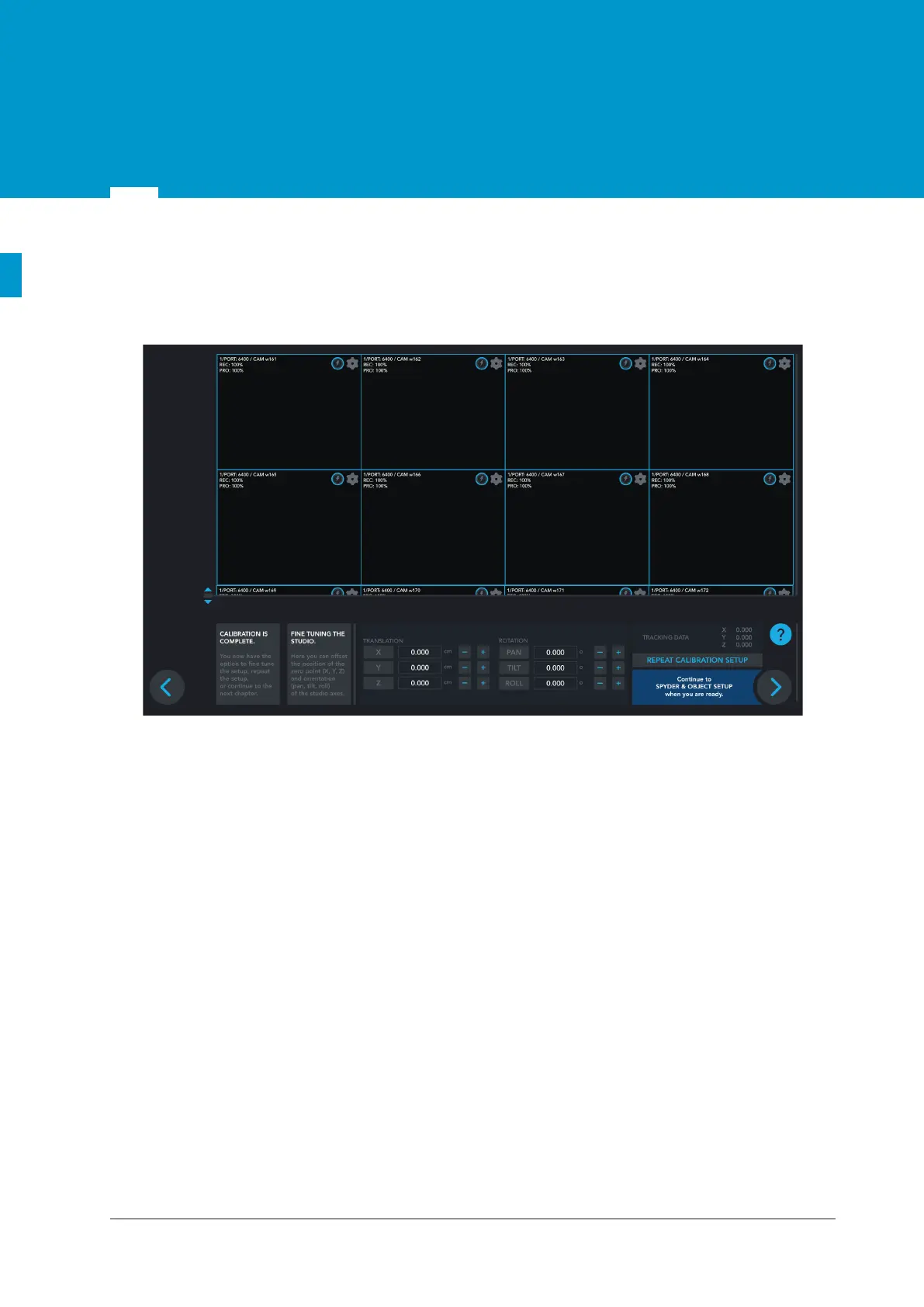
12.3 Fine tune Studio Setup
Here you can offset the position of the zero point (X, Y, Z) and orientation (pan, tilt, roll) of the studio axes.
Figure 12.8
Fine tune Studio Setup
35
37
Table of Contents
Main Page
Table of Contents
2
Introduction
3
Part List
4
Trackables Overview
6
Trackers Technical
8
Specification
10
Get Familiar with the Main Server
10
Get Familiar with the Follower Witness Camera
11
Get Familiar with the Radio Transmitter
13
Get Familiar with the Spyder Module
14
Spyder Module Specification
14
Mounting the Spyder
15
Lens Data Connection
16
Connectivity Diagram
17
Mounting
18
Magic Arm / Clamp and Safety Cable
18
Daisy Chain
19
Object Tracking
20
Camera and Object Tracking
21
Starting up Follower
22
User Interface
22
Main Screen Overview
23
Initialization
23
Follower Network
24
Network Setup Screen
24
Initialization Phases
25
Phase 1
25
Phase 2
26
Phase 3
27
Radio Devices
28
Frequency Setup
28
Add Devices
29
Calibration
30
Calibration Cross Setup
30
Calibration Process
31
Studio Setup
32
Quick Studio Setup
33
Regular Studio Setup
34
Fine Tune Studio Setup
36
Set up Trackables
37
Spyder Module Setup
37
Pipe Lenght and Zero Point
41
Create and Edit Trackables
42
Engine Network
43
Stype Data Recorder
44


 To Next Page