Introduction 29
Before Use
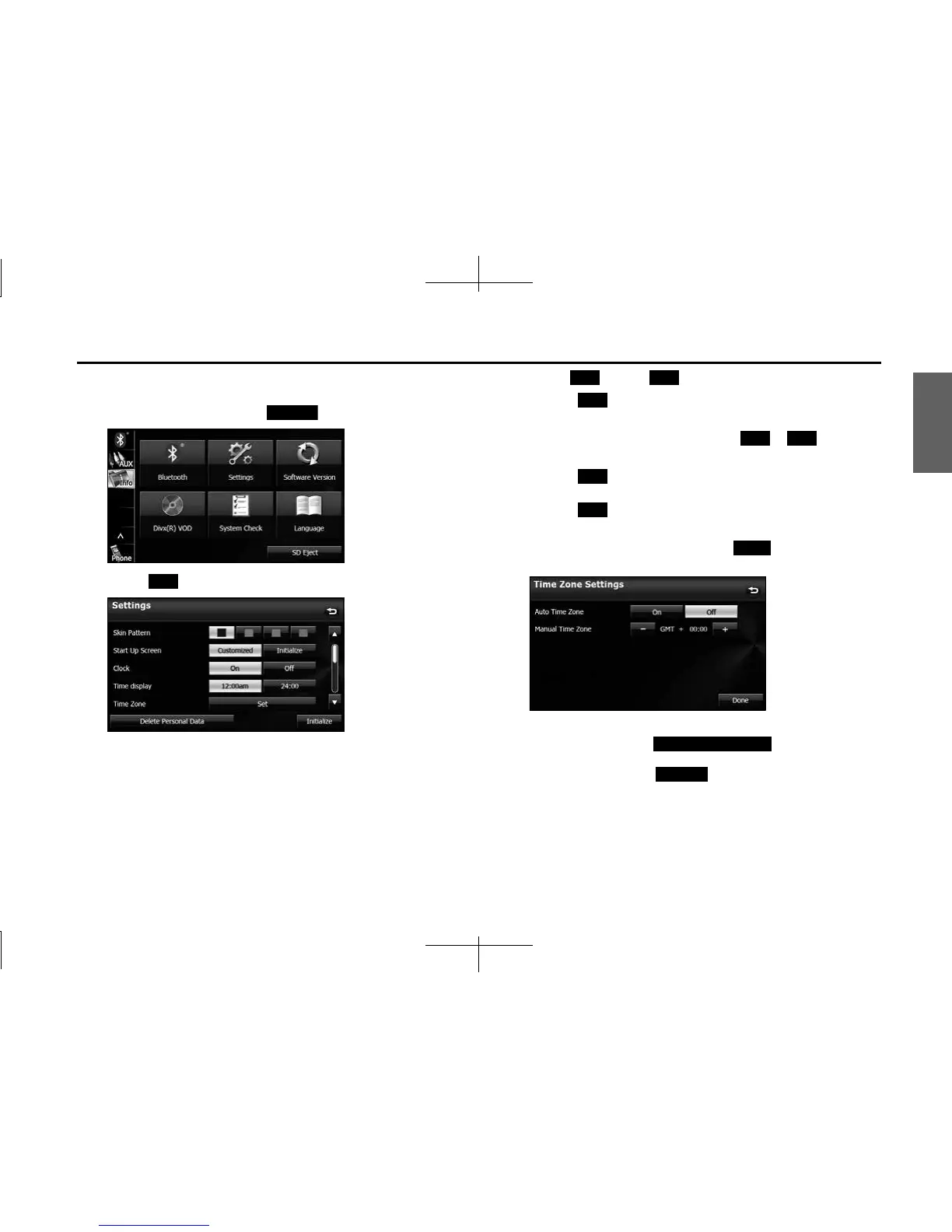
■ Time zone setting
1 On the Info screen, touch (Settings).
2 Touch (Set) in Time Zone.
3 Touch (On) or (Off ) in Auto Time Zone.
• Touch (On) in Auto Time Zone to set the time zone
automatically.
• When Auto Time Zone is “Off”, touch or in Manual
Time Zone to adjust the time zone manually.
• Touch for 1 second or more to raise the time
continuously.
Touch for 1 second or more to lower the time
continuously.
• After configuring the setting, touch (Done) to save the
setting and return to the previous screen.
NOTE
• On the Settings screen, touch (Delete Personal Data)
to initialize your personal data and all settings. (See Page 34.)
• On the Settings screen, touch (Initialize) to return the settings in
the Settings screen to their initial values.
Settings
Set
On O
On
- +
+
-
Done
Delete Personal Data
Initialize














 To Next Page