Introduction 47
Before Use
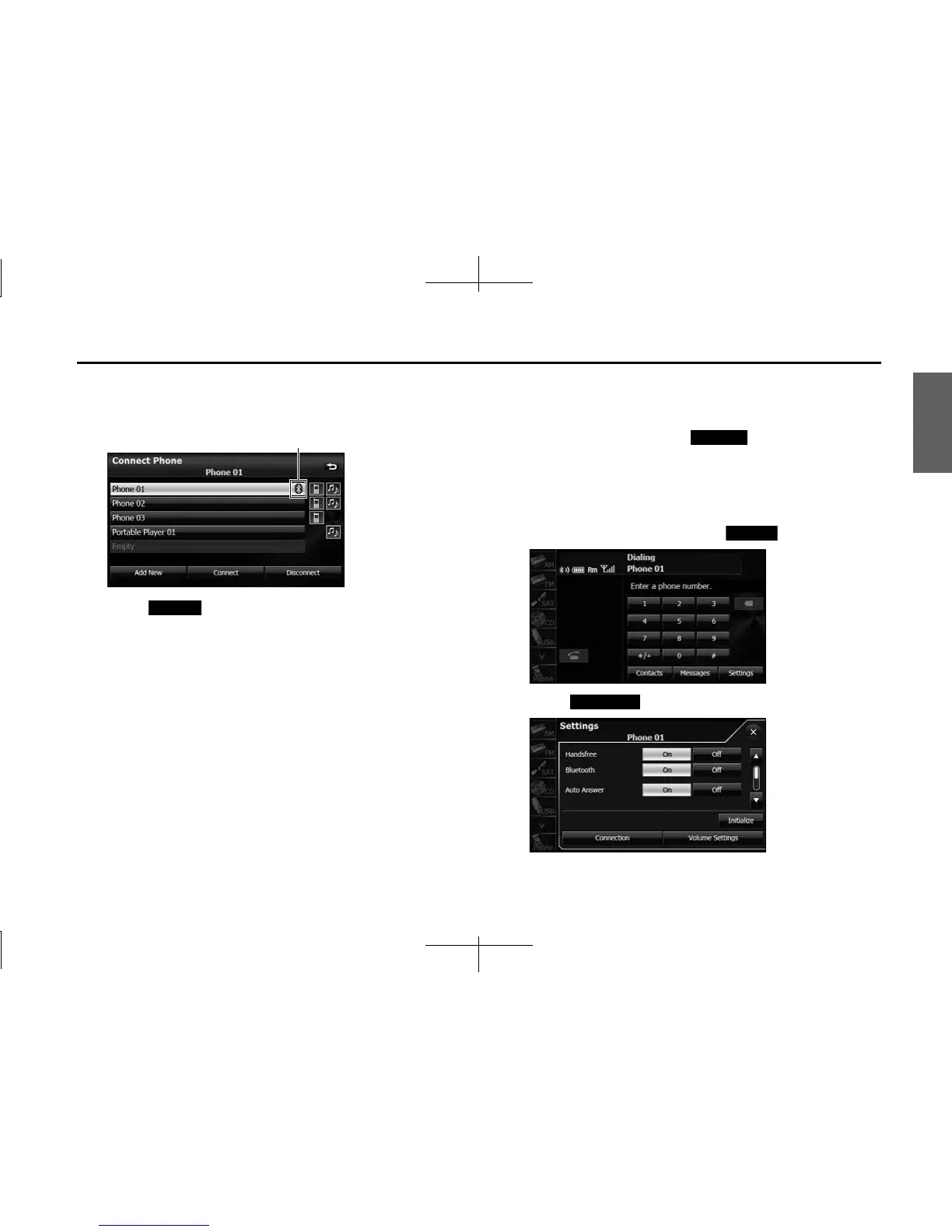
3 Select the cell phone that you want to connect.
• The Bluetooth mark is displayed for cell phones with an active
Bluetooth connection.
4 Touch (Connect).
5 When the connection is complete, “Connection
Completed” appears.
• The connection between the cell phone and the unit is
complete. The Bluetooth signal icon, battery level indicator,
roaming area icon (only when in a roaming area) and reception
indicator appear on the screen.
NOTE
• If the connection fails, “Connection failed” appears on the screen. If this
happens, perform the connection operation again.
• Connection is not possible if no cell phones are registered.
• On the Connect Phone screen, touch (Add New) to register a cell
phone.
• When processing a Bluetooth connection, the Bluetooth Audio may skip.
■ Canceling a cell phone connection
1 On the handsfree screen, touch (Settings).
2 Touch (Connection).
Bluetooth mark
Connect
Add New
Settings
Connection














 To Next Page