16
System and operation
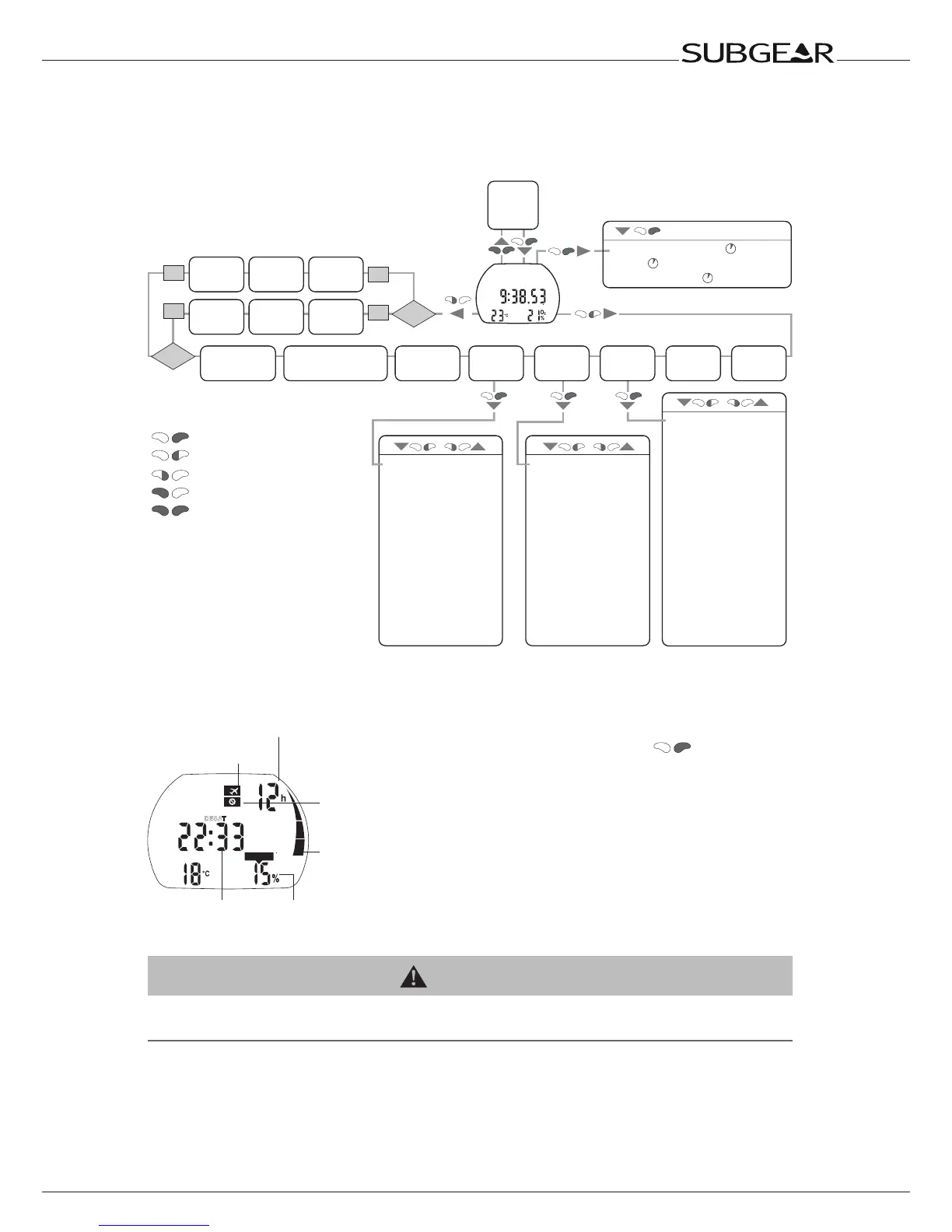
2.2.5 How to navigate Subgear XP-3G at the surface
Starting from the time of day display you can enter into different menus.
“->” means “more information at page”
Enter
/ Scroll/Change
setting
Backlight
Exit
Without operation the display
switches automatically back
to the time of day display and
after 3 minutes the display
switches off.
on
off
CCR
on
off
CCR
/
//
Off
SP1
ppO
2
%
->66
Gas 1
O
2
%
->24
SP2
ppO
2
%
->66
Gas 2
O
2
%
->59
Bail
O
2
%
->68
Gas d
O
2
%
->59
MB Level
L0-L5 ->46
Dive mode selection
(Algo):
deco/gauge/
APNEA
->44
Altitude
adjustment
->84
Set 2
->91
Set 1
->84
Dive
planner
->76
Logbook
->80
Time of day display
•(Desat.timeCNSO
2
% ) ->16
•Date
->17
•Batterycondition
->17
•Alarmclock -
> 92
•UTCtimezone -
> 92
•Timeofday -
> 92
•24h/AMPM -
> 93
•Date -
> 93
•Displaycontrast -
> 94
•IrDAspeed -
> 94
•Soundon/off -
> 94
•ElectronicID -
> 95
•CCRon/off -
> 85
•Depthalarm -
> 85
•Divetimealarm -
> 86
•Safetystopduration -
> 86
•ppO
2
max -
> 86
•Resettoair -
> 86
•Decogason/off -
> 87
•PDIS -
> 87
•Unitsystem -
> 87
•Sait/freshwater -
> 88
•Backlightduration -
> 88
•Attentionbeepon/off -> 89
•Watercontactson/off -> 90
•Resetdesaturation -
> 90
•DualDepthalarm ->96
•Incrementaldepth
alarm ->96
•Divetimeinterval
warning ->97
•Surfaceinterval
warning ->97
•Ascentspeedalarm ->98
•Waterdensity ->98
Set 3
->91
(Apnea)
2.2.6 Checking the desaturation time
Do not fly icon
No-fly time
No-dive
warning
Residual
nitrogen
bar
Oxygen toxicity
Desaturation time
From the time of day display you can check the
desaturation time* by pushing
. Desaturation
time is determined either by oxygen toxicity,
nitrogen saturation or the regression of
microbubbles, depending on which requires the
longer time.
The display switches back to the time of day
display after 5 seconds without operation.
* Only displayed if there is a remaining saturation
due to the last dive or change of altitude.
WARNING
For the calculations of the desaturation and no-y time it is assumed that the diver breathes air while
on the surface.



 To Next Page