77
Dive planner
English
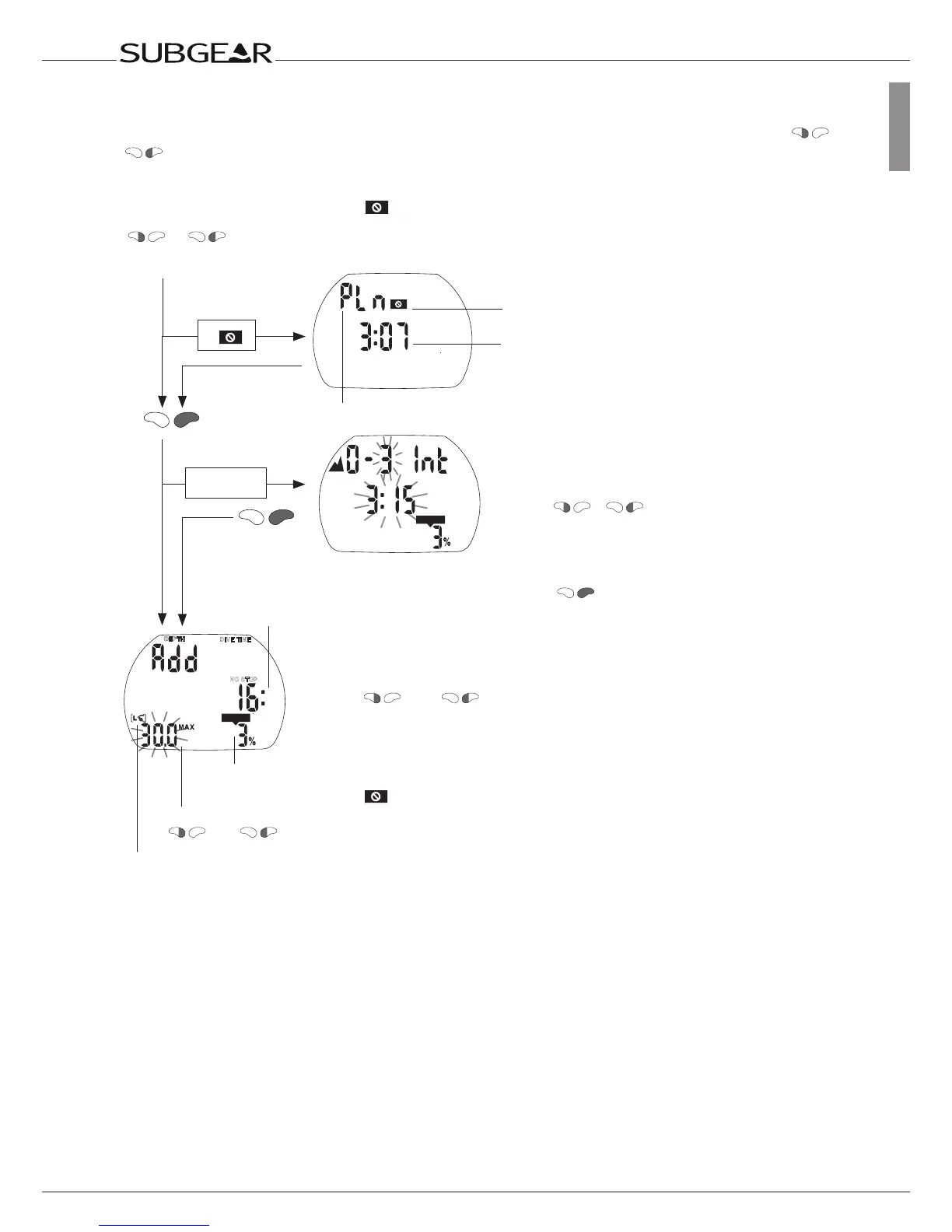
9.1 Planning a no-stop dive
To select the dive planner Subgear XP-3G must be in user mode (time of day display). Push or
until the symbol for the dive planner PLn appears. (The dive planner cannot be selected in gauge
mode.)
Input of the surface interval by
pushing /
Dive planner symbol
Select dive planner
or
until PLn
if
if rep. dive
CNS O
2
%
Theno-divewarninganditsdurationaredisplayed
ifSubgearXP-3Gdetectsanincreasedriskdueto
theaccumulationofmicrobubbles.
Enter the dive planner with
.
The input window for the time interval is displayed if there
was a remaining desaturation (DESAT) before the dive
planner has been selected. This surface interval between
now and the beginning of the dive can be changed with
and in steps of 15 minutes. Subgear XP-3G
displays the CNS O
2
% value and the altitude section to
which you may not rise at the end of the selected surface
interval.
Iftheno-divewarninganditsdurationhasbeen
displayed,SubgearXP-3Gproposesthistime–
roundeduptothenext15minutes–assurface
interval.Iftheproposedintervalisshortened,the
no-divewarningappears.



 To Next Page