64
Diving with 2 or 3 gas mixtures
Changing the gas mixture
S
L
O
W
NO
DEPTH
DIVE TIME
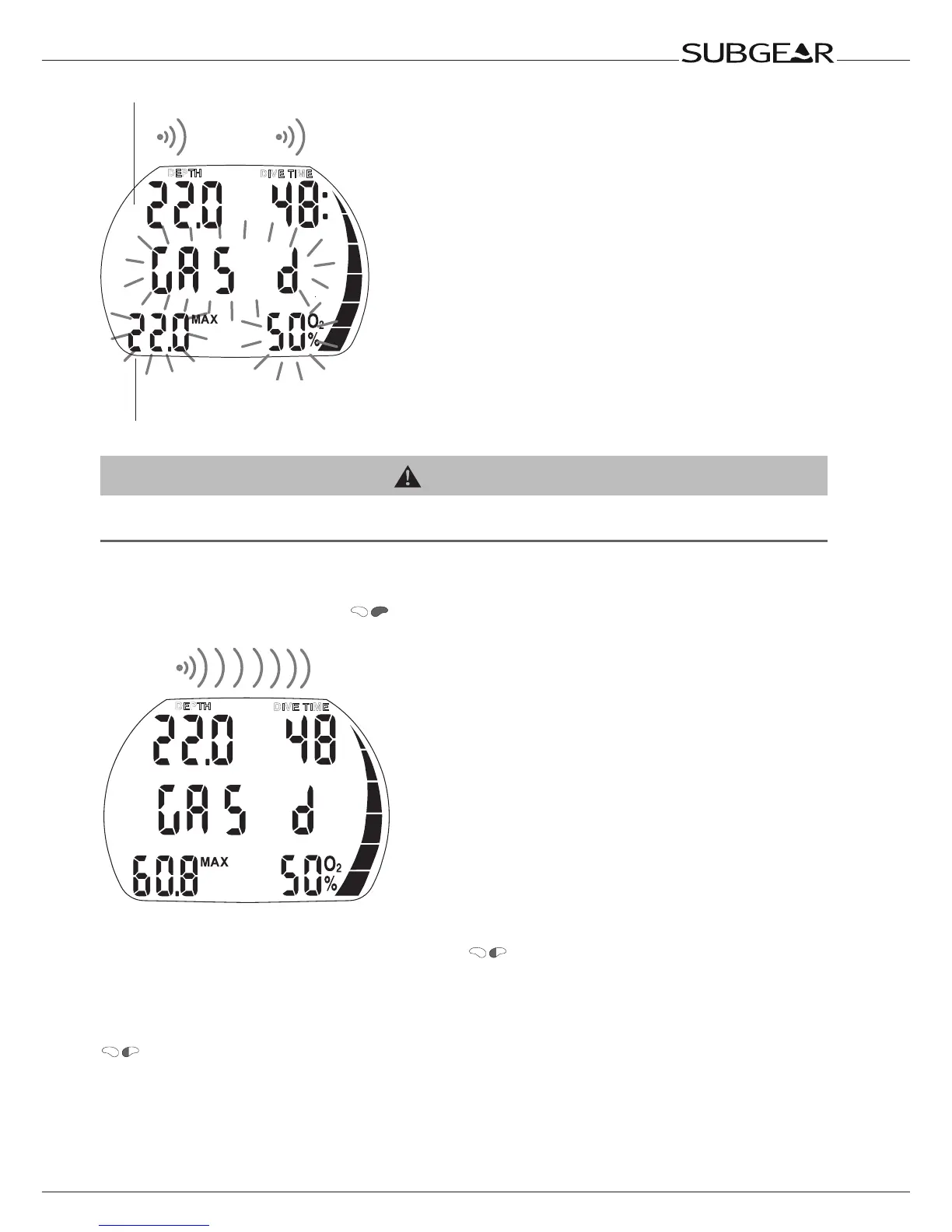
Switch depth
Switch to gas d
4s
MOD gas d
After immersion, Subgear XP-3G automatically selects gas 1.
WARNING
Whenduringanascentaswitchdepthisreached(MODgas2orgasd),anaudiblewarninggoesoffand“GAS2”
/“GASd”,itsMODandO2%blinkfor30seconds.
Procedure:
1. Switch to the regulator with gas 2 / gas d and start breathing.
2. Confirm the change by pressing
within 30 seconds. “GAS 2” / “GAS d” and the oxygen
fraction of gas 2 / gas d is displayed for 5 seconds without blinking.
S
L
O
W
NO
DEPTH
DIVE TIME
Change to gas d confirmed
To interrupt the switch process at any point, press so many times until the original gas is again
active; or do not confirm the gas change process.
No change of gas mixture:
If a diver fails to confirm the change of gas mixture or interrupts the switching procedure by pressing
, Subgear XP-3G displays “GAS 1” / “GAS 2”, the MOD and the oxygen fraction for 5 seconds.
Subgear XP-3G continues to calculate with gas 1 / gas 2 only and adapts the decompression calculation
accordingly.



 To Next Page