User Manual 6 Electrical Connection
21
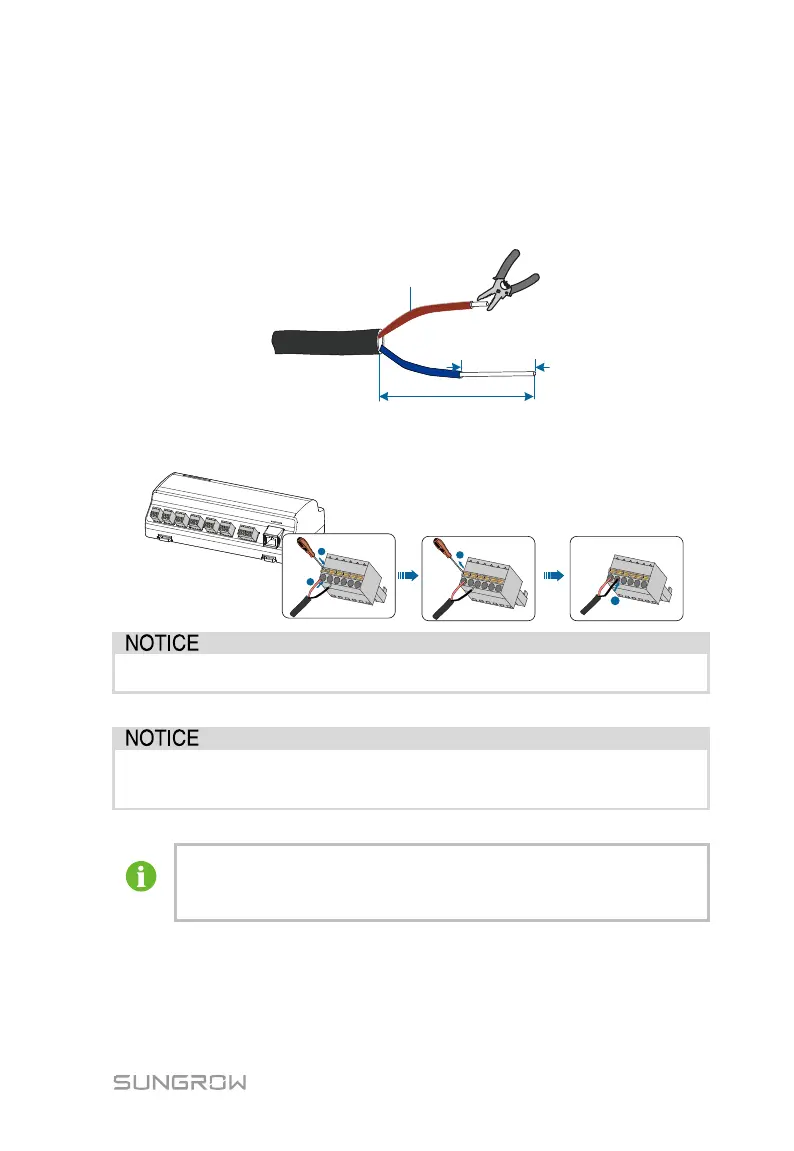
Cable connection procedure:
Step 1 Lead the RS485 communication cable from the inverter to the wiring area of
Logger1000.
Step 2 Strip the cable jacket and insulation layer with a wire stripper by about
15mm and 8mm to 10mm respectively.
0.75 mm
2
1.5 mm
2
15mm
8
~
10mm
~
Step 3 Connect the stripped cable to the RS485 ports of the Logger1000, as shown
in the figure below.
RS485A is connected to port A while RS485B is connected to port B.
The RS485 communication cable must be the shielded twisted pair with
the shielding layer single-point grounded.
When a multi-core multi-strand copper wire cable is used, crimp an
appropriate euro style terminal at the communication cable head and
then connect it to the RS485 port of the Logger1000.
Step 4 Connect the Logger1000 to the inverter.



 To Next Page