User Manual 9 Grid Dispatching Function
61
Step 4 After finishing parameter setting, click "Save" to save the operation.
Local power control
If reactive dispatching instruction or dispatching target value is used as dispatching
input locally, the reactive control mode is set to "Local power control".
Step 1 Click "Power control" -> "Reactive power" to enter the reactive power
interface.
Step 2 Set the "Reactive control mode" to "Local power control".
Step 3 Set local dispatching parameters. For specific parameter description, refer to
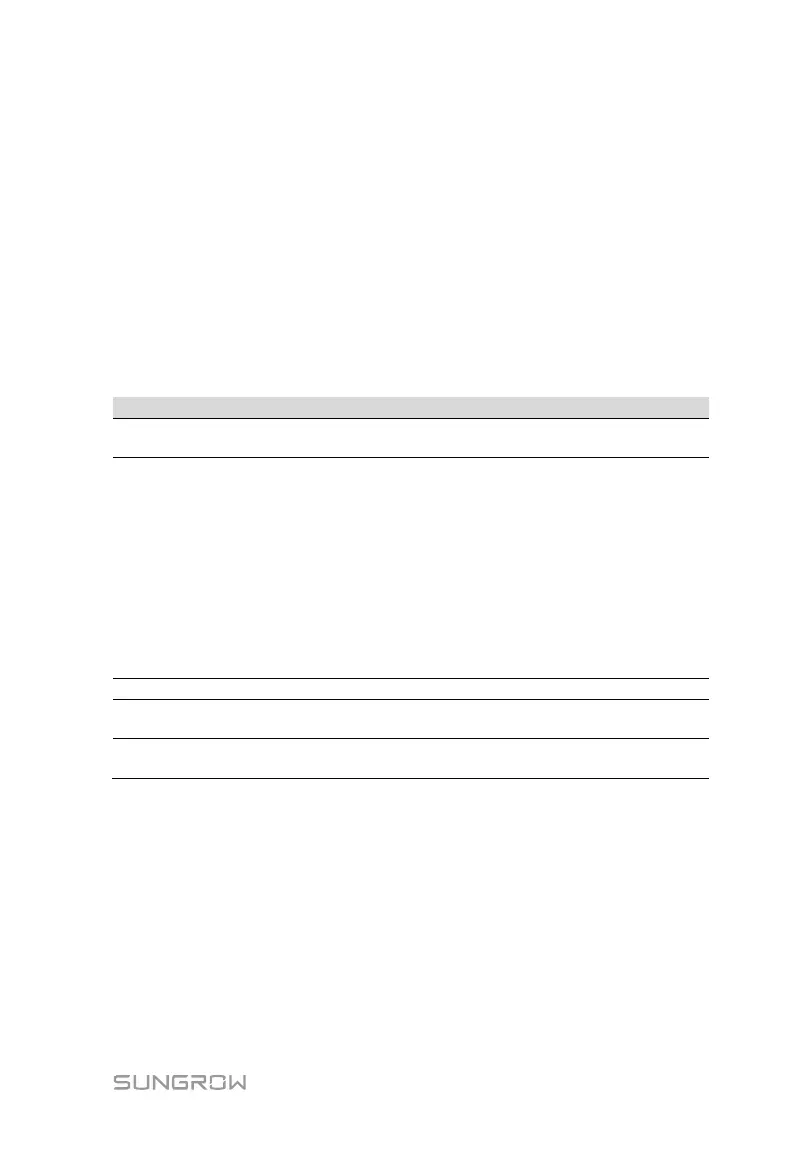
the following Tab. 9-8.
Tab. 9-8 arameter description
Communication
abnormality output (%)
Communication is abnormal, and specified dispatch
output value is delivered.
Control method
Open loop control:At the start time, the locally configured
active instruction is sent to the power output port of the
inverter, thereby implementing reactive power control.
Closed-loop control: A
t the beginning time, reactive
instruction configured locally is used as target value,
reactive power and power factor of the meter need to be
collected and used as input parameters, and reactive
power compensation ratio is calculated and sent to power
output port of the inverter. Generally, this strategy is used
for improving the power factor of the property boundary
point.
Select energy meter involved in power regulation
Control cycle
Time interval of delivering dispatching instructions
Parameter range: 5~60s
Q-Method
PF: set the power factor as the target value
%: set reactive power percentage.
Note: *Only when the control method is set to "Closed-loop control", the parameter
"Select energy meter" is settable.
Step 4 Add local power control manner
Fill in "Start time" and "Percentage"(PF), and click "Save".
Subsequent operation
Delete local power control manner: select a local power control manner that needs
to be deleted, and click "Clear data".



 To Next Page