24
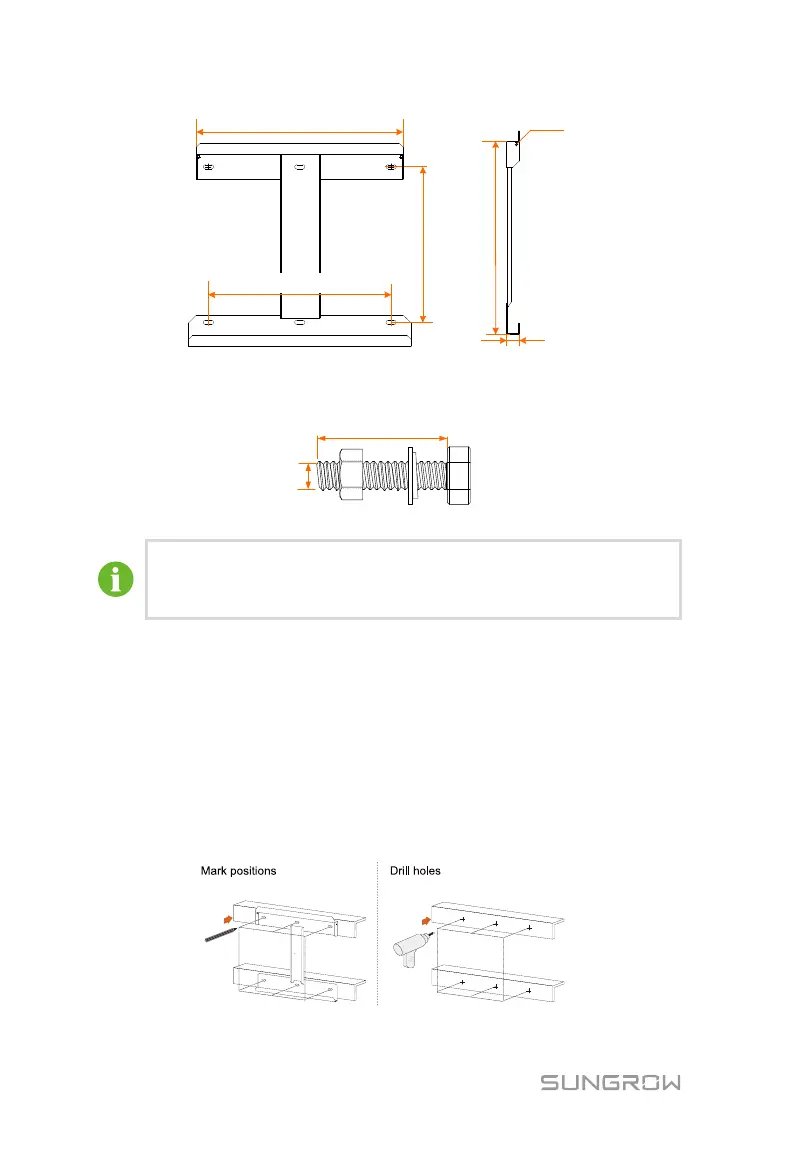
447mm/17.60in
391mm/15.40in
311mm/12.24in
2-M4×10
495.5mm/19.51in
32mm/1.26in
Fig. 5-1 Dimensions of the bracket (figures in inch)
The stainless fasteners are supplied for attaching the bracket to metal frame.
Fig. 5-2 Dimensions of fastener for metal frame (figures in mm)
To install the PCS to concrete walls, the user needs to purchase
expansion bolts with proper size (recommended: M10*65) to attach
the bracket to concrete walls.
5.4.1 Installing to Metal Frame
Step 1 Remove the bracket and fasteners from the packaging.
Step 2 Place the bracket to the chosen metal frame and adjust it to proper
position and height.
Step 3 Mark the position for holes, drilling according to the hole positions of the
bracket.
Step 4 Drill holes according to the marks made before. If the shape of the metal
frame does not match the bracket, re-drill holes on the bracket according
to the metal frame.
Step 5 Secure the bracket to the metal frame firmly with the supplied fastener.


 To Next Page