17
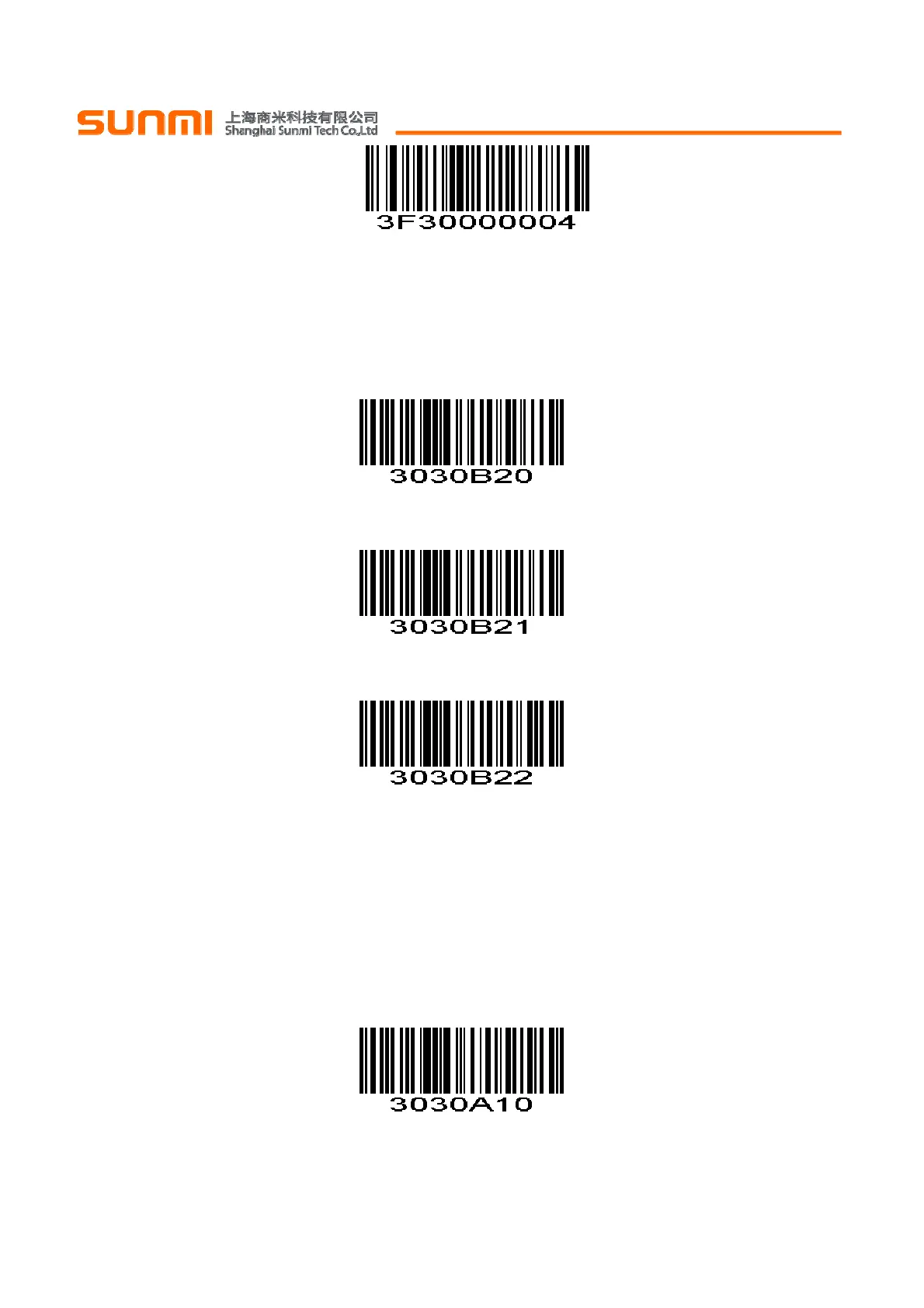
For example:
Time interval: 100ms
First scan the setting code above,then scan ‘0’, ‘2’, ‘0’ numeric barcodes in order.
如:
设置输出时间间隔为:100ms
先扫描键盘输出字符时间间隔设置码,再按顺序扫描数字设置码 0、2、0。
Quick Settings of Keyboard Output Time Interval 键盘输出时间间隔快速设置
0ms
(0x00)
10ms
(0x01)
50ms
(0x02)
Letter case conversion 键盘输出强制字母大小写转换
If set to "Case Inversion", the uppercase of the output data will be lowercase, lowercase letters will be
uppercase; If set to "all uppercase", regardless of whether the letters in the output data are uppercase or
lowercase, all converted to uppercase letters; If set to "all lowercase", regardless of whether the letters in the
output data is uppercase or lowercase, all converted to lowercase letters.
若设置为“大小写反转”,则输出数据中大写字母将变为小写,小写字母变为大写;若设置为“全为大写”,则
无论输出数据中字母是大写还是小写,全部转换为大写字母;若设置为“全为小写”,则无论输出数据中字母是大
写还是小写,全部转换为小写字母。
*Normal Letter Case *字母大小正常
(0x00)


 To Next Page