26
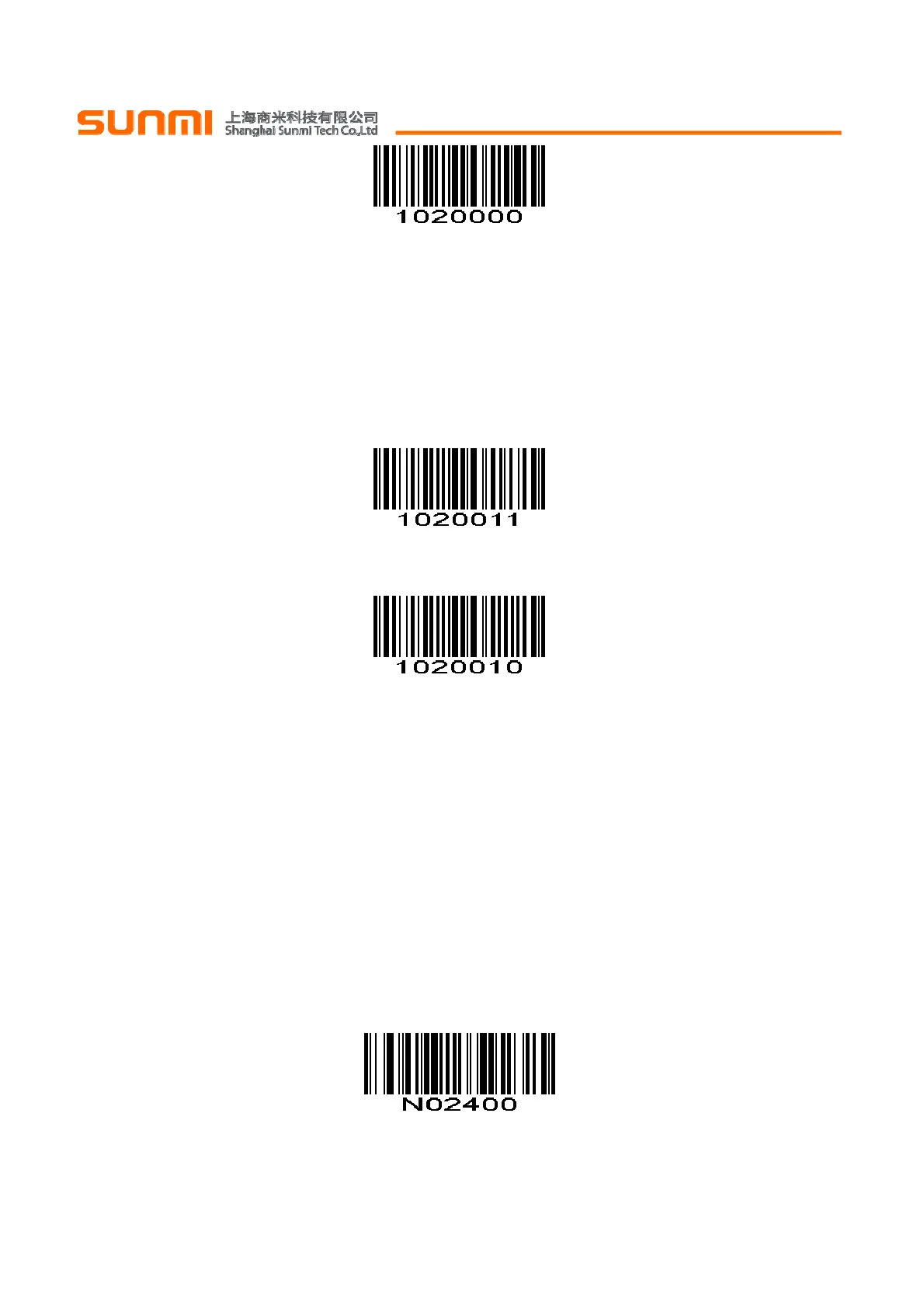
*Do Not Convert UPC-E to UPC-A
不转换Convert UPC-E 为 UPC-A
(0x00)
EAN-8 Zero Extend EAN-8 零扩展
When enabled, this parameter adds five leading zeros to decoded EAN-8 symbols to make them
compatible in format to EAN-13 symbols.
Disable this parameter to transmit EAN-8 symbols as is.
当使能此参数时,此参数加5个前置0解码EAN-8使其兼容EAN-13的格式。
禁止此参数时,传输EAN-8码制
Enable EAN-8 Zero Extend 使能EAN-8零扩展
(0x01)
*Disable EAN-8 Zero Extend 禁止EAN-8零扩展
(0x00)
Bookland ISBN Format Bookland ISBN 格式
If you enabled Bookland EAN using Enable/Disable Bookland EAN , select one of the following formats
for Bookland data:
Bookland ISBN-10 - The scan engine reports Bookland data starting with 978 in traditional 10-digit
format with the special Bookland check digit for backward-compatibility. Data starting with 979 is not
considered Bookland in this mode.
Bookland ISBN-13 - The scan engine reports Bookland data (starting with either 978 or 979) as
EAN-13 in 13-digit format to meet the 2007 ISBN-13 protocol.
如果通过
使能
/
禁止
Bookland EAN 使能 Bookland EAN,选择下列格式的 Bookland 数据之一:
Bookland ISBN-10 -识读引擎报告的 Bookland 数据具有向后兼容性,此数据是带有特殊 Bookland 校验
位的具有以 978 传统 10 位格式开头的数据。开始为 979 的数据不在 Bookland 此模式。
Bookland ISBN-13 - 识读引擎报告的 Bookland 数据(从 978 或 979)为 13 位格式的 EAN-13,以满足
2007 年的 ISBN-13 的协议。
*Bookland ISBN-10
(0x00)


 To Next Page