6.8 Relay 2
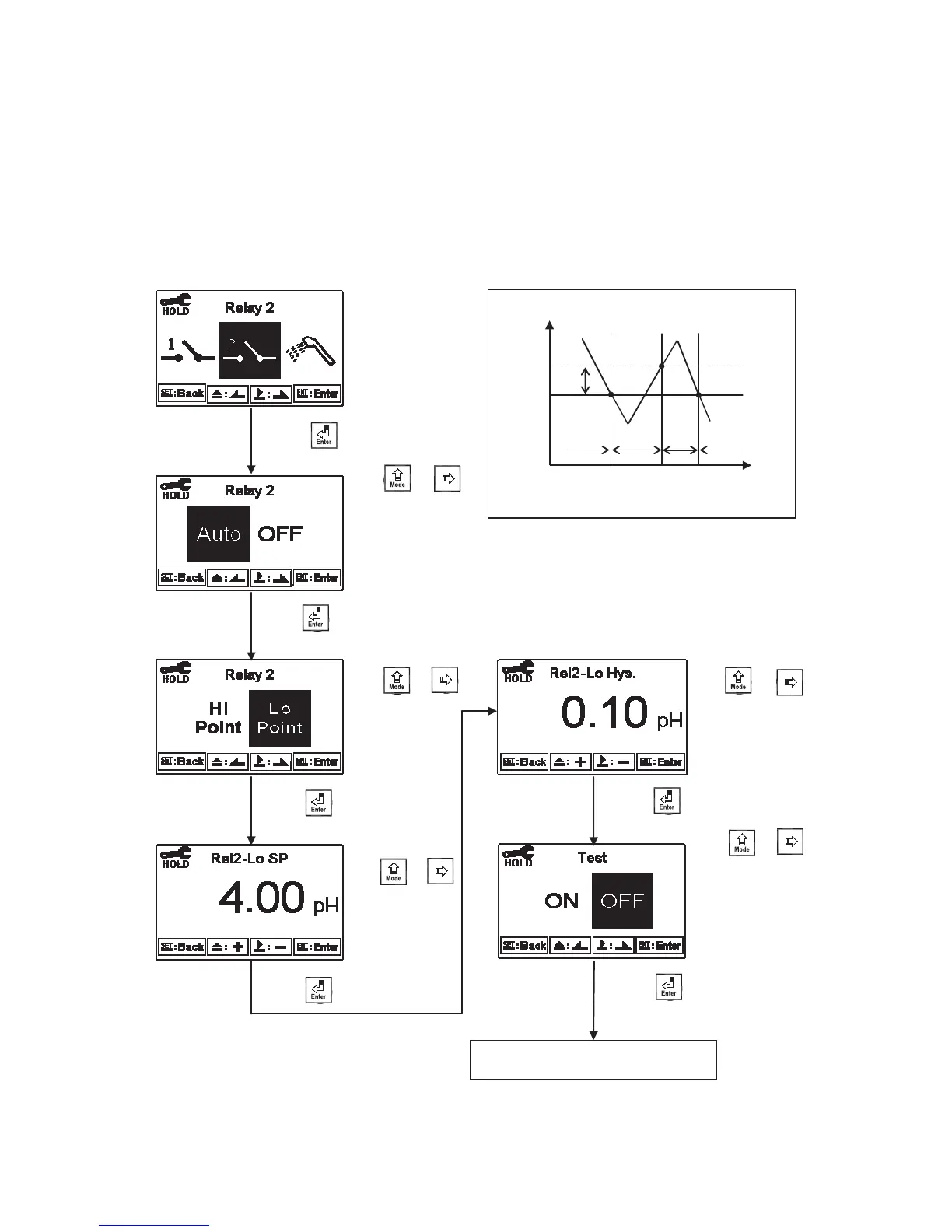
Enter setup of Relay 2. Select the item to turn on or turn of the relay 2 function. If you select to turn
on the relay 2, then select for using relay 2 as “High set-point” alarm or “Low set-point” alarm. Set
the value of set-point (SP) and Hysteresis (Hys.). The relationship between parameters can refer to
an explanatory diagram of the box (as a low point alarm).
Low Point Alarm Control
off
SP
Hys
pH
t (sec)
off
on
on
Enter “Clean” Setup
Press ġ or
to select to activate
REL2 or not. If
not, the guide
menu goes to setup
of clean.
Press to confirm it.
Press to confirm it.
Press ġ
or
to select use REL2
as Hi point or Lo
point alarm.
Press to confirm it.
Press or
to adjust set-point
(SP) value
Press to confirm it.
Press or
to adjust Hysteresis
(Hys.) value
Press to confirm it.
Press to confirm it.
Press ġ or to
select to activate a test of
REL2 or not. If “ON”, the
relay 2 is in action, and
the “ACT” indication
light will light up.
мй


 To Next Page