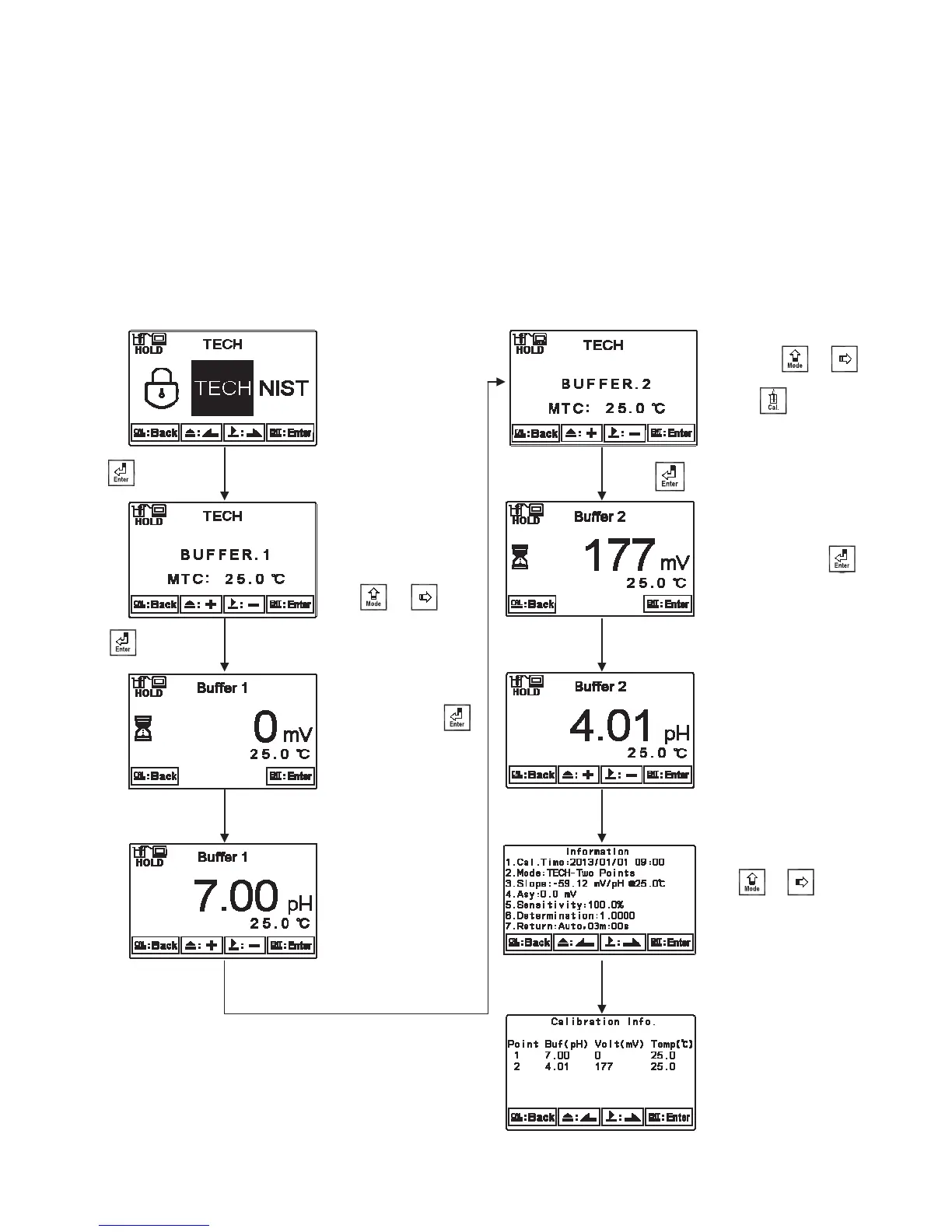
7.3.5 TECH, NIST buffer Calibration
The procedure below is two points calibration of TECH buffer. (The procedure is same as
NIST buffer mode.) First, enter the setup of Multi-points calibration and set the number of
calibration point for 2. (See chapter 6.5 Multi-Cal) Then, go to Calibration menu and select
TECH mode. Operate the instrument as following procedure diagram. For three points calibration,
it also needs to set 3 points in the Multi-Cal setting in advance, and the calibration procedure is
the same.
Press to confirm it.
Press or to
change the page of
calibration result display
Clean the electrode by
distilled water and then put
it into the second buffer.
If under MTC temperature
mode, pressġ or ġġ
to adjust temperature value.ġ
Or press to decide to
simply make a single point
calibration.
The instrument
measures the mV value
of the buffers. Press
to directly shows the
determination result, or
wait and read for the
result by automatic
display.
Clean the electrode by
distilled water and then
put it into the first
buffer. If under MTC
(Manual Temp.
Compensation)
temperature mode,
pressġ or ġġ
to adjust temperature
value.
Press to confirm it.
Obtain the pH value of
first point buffer
solution.
Obtain the pH value of
second point buffer
solution.
The instrument
measures the mV value
of the buffers. Press
to directly shows the
determination result, or
wait and read for the
result by automatic
display.
Press to confirm it.
нн


 To Next Page