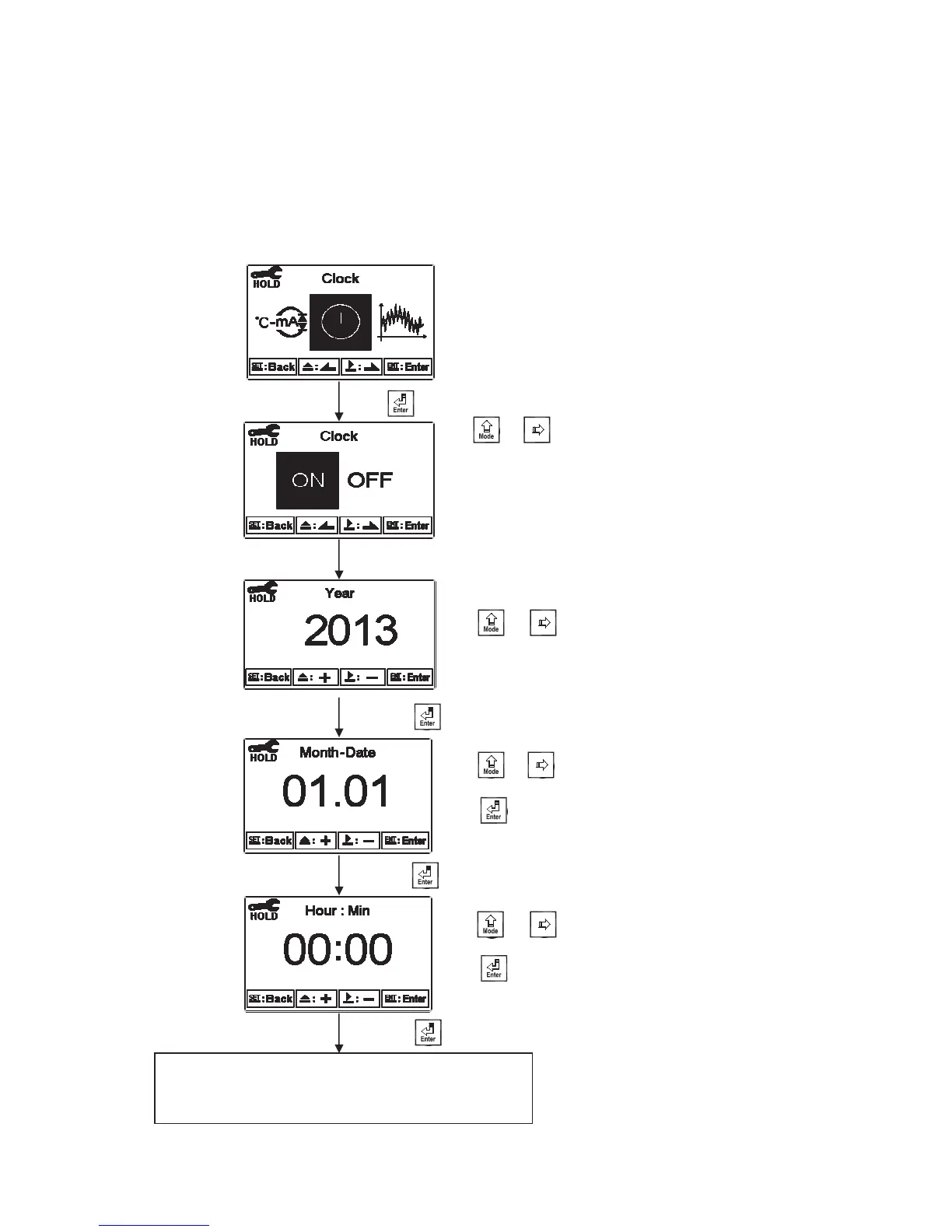
6.12 Date/Time(Clock)
Enter setup of Date/Time(Clock). Set the “Year”, “Month”, “Date”, “Hour”, and “Minute” time. If
you select to turn off the clock function, there will not display clock under measurement mode. The
calibration time of calibration record will also show ”OFF” under calibration overview display.
Note: The clock needs to be reset once encounters power failure.
Enter “ Sample average of measurements
(Digital Filter) ” Setup
Press to confirm it.
Press or to
set the hour part, and
press to move to
adjust the minute part.
Press or to
set the month part, and
press to move to
adjust the date part.
Press or to
set the year.
Press to confirm it.
Press to confirm it.
Press to confirm it.
Press ġ or
to select to activate
Clock function or
not. If not, the
guide menu goes to
setup of Digital
filter.


 To Next Page