Istruction Manual for Operation and Maintenance SPX-960:
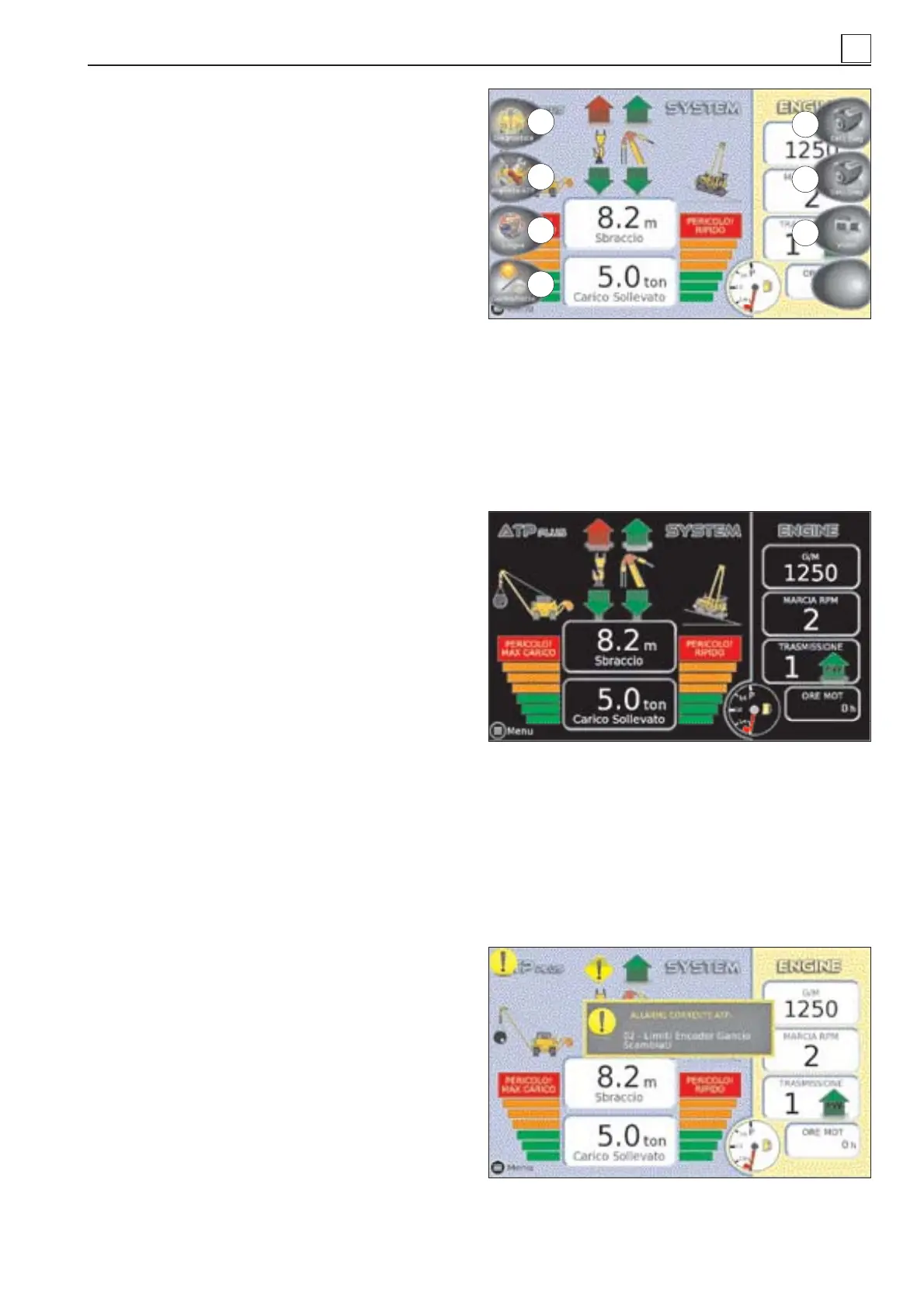
Screen-shot 5. Function keys (pushing Menù
button).
The terminal features eight keys which are
located on the page sides and are asso-
ciated to as many functions.
Pressing of the fi rst key at the bottom left
(Menu, under colored bars) gives access
to a page where the associated functions
are described.
1) Diagnostic: shows a sequence of pos-
sible malfunctions/faults in the lifting sy-
stem.
2) ATB/ATP setup: calls up the setup pa-
ges of the lifting system.
3) Language: selects the language and
the corresponding units of measure.
4) Day/night: changes the colors of the
display for use at night/during the day.
5) DM1 Diag: shows the active alarms
specifi c for the engine. Red = serious mal-
function/fault; Yellow = alert.
6) DM2 Diag: requests the table of dia-
gnostic inactive codes stored in the engine
ECU.
7) Video: shows the image captured by the
camera installed at the back (optional).
Screen-shot 6. Night display.
Screen-shot 7. Error/fault messages specifi c to
lifting system.
A popup window with a message appears
on screen whenever a setup fault/malfun-
ction or error occurs. The message disap-
pears spontaneously after a few seconds,
and on screen a yellow round icon remains
to indicate that alarms are active.
Error/fault messages specifi c to engi-
ne.
A popup window appears on screen whene-
ver an alert triggers or faults/malfunctions/
errors occur. Alerts are yellow in color and
serious malfunctions are red. Press the
key DM1 Diag to view the message (ACK)
and iconize the window. Further pressing
of the key calls back the message(s) rela-
ting to the active alarm.
Key DM2 Diag is pressed to call up inac-
tive alarms which are stored in the engine
ECU. Alarms are listed in a table showing
the SPN / FMI, a description of the alarm
and the number of times that it has occur-
red.
Screen 5: function keys
Screen 6: night display
Screen 7: error/fault messages specifi c to lifting
system
1
2
3
4
5
6
7
4
4-17
MACHINE OPERATION


 To Next Page