Istruction Manual for Operation and Maintenance SPX-960:
4.3.4 OPTIONAL VISIO TERMINAL
FEATURES
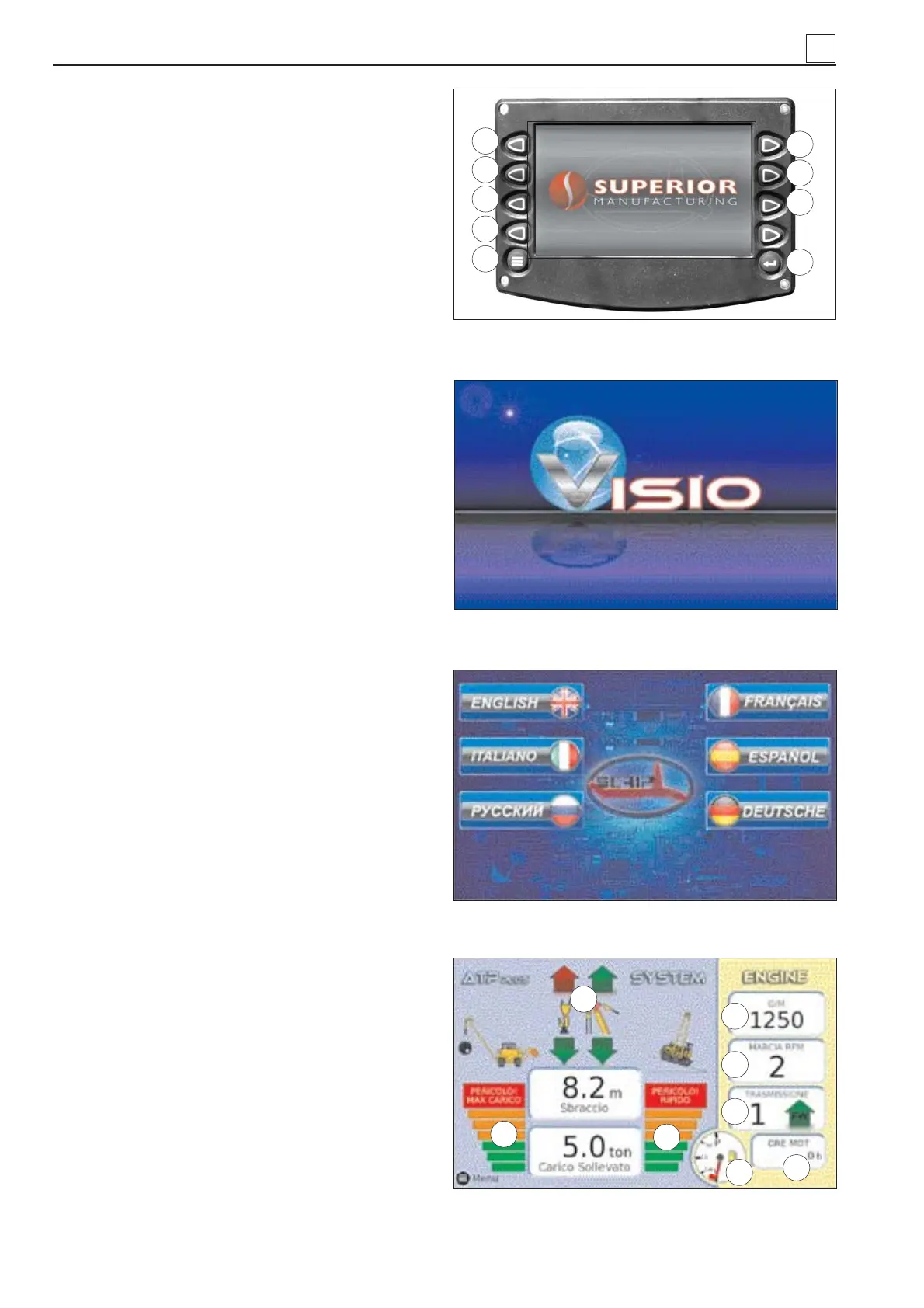
Following the screen-shot of Visio monitor with re-
lated functions ( after turn-on starter key) that could
be selected by the ten side button:
Button 1: Diagnostic: shows a sequence of pos-
sible malfunctions/faults in the lifting sy-
stem.
Button 2: ATB/ATP setup: calls up the setup pages
of the lifting system.
Button 3: Language: selects the language and the
corresponding units of measure.
Button 4: Day/night: changes the colors of the di-
splay for use at night/during the day.
Button 5: DM1 Diag: shows the active alarms spe-
cifi c for the engine. Red = serious mal-
function/fault; Yellow = alert.
Button 6: DM2 Diag: requests the table of diagno-
stic inactive codes stored in the engine
ECU.
Button 7: Video: shows the image captured by the
camera installed at the back (optional).
Button 8: Menù
Button 9: Exit
Screen-shot 1. Starting engine.
Screen-shot 2. Display
Screen-shot 3. Language choice (only for fi rst
start).
Screen-shot 4. ATP Display.
1) The color of the arrow has the fol-
lowing meaning:
- GREEN = enabled movement;
- RED = blocked movement.
2) The color of the bars has the fol-
lowing meaning:
- GREEN = normal load;
- ORANGE = alert;
- RED = overload (max. load) (hook up
and boom down movements blocked).
3) The color of the bars has the fol-
lowing meaning:
- GREEN = normal gradient;
- ORANGE = alert;
- RED = steep (max. gradient of longitudi-
nal axis) (hook up and boom down move-
ments blocked)
4) Engine rotation speed.
5) Engine speed range.
6) Gear ratio and travel direction
7) Engine hour meter
8) Fuel level
4
Screen 1: machine switch-on
Screen 2: display
Screen 3: choise of language
Screen 4: ATP display
5
4
6
8
7
2
3
1
4
3
2
1
8
7
6
5
9
4-16
MACHINE OPERATION


 To Next Page