Istruction Manual for Operation and Maintenance SPX-960:
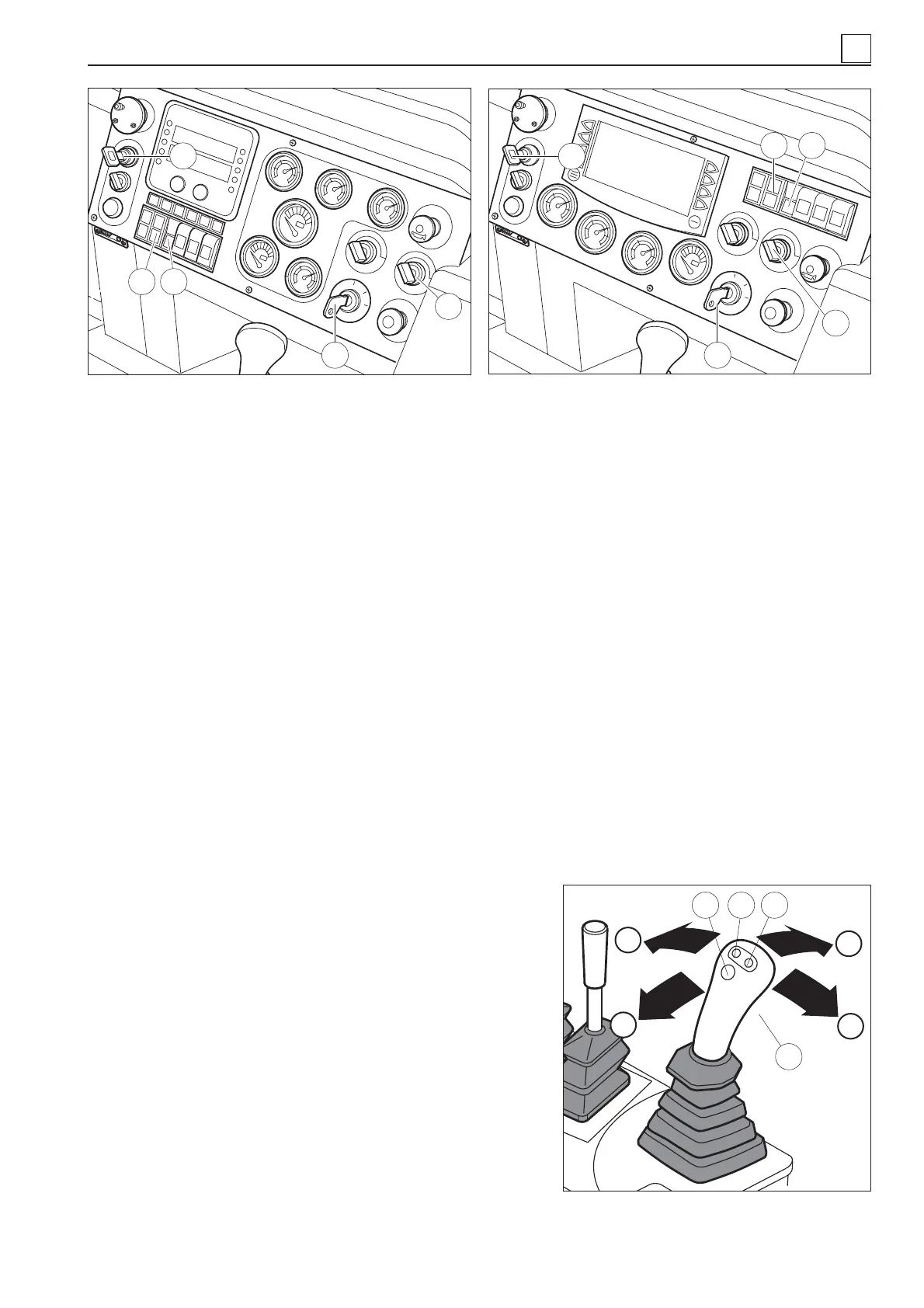
6) Energize the engine by pressing the throttle button (14 in Fig. 41/A/B). The button is used to decelerate.
This operation brings the hydraulic lifting system at working speed.
7) Put in the key of the master switch of the anti-tipping system (35 in Fig. 41/A/B). This operation engages
the anti-tipping system.
8)
Ruotare
in senso anti-orario
il selettore del freno di parcheggio (19 Fig. 41/A/B), deve risultare in posi-
zione libera.
4.4.2 PIPE LAYER CONTROLS
After the operations described above, the machine is ready for operation.
To control the pipe layer movements, operate the multiple function drive joystick (Fig. 42) located on the
left-hand side of the operator seat.
Set the operating speed by pressing one of the 4 buttons on the joystick:
- button 5 (Fig. 44) sets 900 rpm;
- button 6 (Fig. 44) sets 1300 rpm;
- button 7 (Fig. 44) sets 1800 rpm;
- button 4 (Fig. 44) sets 2100 rpm.
The joystick features other two buttons which are used for
fi ne-tuning the number of rpms:
- press the button (14 in Fig. 40/A/B) to progressively incre-
ase/reduce the engine revolutions (rpm);
- Push the joystick to “A” to let the pipe layer move forward.
- Pull the joystick to “B” to let the pipe layer move backward.
- Push the joystick to “C” to let the pipe layer turn left.
- Pull the joystick to “E” to let the pipe layer turn right.
4
4-23
Fig. 41/A – Controls featured in ATP Plus version
(STANDARD)
Fig. 41/B – Controls featured in ATP Plus version
with terminal (OPTION)
6
8
19
14
8 14
35
35
6
19
Fig. 42
C
A
B
E
654
7
➤
MACHINE OPERATION


 To Next Page