Chapter 2: Installation
2-7
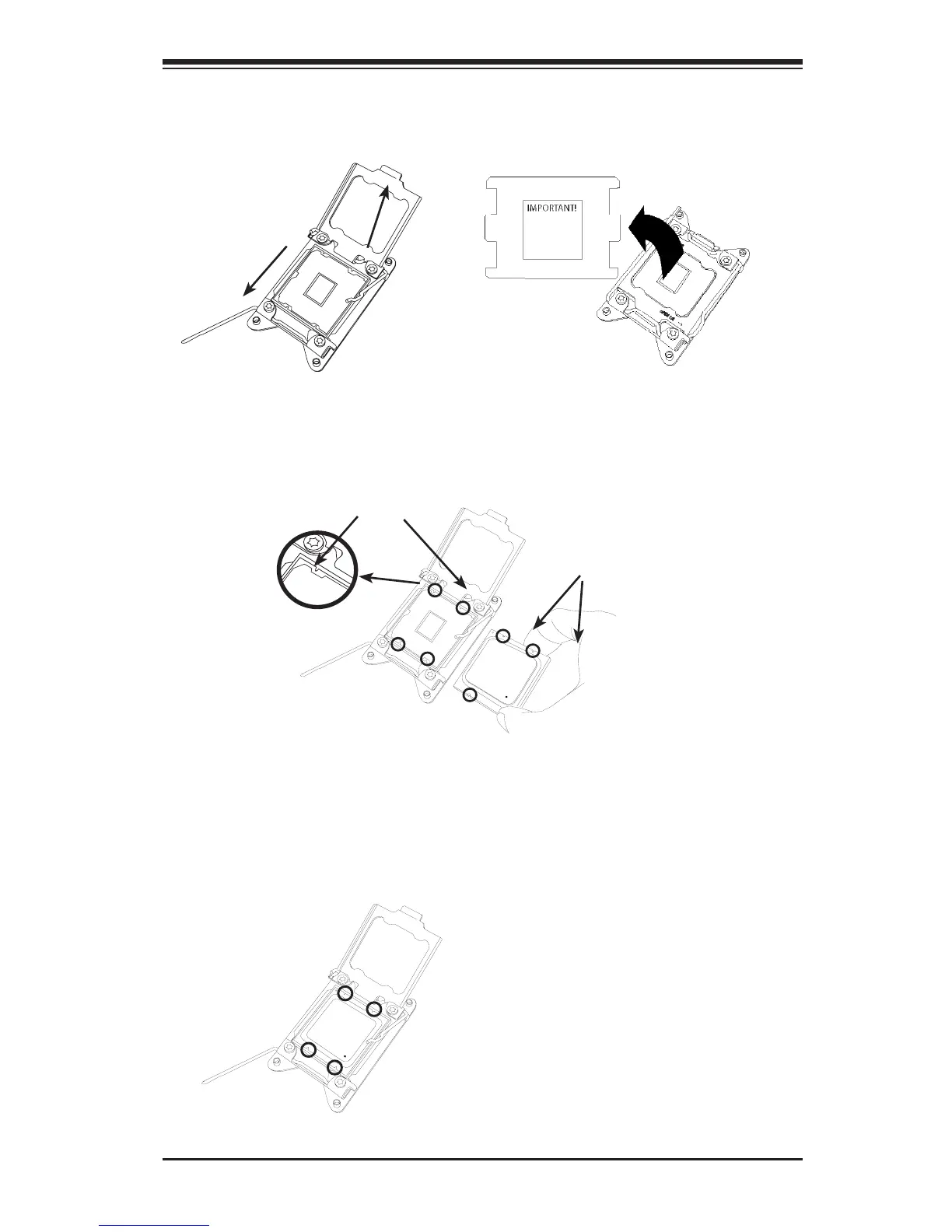
4. Using your thumb and the index nger, remove the 'WARNING' plastic cap
from the socket.
5. Use your thumb and index nger to hold the CPU on its edges. Align the CPU
keys, which are semi-circle cutouts, against the socket keys.
6. Once they are aligned, carefully lower the CPU straight down into the socket.
(Do not drop the CPU on the socket. Do not move the CPU horizontally or
vertically. Do not rub the CPU against the surface or against any pins of the
socket to avoid damaging the CPU or the socket.)
Warning: You can only install the
CPU inside the socket in one direc-
tion. Make sure that it is properly
inserted into the CPU socket before
closing the load plate. If it doesn't
close properly, do not force it as it
may damage your CPU. Instead,
open the load plate again and dou-
ble-check to ensure that the CPU is
aligned properly.
Socket Keys
CPU Keys




 To Next Page