MPC-385 SERIES OPERATION MANUAL – REV. 3.21K (20201120)
MANIPULATOR: The MANIPULATOR Selector toggles the active manipulator. Both an
LED and the named manipulator on the ROE display change to signify which manipulator is
active. When the MANIPULATOR A output is selected, LED 1 will light, and the display will
say “Drive A” in the upper right-hand corne r. When the MANIPULATOR B output is
selected, LED 2 will light, and the display will say “Drive B”.
The status of a manipulator is preserved when you toggle to the other manipulator. Status
includes the current position, current MODE (speed) setting, whether you are in diagonal or
orthogonal movement, and whether the manipulator is currently locked. In addition, a
separate WORK POS is maintained for each manipulator in use.
A separate set of DIP switches is present on the back of the controller for controlling setup of
the two different manipulator outputs (see Controls on the MPC-200).
You can also configure how the MANIPULATOR Selector operates. The selector can function
as a two position toggle, where pressing the left side of the toggle selects Manipulator 1 and
pressing the right side of the toggle selects Manipulator 2, or the selector can function in a
cyclical fashion, pressing once on either side selects the other manipulator or pressing twice
reselects the manipulator you are already on. Selection method is determined by DIP switch
3 on the back of the ROE.
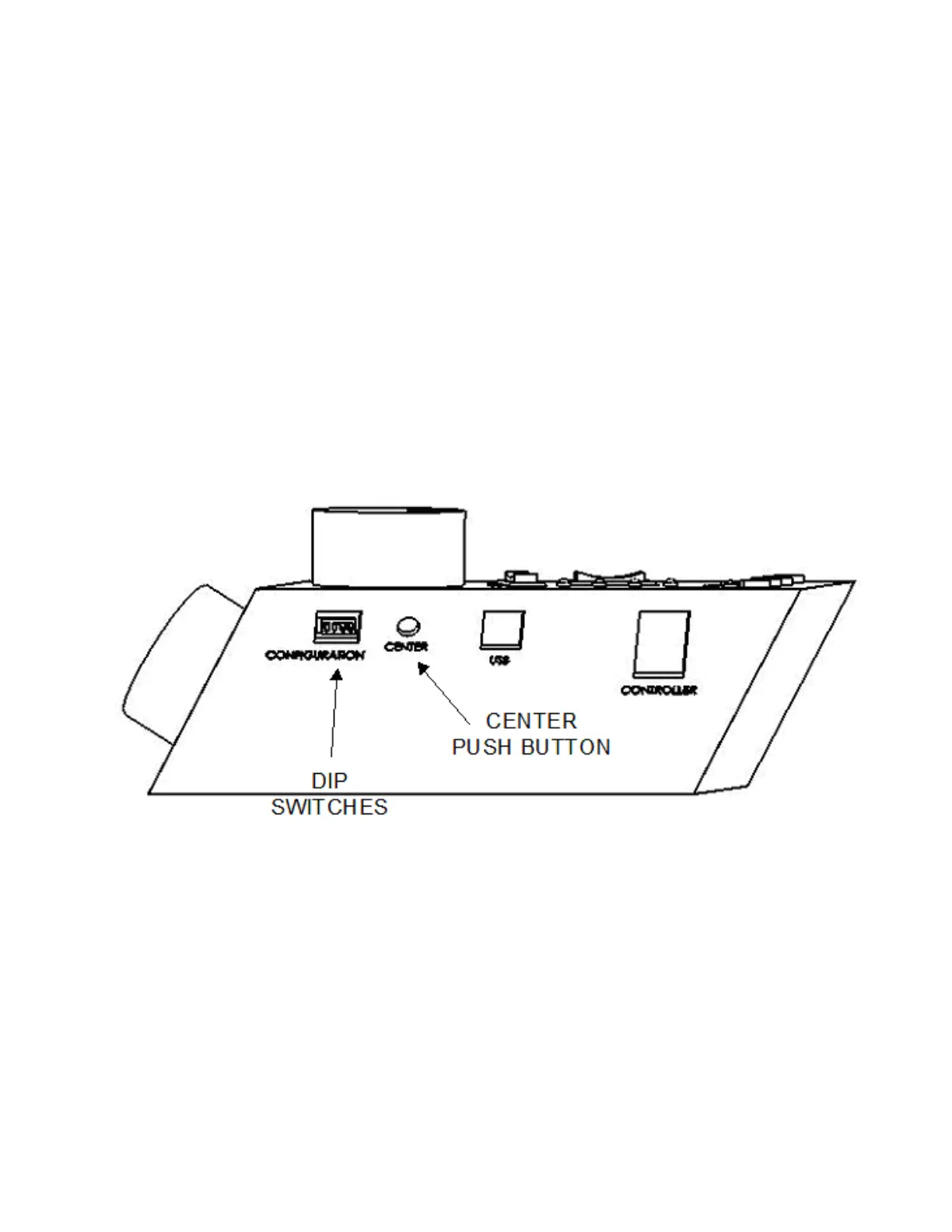
Figure 2-3. Side view of ROE-200.
2.3.3 Other Controls on the ROE-200
CENTER (round push button on the back of ROE-200): CENTER is an initialization
function that is used when the unit is first set up and occasionally during normal operation.
CENTER should only be done in the absence of a pipette as the manipulator makes large
robotic movements to its extreme ranges of motion. To CENTER, press and release the white
button on the back of the ROE-200. This will cause a prolonged movement in each axis to the
end of travel (EOT) sensors beyond the origin (0,0,0). Once the sensors are found, a short
move in the opposite direction is made and this location is defined as (0,0,0). Finally, the unit
moves to the location (12500 (X), 12500 (Y), 12500 (Z)), the center of travel of each axis. If
the unit is turned off or STOP/SET is pressed during the running of CENTER, the unit will


 To Next Page