EasyManua.ls Logo

Sutter Instrument MPC-200 - Appendix E. Quick Reference; Manual Operation; Configuration; Table E-1. ROE-200 Configuration Switches (Rear)

Sutter Instrument MPC-200
73 pages
Print Icon
To Next Page IconTo Next Page
To Previous Page IconTo Previous Page
Loading...
MPC-385 SERIES OPERATION MANUAL REV. 3.21K (20201120)
59
APPENDIX E. QUICK REFERENCE
E.1. Manual Operation
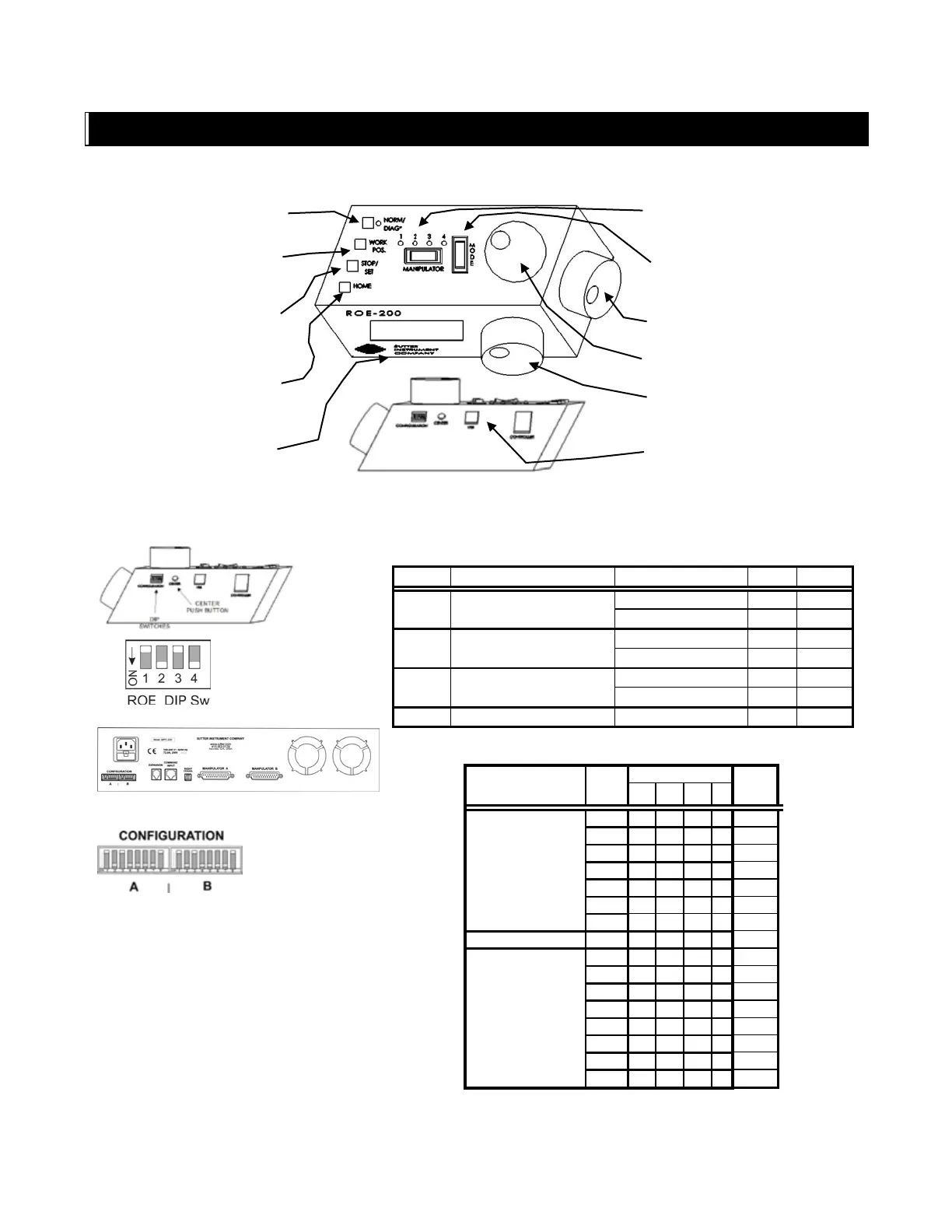
NORM/DIAG: Normal or
Diagonal (LED on) mode.
WORK POS: Moves to
defined Work Position.
Hold >2 sec., lock/unlocks
ROE.
STOP/SET: Stops
movement. Hold down and
press WORK sets Work
pos. to current pos.
HOME: Moves to position
0,0,0.
Display: Shows current
position along with other
state information.
MANIPULATOR: Selects
Manipulator 1 through 4 (as
connected).
MODE: Selects Mode 0
through 9, or 0 and 5 (ROE
Switch 1 OFF).
X-Axis Movement Knob:
Z-Axis Movement Knob:
Y-Axis Movement Knob:
CENTER (CALIBRATE):
E.2. Configuration
Table E-1. ROE-200 configuration switches (rear).
Switch #
Definition
State
Setting
Position
1
Modes
All modes
ON
DOWN
Mode 0 and 5
OFF
UP
2
Relative coordinates during
Diagonal Mode
Enabled
ON
DOWN
Disabled
OFF
UP
3
Manipulator selection
Not cyclical
ON
DOWN
Cyclical
OFF
UP
4
Reserved
ON
DOWN
Table E-2. MPC-200 rear-panel config. Switches 1 4 (angle setting) for Device,
A or B.
Steepness Relative
to 45°
Angle
Switch
(Value)
1
2
3
4
More
11
0
0
0
0
0
14
1
0
0
0
1
21
0
1
0
0
2
27
1
1
0
0
3
29
0
0
1
0
4
35
1
0
1
0
5
39
0
1
1
0
6
None
45
1
1
1
0
7
Less
39
0
0
0
1
8
35
1
0
0
1
9
29
0
1
0
1
10
27
1
1
0
1
11
21
0
0
1
1
12
14
1
0
1
1
13
11
0
1
1
1
14
7
1
1
1
1
15
0 = OFF (Up); 1 = ON (Down)

Table of Contents

Related product manuals