MPC-385 SERIES OPERATION MANUAL – REV. 3.21K (20201120)
If you toggle from Drive A to Drive B and back again you will see that the display coordinates
and Mode settings are maintained for Drive A while you are using Drive B and vice versa.
The remaining functions of the ROE are explained in the next section.
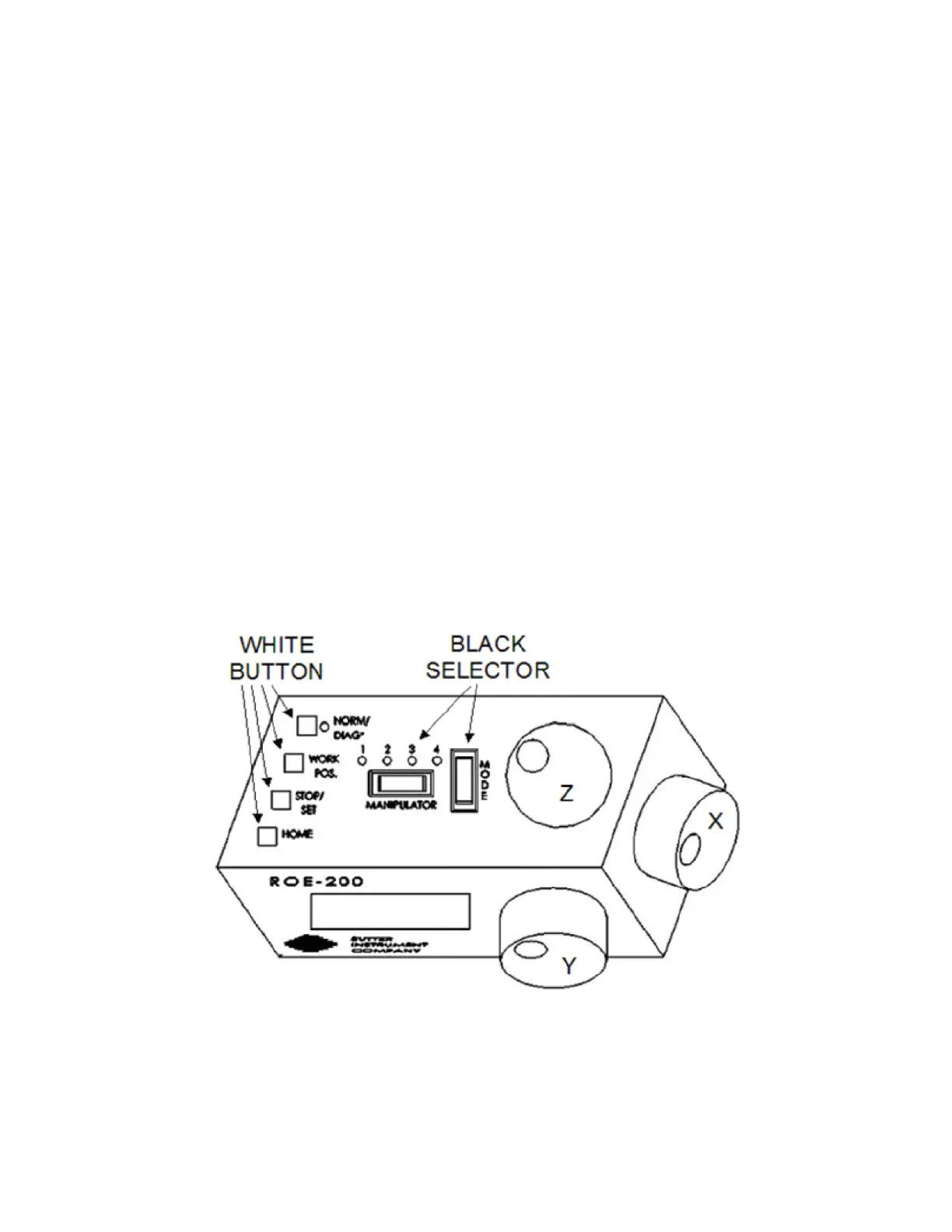
2.3 Main Controls on the ROE-200
2.3.1 White Buttons:
DIAG/NORM: Pressing the DIAG/NORM button will cause the green LED near the button to
light, indicating the MPC-200/ROE-200 is in Diagonal mode. In this mode, rotation of the Z-
axis knob produces diagonal movement. A second press will put the manipulator back into
Normal mode. When in diagonal mode, the X and Y knobs remain active, allowing you to
readjust the X and Y positioning of the pipette as you approach a cell in diagonal mode. Angle
of diagonal mode movement is set via DIP switches on the back of the MPC-200 controller
(see controller DIP switch setting instructions on Pages 19-21). When using MODE 9 (MODE
toggle set to 9), Diagonal mode produces short, quick, impulse-like movement that may be
useful in sharp pipette impalements.
When you switch to Diagonal mode, the ROE-200 display is changed from absolute to relative
coordinates and the current location is set to 0,0,0. This allows users to invoke relative
measurements using the display as a measuring device. A fourth coordinate that gives
movement along the diagonal is also added for users who wish to measure the movement of
along the axis coaxial with a pipette. When you return to Normal mode, the absolute
coordinate system is recovered. The relative coordinate feature can be disabled via DIP
switch 2 on back of the ROE-200.
Figure 2-2. Top view of ROE-200.
HOME: When pressed, the manipulator will make a move along a stereotypic path to the
location 0,0,0 or "home”. Home is the location where you would most likely exchange your
pipette and is maximal up on the Z-axis, maximal right on the X-axis (maximal left on a left-
handed manipulator) and maximal front on the Y-axis. The stereotypic path of the movement


 To Next Page