MPC-385 SERIES OPERATION MANUAL – REV. 3.21K (20201120)
13. Multi Axis Movement Speed Increase: Specified travel speeds
are for single-axis movements. When travel traverses a 45°
diagonal within a dual-axis square, speed is increased by 40%
(x 1.4), and by 70% (x 1.7) within a triple-axis cube.
14. Move Interruption: A command should be sent to the
controller only after the task of any previous command is
complete (i.e., the task-completion terminator (CR) is
returned). One exception is the “Interrupt Move” (^C)
command, which can be issued while a command-initiated
move is still in progress.
15. Extracting the MPC-200 Firmware Version Number: The
firmware version number returned by the ‘K’ command is
encoded in BCD (Binary Coded Decimal) in two bytes, with
minor version byte first, followed by major version byte, each
of which contains two digits , the first of which is in the upper
nibble and the next in the lower nibble. For example, if the
complete version is 3.15, then the bytes at offsets 1 and 2 will
show (in hexadecimal) as 0x15 0x03 (ret[1] and ret[2] as
shown in the following code snippets). The following code
shows how to extract and convert the 4 BCD digits into usable
forms for later comparison without altering the original
command return data (written in C/C++ and is easily
portable to Python, Java, C#, MATLAB script, etc.).
/* “ret” is the array of bytes containing
the ‘K’ command’s return data */
/* define variables */
unsigned char verbyte; /* temp work byte */
int minver, majver, majminver;
float version;
Minor version number as an integer (e.g., 15):
verbyte = ret[1]; /* get minor ver. digits */
/* get 1’s digit & then get & add 10’s digit */
minver = (verbyte & 0x0F) +
((verbyte >>4 & 0x0F) * 10);
Major version number as an integer (e.g., 3):
verbyte = ret[2]; /* get major ver. digits */
majver = (verbyte & 0x0F) +
((verbyte >>4 & 0x0F) * 10);
Complete (thousands) version as an integer (e.g., 315):
majminver = majver * 100 + minver;
Complete version as a floating-point number (e.g., 3.15):
version = majminver * .01;
16. ‘S’ Command’s Streaming Return Data for Current Position:
The Straight-Line Move (‘S’) command has two modes of
operation:
a. a CR is returned when the target position has been
reached (F’ (Off) command before the ‘S’ command
sequence), or
b. streaming positional data is returned while movement is
occurring, and then a CR once movement is complete
(‘O’ (On) command before the ‘S’ command sequence).
Positional data is streamed at every 1 micron of movement,
and the rate (data per second) depends on the ‘S’ command
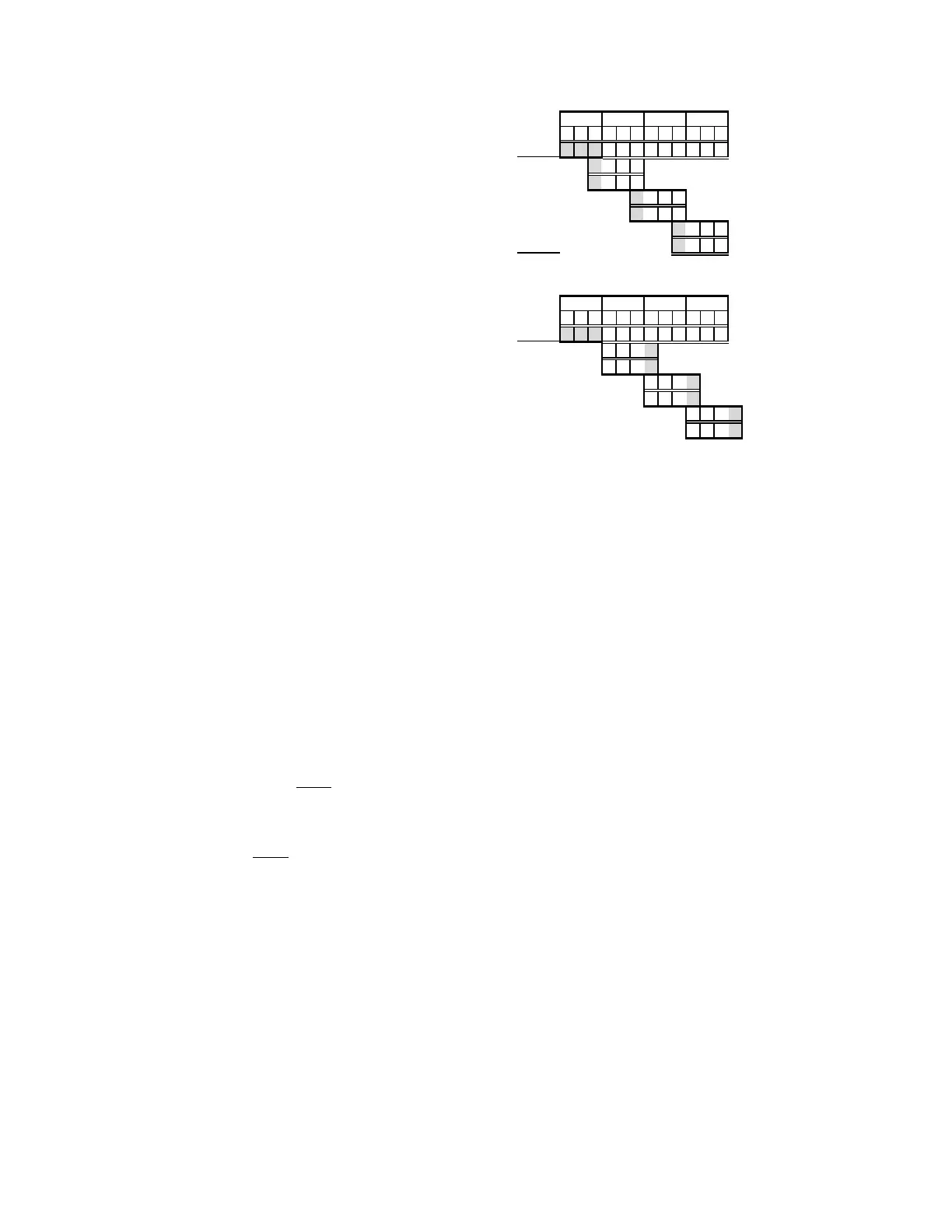
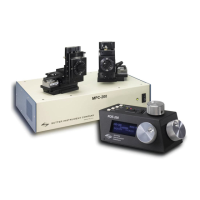
speed level used. Each positional data block streamed consists
of 12 bytes:
1 The 1
st
three bytes each contains FF hexadecimal (255
decimal) as a data block signature,
2 the next 3 contains positional data for the X axis,
3 the penultimate is for Y, and
4 last for Z.
All positional data are in microsteps. Each 3-byte position
needs to be converted into 4-byte blocks by prepending a byte
containing 0, so that the resulting data (now 4 bytes) can be
treated programmatically as an unsigned 32-bit “long”
(C/C++) or “U32” (LabVIEW) data type. All positional data
streamed is in Little-Endian bit/byte order (Wintel), so
conversion to 32-bit longs will require bit-order reversal (byte
swapping) for Big-Endian platforms (e.g., LabVIEW). The
appropriate microstep-to-microns conversion factor is needed
according to the device type being moved (see
Microns/microsteps conversion factors (multipliers)
table).
Little-Endian bit/byte order environment:
pos[x]
cpxus
cpyus
cpzus
Big-Endian bit/byte order environment (“pos” is in Little-
Endian format):
pos[x]
cpxus
cpyus
cpzus
The following C/C++ code snippets can be used to process
the streaming data.
Array for a streamed 12-byte block of data containing current
position
unsigned char pos[12];
32-bit variables for current position in microsteps, all
initialized to 0 to ensure MSB allows only positive values
long cpxus, cpyus, cpzus;
cpxus = cpyus = cpzus = 0;
Copy 24-bit (3-byte) position for each axis to 32-bit (4-byte)
equivalents. Use the byte position offsets shown in the
diagram above. (“le” means Little Endian; “be” means Big
Endian bit/byte order.)
If in Little-Endian environment (e.g., Windows, Intel-
MacOSX), copy all 3 U24 bytes for each axis to the respective
U32 variables.
memcpy(&cpxus[1], &pos[3], 3); /* X */
memcpy(&cpyus[1], &pos[6], 3); /* Y */
memcpy(&cpzus[1], &pos[9], 3); /* Z */
If in Big-Endian environment (e.g., legacy MacOS,
LabVIEW), copy U24 to U32 byte at a time (1
st
to 3
rd
, 2
nd
to
2
nd
, & 3
rd
to 1
st
). Note that “pos” is always in Little-Endian
bit/byte order.
memcpy(&cpxus[2], &pos[3], 1); /* X */
memcpy(&cpxus[1], &pos[4], 1);
memcpy(&cpxus[0], &pos[5], 1);
memcpy(&cpyus[2], &pos[6], 1); /* Y */
memcpy(&cpyus[1], &pos[7], 1);
memcpy(&cpyus[0], &pos[8], 1);
memcpy(&cpzus[2], &pos[9], 1); /* Z */
memcpy(&cpzus[1], &pos[10], 1);
memcpy(&cpzus[0], &pos[11], 1);
Ready to update UI with current position in microsteps using
32-bit integer values.
Convert microsteps to microns. Use double-precision
variables for current position in microns; initialize each to 0.
double cpxum, cpyum, cpzum;
cpxum = cpyum = cpzum = 0;
Microsteps-to-microns conversion factor (see “Microns /
microsteps conversion” table for appropriate factor)
double us2umCF = 0.0625;


 To Next Page