ADDENDUM TO ALL OPERATION MANUALS OF MPC-200/ROE-200-EQUIPPED MPC-SERIES SYSTEMS – REV. 1.00
Addendum
To
All Operation Manuals of
MPC-200/ROE-200-Based
MPC-Series Systems
Rev. 1.00 – November 28, 2007
As of Version 3.11 (November 12, 2007) of the firmware for the MPC-200 micromanipulator
controller and ROE-200 input device, the CENTER routine associated with the white button on the
rear of the ROE-200 has been replaced with a CALIBRATE routine that is less likely to break a
pipette. Thus, it can be used in the middle of an experiment when you see the message EOT (end of
travel) displayed on the ROE-200. Please note that all references to CENTER in the current manual
should be replaced with CALIBRATE. Furthermore, the detailed instructions regarding the
centering routine in section 2.3.3 should be replaced with the CALIBRATE instructions below.
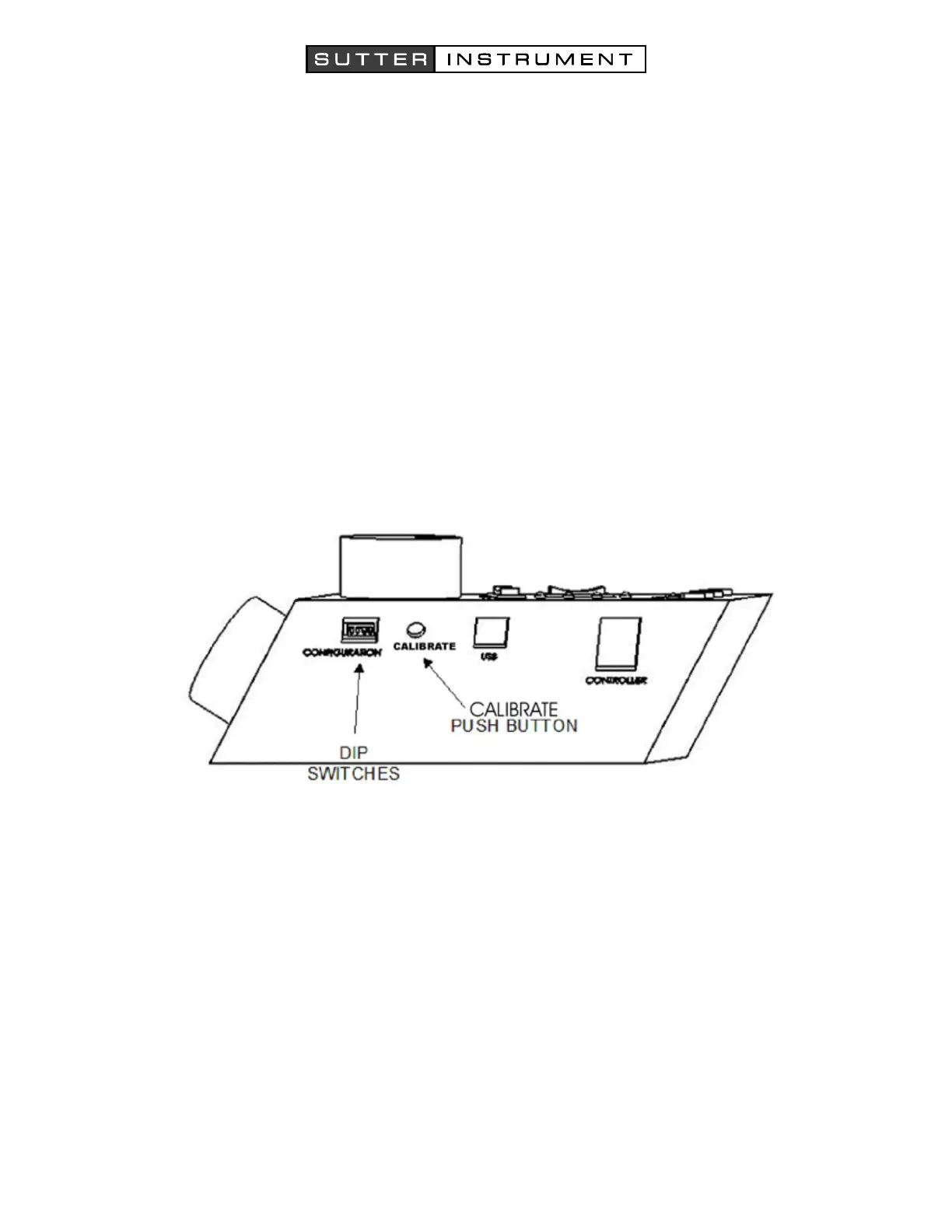
Figure 1. Location of the CALIBRATE button on the ROE-200.
CALIBRATE is used in two ways. When the unit is first set up, CALIBRATE is used to establish the
zero location. Then, occasionally, during normal operation, CALIBRATE is used to reestablish the
zero location. CALIBRATE follows a more conservative path than CENTER and can generally be
used in the presence of a pipette.
To CALIBRATE, press and release the white button on the back of the ROE-200. The manipulator
will back away from the current location along the established diagonal (like a HOME move), and
ultimately move to the end of travel (EOT) sensors, beyond the origin (0,0,0). Once the sensors are
found, a short move in the opposite direction is made and this location is defined as (0,0,0). The
purpose of CALIBRATE is to allow 0,0,0 or HOME to be safely reestablished during an experiment
without risking damage to the pipette.
If the unit is turned off or STOP/SET is pressed during the running of CALIBRATE, the unit will
not be correctly initialized. In this case, it is necessary to cycle the power off and on, and then run
CALIBRATE again to its completion.


 To Previous Page