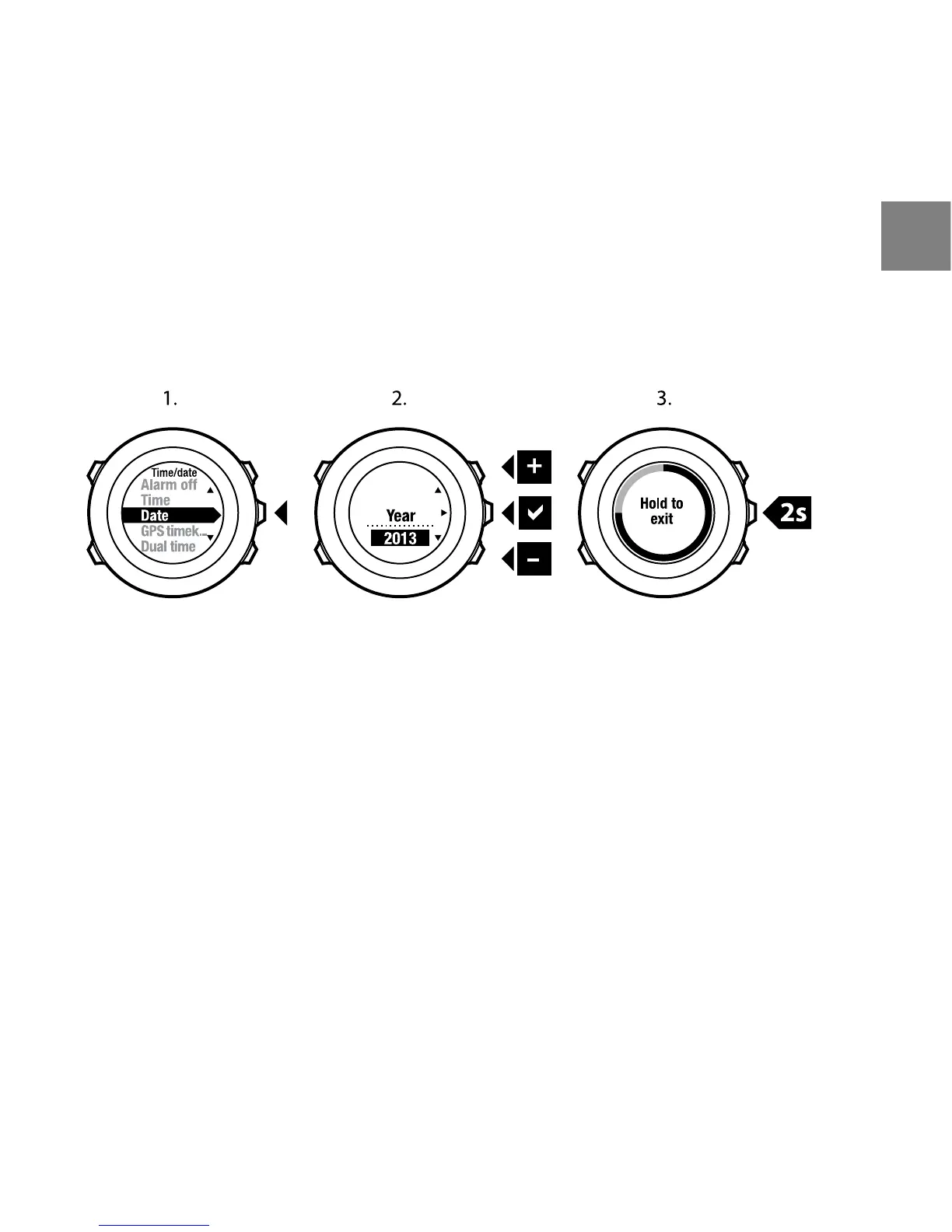
To set the date:
1. In the options menu, go to GENERAL, then to Time/date and Date.
2. Change the year, month and day values with [Start Stop] and [Light Lock].
Accept with [Next].
3. Go back to the settings with [Back Lap], or keep [Next] pressed to exit the
options menu.
Setting dual time
Dual time allows you to keep track of the current time in a second time zone,
for example, when travelling. Dual time is displayed on the bottom row of the
TIME mode display and you can access it by pressing [View].
To set the dual time:
1. In the options menu, go to GENERAL, then to Time/date and Dual time.
2. Change the hour and minute values with [Start Stop] and [Light Lock].
Accept with [Next].
3. Go back to the settings with [Back Lap], or keep [Next] pressed to exit the
options menu.
23
en















 To Next Page