Security System Operation (cont'd)
20
How to Remove Bypassed Zones
A bypassed zone will automatically be unbypassed when you disarm the system. If the
system is disarmed and a zone is bypassed, you can remove the bypass as follows:
ACTION SCREEN
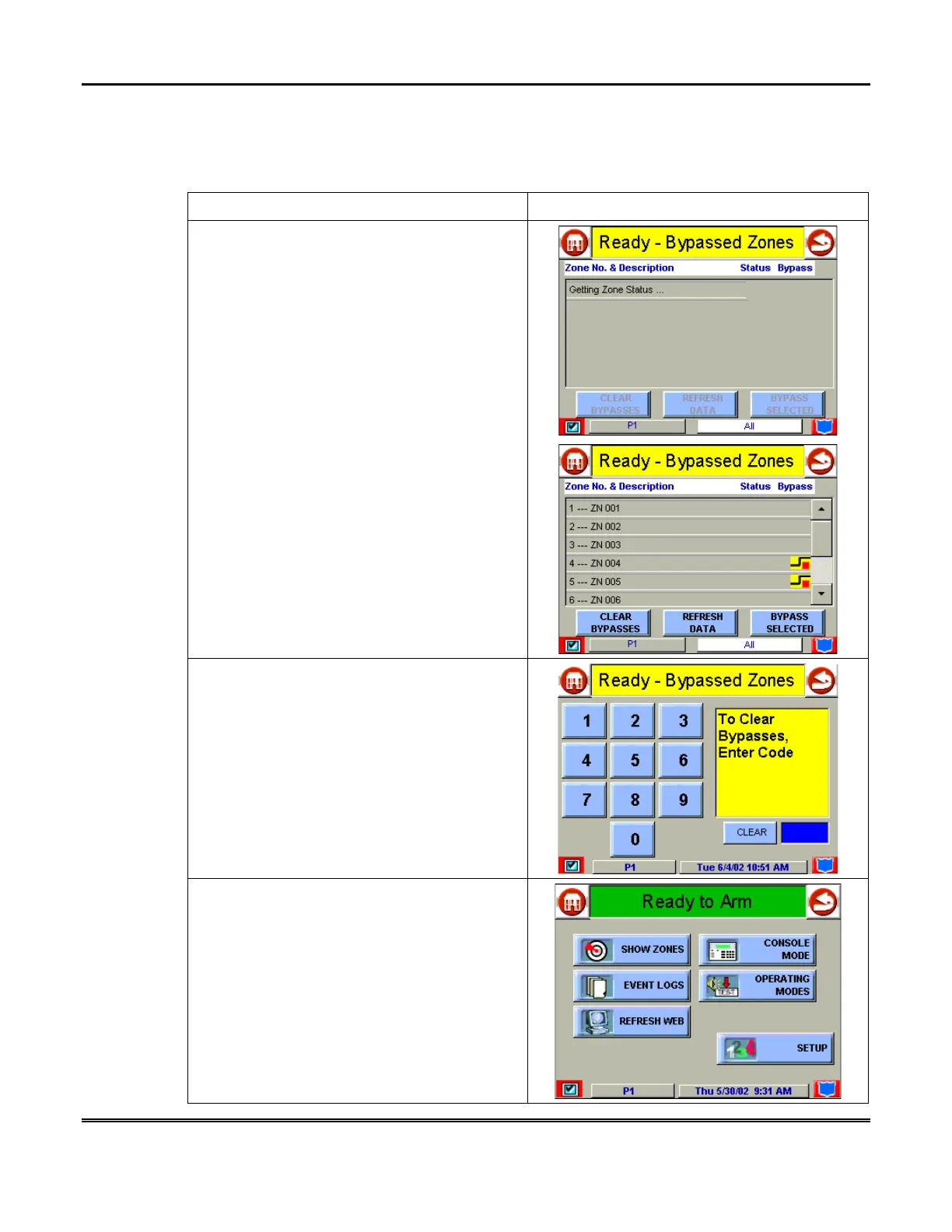
1. View bypassed zones by pressing the
SHOW ZONES
button. The "Zones" screen is
displayed.
NOTE:
While Symphony is requesting and
receiving the zone data from the control panel,
the "Zones" screen displays "
Getting Zone
Status.
..".
2. Remove zone bypasses by pressing the
CLEAR BYPASSES
button. The "User
Authorization" screen is displayed with the
instructions
To Clear Bypasses, Enter Code
.
NOTE:
A zone cannot be unbypassed while
the system is armed.
3. Enter your 4-digit user code. The "More
Choices" screen is displayed showing the
system as
Ready to Arm
.
NOTE:
This will not occur if any zone(s) is
open (not ready).



 To Next Page