About Symphony (cont'd)
10
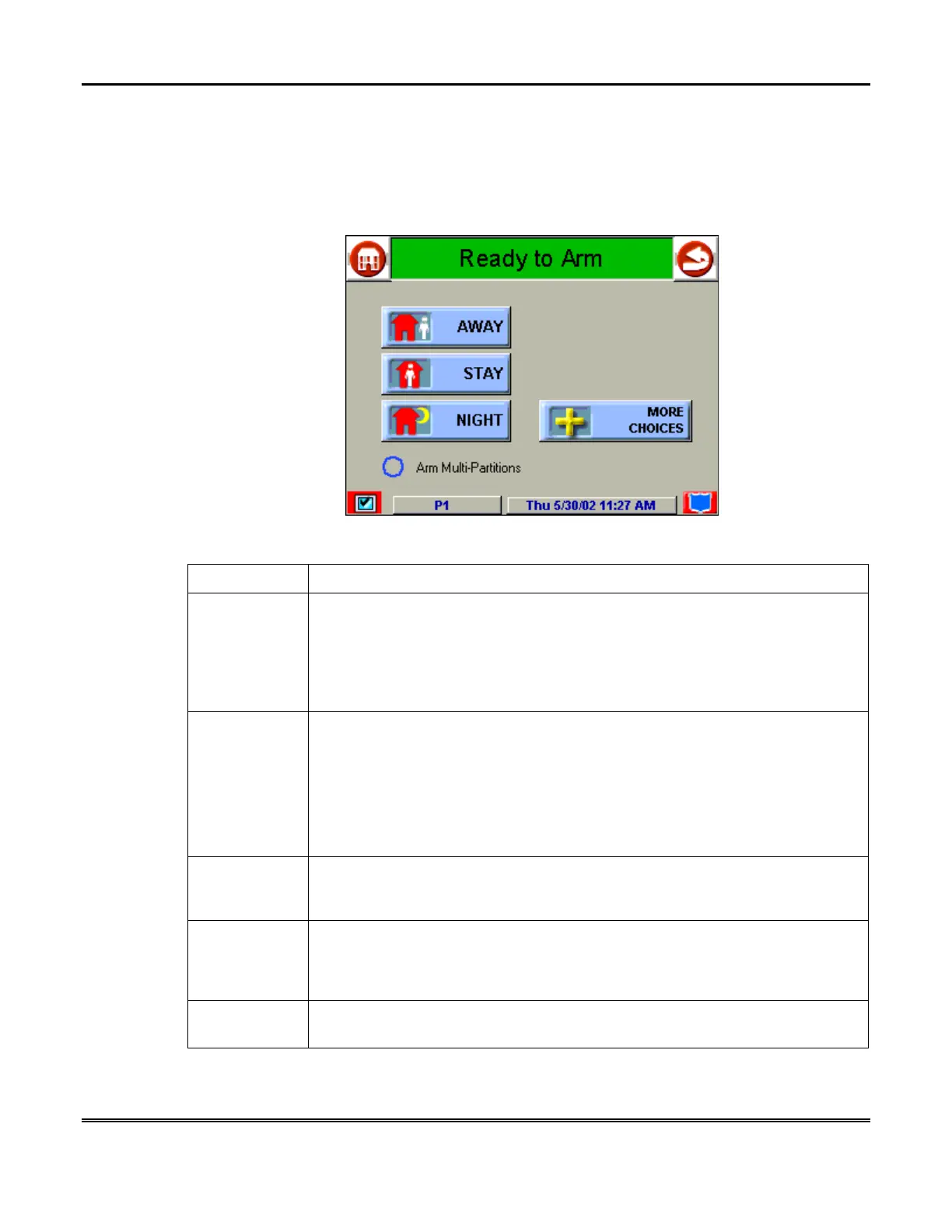
Symphony "Arming" Screen
From the "Home" screen, press
SECURITY
to access the Symphony "Arming" screen.
Use this picture and the table that follows to become familiar with the Symphony
security functions.
ITEM FUNCTION
AWAY
Press this button to arm when no one will be staying on the premises. When
armed in
AWAY
, the system will sound an alarm if a protected door or window
is opened, or if any movement is detected inside the premises. You may leave
through the entrance door during the exit delay period without causing an
alarm. You may also reenter through the entrance door, but must disarm the
system with you User Code within the entry delay period or an alarm will occur.
STAY
Press this button to arm when you are staying home, but might expect
someone to use the entrance door later.
When armed in
STAY
, the system will sound an alarm if a protected door or
window is opened, but you may otherwise move freely throughout the
premises. Late arrivals can enter through the entrance door without causing an
alarm, but they must disarm the system within the entry delay period or an
alarm will occur.
NIGHT
Press this button to arm when you are staying home and do not expect anyone
to use the entrance door.
Your installer may have configured NIGHT Mode
differently; have him/her describe the actual settings of this mode.
Arm Multi-
Partitions
Check this box when you want to arm more than one partition. When
Arm
Multi-Partitions
is checked, all partitions within the system can be armed at
one time (if the user is so authorized). When the
Arm Multi-Partitions
circle
does not contain a check mark, each partition must be armed individually.
MORE
CHOICES
Press this button for more Security, Lighting, telephony, and Symphony setup
features.



 To Next Page