Optional Message Center Features (cont'd)
58
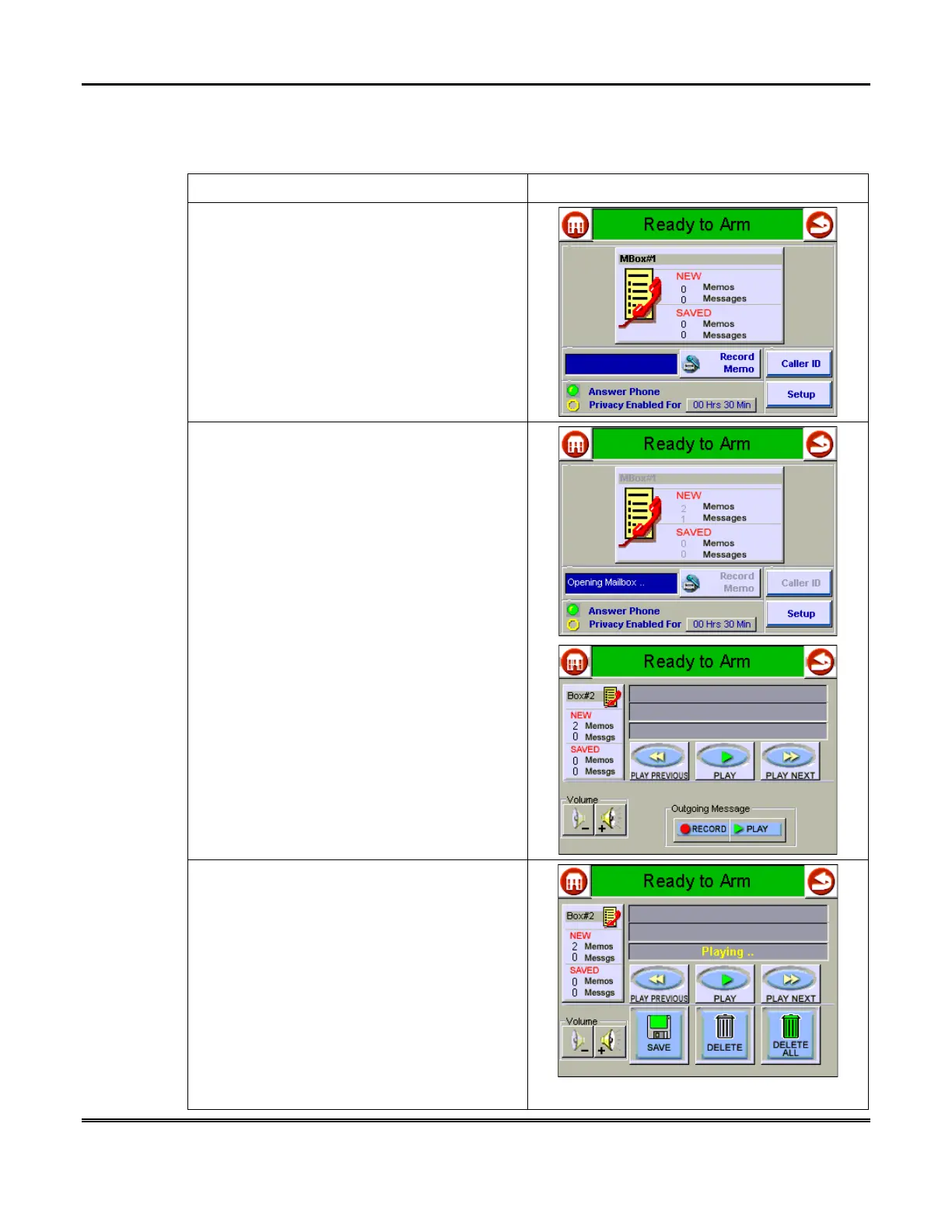
How to Listen to Memos and Messages
To listen to memos and messages:
ACTION SCREEN
1. From the "Home" screen, press the
MESSAGES
button to display the "Message
Center" main screen.
2. Select the desired Mailbox by touching it.
Then, use the control buttons to navigate
through your memos and messages.
Adjust the speaker volume as needed using
the Volume + and – buttons.
NOTE:
The volume setting for the Message
Center is temporary. This setting is
independent to the Symphony system volume
setting defined on the “Setup” screen. Upon
exit from the Message Center, Symphony
volume is as defined on the “Setup” screen.
Message Center plays back messages in this
order:
•
New Memos
•
New Incoming Messages
•
Saved Memos
•
Saved Messages
After each memo or message is retrieved, you
may
SAVE
or
DELETE
it using the control
buttons. You may also erase memos/
messages by selecting the
DELETE ALL
button.



 To Next Page