Security System Operation (cont'd)
24
How to Disarm Using a Keyswitch
To disarm the partition,
turn the key to the right and release. If an alarm has
occurred, the red light will be flashing rapidly (memory of alarm).
How to Check the Status of Other Partitions
This system supports between one and eight Partitions (as configured by your
installer.) Partitioning enables a single physical alarm system to control up to eight
areas of protection (partitions). Each Symphony and Keypad is assigned a default
partition for display purposes, and will show only that partition's information.
For example, if your physical site is a four-apartment housing unit, this alarm
system would be configured with four partitions. Each apartment’s zones (door,
windows, smoke detectors, etc.) are assigned to separate partitions, giving each
apartment independent arming/disarming control of its own partition (area). A
landlord or manager may be granted access to all partitions, so he/she can control
the entire system.
If a user is so authorized, a Symphony or Keypad in one partition can be used to
perform system functions in another partition. (Note that only those partitions
authorized and programmed by the installer can be accessed in this manner.)
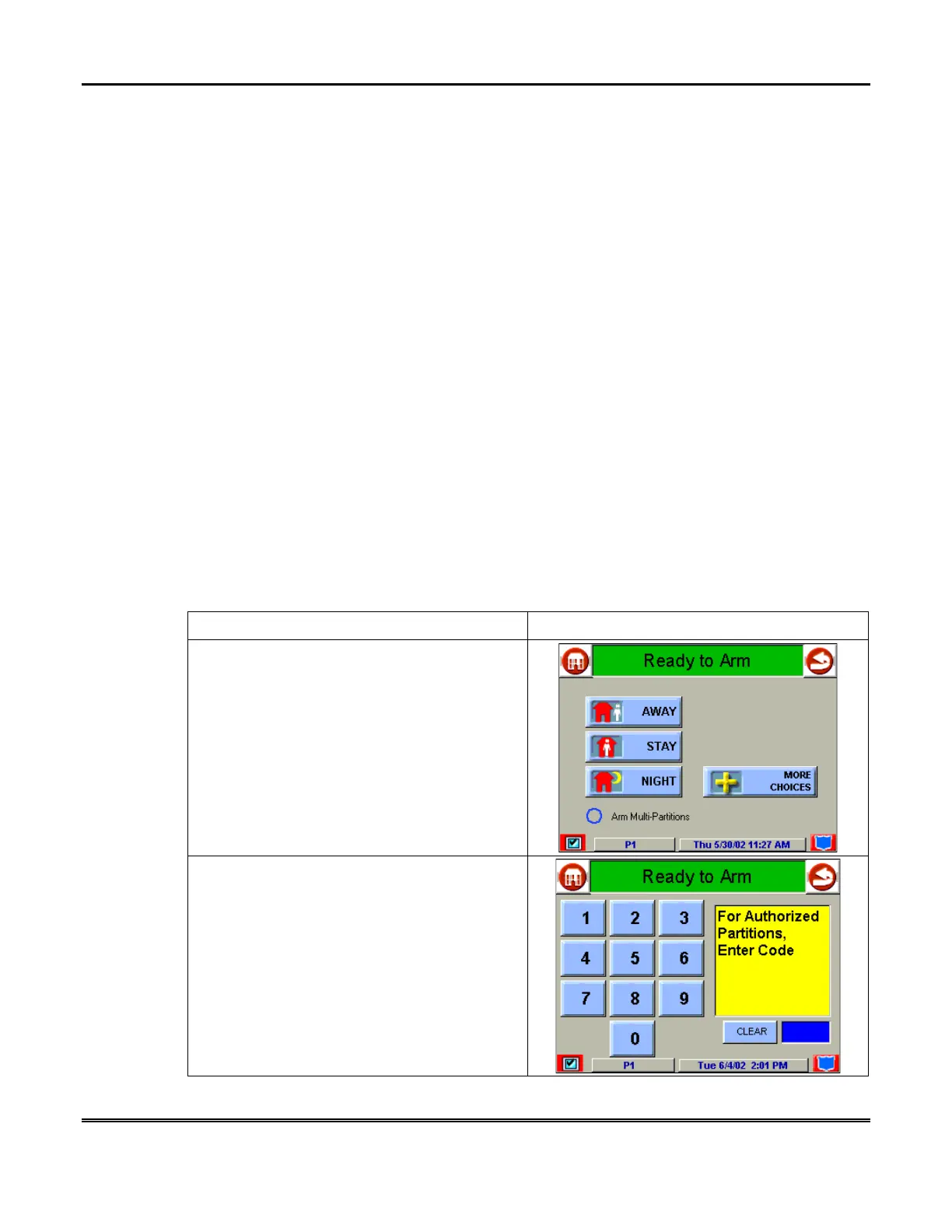
To check the status of other partitions perform the following:
ACTION SCREEN
1. From the "Home" screen press the
SECURITY
button to display the "Arming"
screen.
2. Press the "Current Partition" tab (lower edge
of the screen; in this case it displays
P1
). The
"User Authorization" screen is displayed with
the instructions “
For Authorized Partitions,
Enter Code”
.



 To Next Page