Security System Operation (Cont'd)
23
ACTION SCREEN
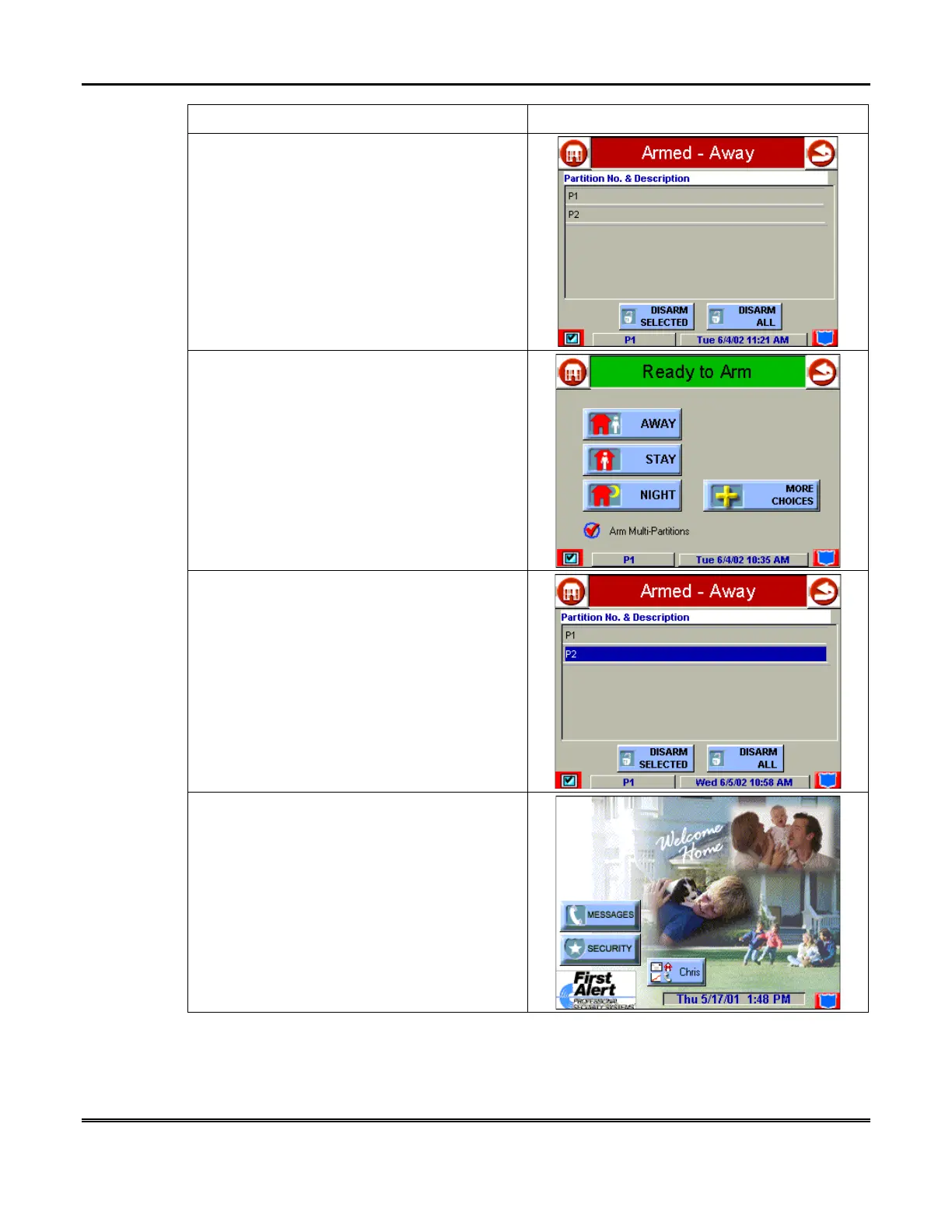
3. Enter your 4-digit user code. The
Partition
No. & Description
screen is displayed.
4. Press the
DISARM ALL
button if you wish
to disarm the system. Symphony beeps once
and the "Arming" screen is displayed showing
the system as Ready to Arm or not ready if any
zone is faulted (open).
NOTE:
If you wish to disarm only selected
partitions, you must first highlight the
partition(s) to be disarmed, then press the
DISARM SELECTED
button. Symphony
beeps once and the "Arming" screen is
displayed showing the system as Ready to
Arm or not ready if any zone is faulted (open).
NOTE:
Once the system is disarmed,
Symphony will return to the "Home" screen
after the selected “To Home Page After” time
has expired. This time is selected on the
“Setup” screen.



 To Next Page