Symphony Setup (Cont'd)
73
•
Daylight Savings Time is processed internal to the Symphony, since Symphony
gets GMT from the server. When Symphony adjusts for DST, the next time the
1-hour timer expires, the new value should be sent to the control panel.
IMPORTANT:
This means that the Symphony setting will override and overwrite
the control panel time setting. That is, if the control panel is set to DST and adjusts
but Symphony is not, upon the 1-hour timer expiration, the control panel will be
updated to the current Symphony time that is not adjusted for DST.
From the
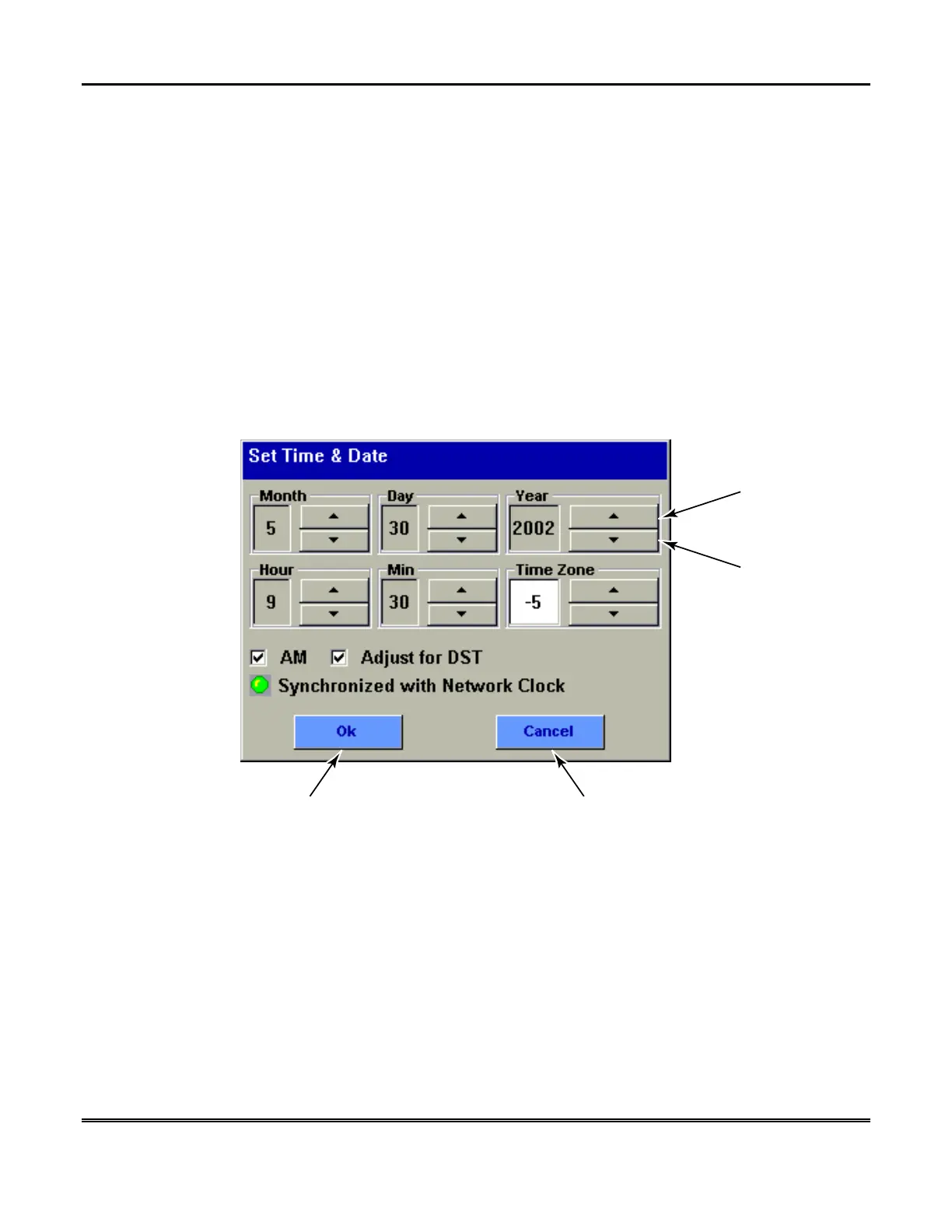
Set Time & Date
screen, while referring to the Time Zones Settings
chart, select the corresponding
Time Zone
for the location of the Symphony by
pressing the “increase” or “decrease” arrow buttons.
From the
Set Time & Date
screen adjust either or both the time and date by
pressing the “increase” or “decrease” arrow buttons as necessary until the proper
month, day, year, hour, and minute are displayed.
AUI-009-V0
CANCEL
BUTTON
OK
BUTTON
DECREASE
BUTTON
(TYPICAL)
INCREASE
BUTTON
(TYPICAL)
Set Time & Date Screen



 To Next Page