137
4. Initialize trigger system:
4.1. Rotate the Voltage encoder until TRIG INIT appears.
4.2. Press Current encoder to initialize trigger system. TRIG ABORT appears on the display,
TRIG indicator is on.
4.3. Press BACK Button, Main screen appears.
Power supply is waiting for trigger.
5. Turn on the power supply output and press Current encoder to trigger the sequencer.
NOTE
To stop execution of a running sequence, press the PROG button. PROG (Green) LED
illuminates, TRIG ABORT appears. Press Current encoder to abort the running sequence.
5.3.4 LIST Mode Example
Select LIST Mode Sequence
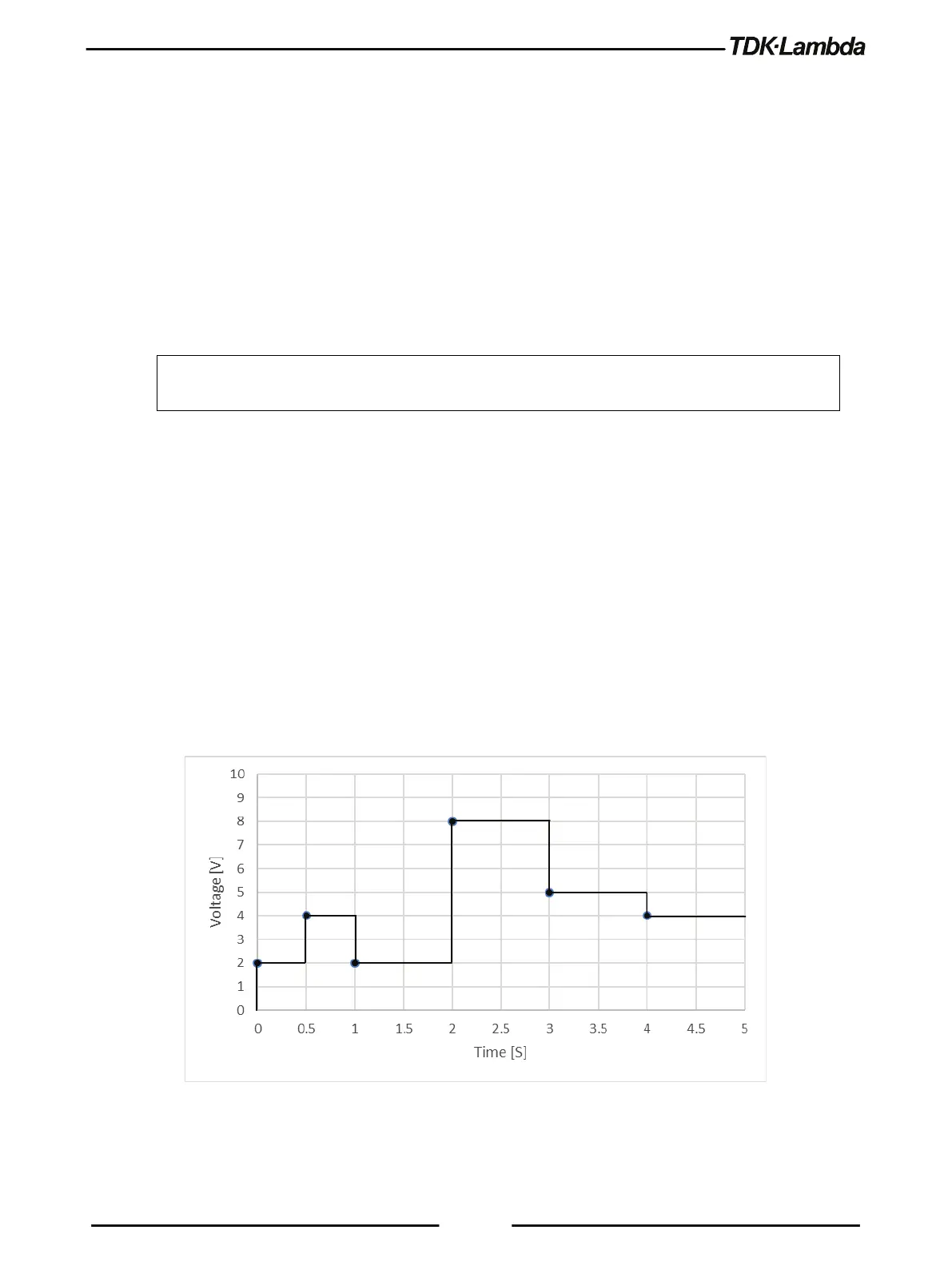
Set voltage values ”2,4,2,8,5,4” Volts
LIST:DWEL 0.5,0.5,1,1,1,1
Set dwell values ”0.5,0.5,1,1,1,1” Seconds
Set AUTO step execution mode ”AUTO”
Set list execution iterations ”1”
TRIG:SOUR BUS Select BUS trigger source via communication
Trigger system is enabled for a single trigger action
Figure 5–5: LIST Mode Example













 To Next Page